QUICK VERDICT. The Visme free plan is more generous than most design tools in one respect — unlimited projects — and stricter than almost all of them in another: you cannot download anything at all. Not a JPG, not a PDF. Free projects also carry a Visme logo and are public by default. It works well as a build-and-share-by-link tool or as a trial, and badly as a way to produce files. The first download costs $12.25/month billed annually.
What the Visme free plan actually includes
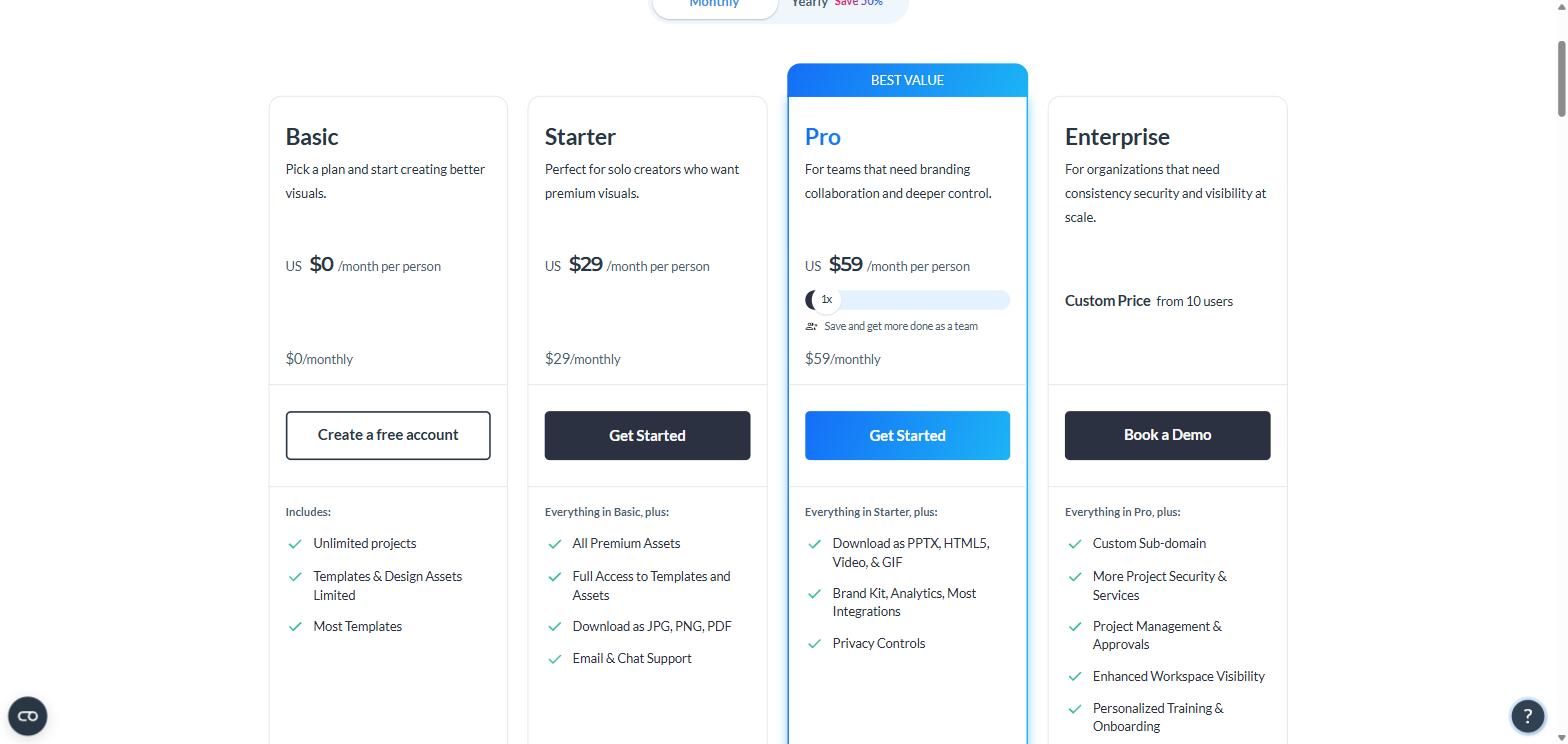
Visme calls the free tier Basic. Here is what it gives you:
Unlimited projects — genuinely unlimited, not a three-design cap
500MB storage
Up to 50 slides or pages per project
My Files file manager
Charts and data widgets — limited
Collaboration — limited
Access to “most templates”, but not premium assets and templates
Basic sits alongside Starter at $29/month and Pro at $59/month. Screenshot: visme.co
And here is what it does not give you:
No downloads in any format — this is the one that surprises people
A Visme logo appears on your projects
No privacy settings — projects are public
No brand kit, no analytics, no premium support
For the wider picture on how the tool performs, see our Visme Review 2025. If you just want to look at the current plans yourself, they are on the Visme pricing page.
The wall: you cannot export anything
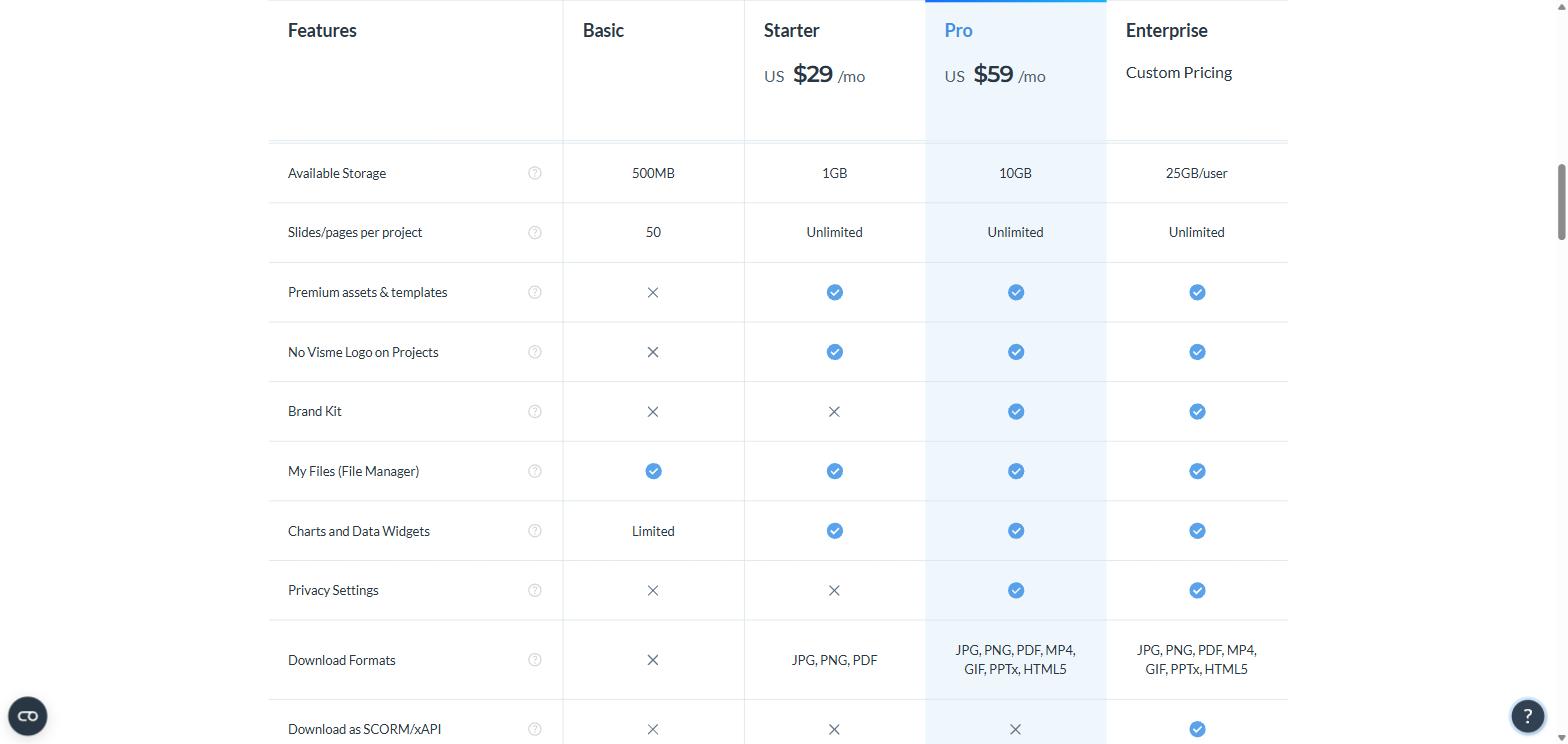
This is the single most important thing to understand before you start building. On the Basic plan the Download Formats row on Visme’s pricing table is a cross, not a list. Starter gets JPG, PNG and PDF. Pro adds MP4, GIF, PPTX and HTML5. Basic gets none of them.
The Basic column, line by line: 500MB, a 50-slide cap, a Visme logo, and a cross under Download Formats. Screenshot: visme.co
What you can do for free is publish and share a project by link, and view it in the browser. So the free plan is usable if your output is a link — an online presentation, a shareable infographic page, an embedded report. It is not usable if your output is a file that has to go into an email, a deck, or a print job.
Related limits worth knowing: importing from PowerPoint is capped at 10 slides, and at the lower tiers exporting back to PPTX is flagged as “not editable” — you get slides, not an editable PowerPoint file.
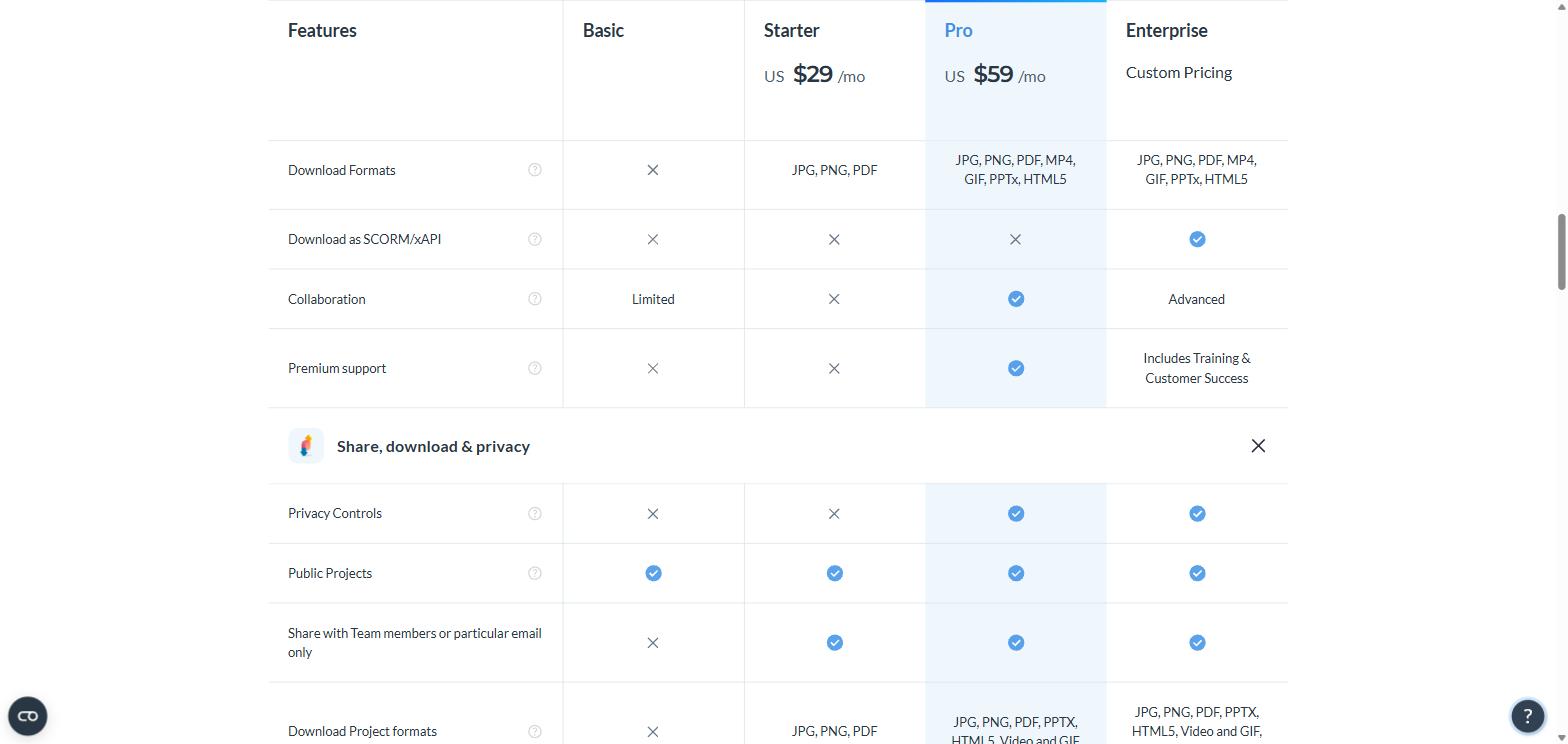
Public projects only, no privacy controls, no team sharing, no downloads. Screenshot: visme.co
What each upgrade actually unlocks
Plan
Monthly
Annual
What you are really buying
Basic
$0
$0
Unlimited projects, share by link only
Starter
$29
$147 ($12.25/mo)
Downloads (JPG, PNG, PDF), premium assets, logo removed, 1GB
The annual discount is bigger than advertised. Visme’s toggle says “Save 50%”. The real numbers are $29 → $12.25 and $59 → $24.75 — closer to 58% off. If you know you want the tool, annual is the only sensible way to buy it.
Starter is a narrower step up than it looks. It removes the logo and turns on downloads, which is what most people upgrade for. But it still has no brand kit, no privacy settings and no premium support, and — oddly — its collaboration is marked as unavailable while the free plan’s is marked “limited”. If you need team features or private projects, the real upgrade is Pro at more than double the price.
Who the Visme free plan genuinely suits
A good fit if: you are evaluating the tool before committing; your deliverable is a shared link rather than a file; you are a student or solo user making an occasional online presentation; you want to test whether Visme’s data-visualisation approach fits how you work before paying.
Not a fit if: you need a PDF or an image out of it, ever; you are producing client-facing work where a Visme logo is a problem; you need projects kept private; you are working with a team.
The honest summary is that the Visme free plan is a well-equipped demo, not a free product. Compare that with the usual freemium pattern in this category, where free users can export with a watermark. Visme chose not to allow export at all, which makes the free tier cleaner to understand but much less useful in practice.
What independent reviewers say
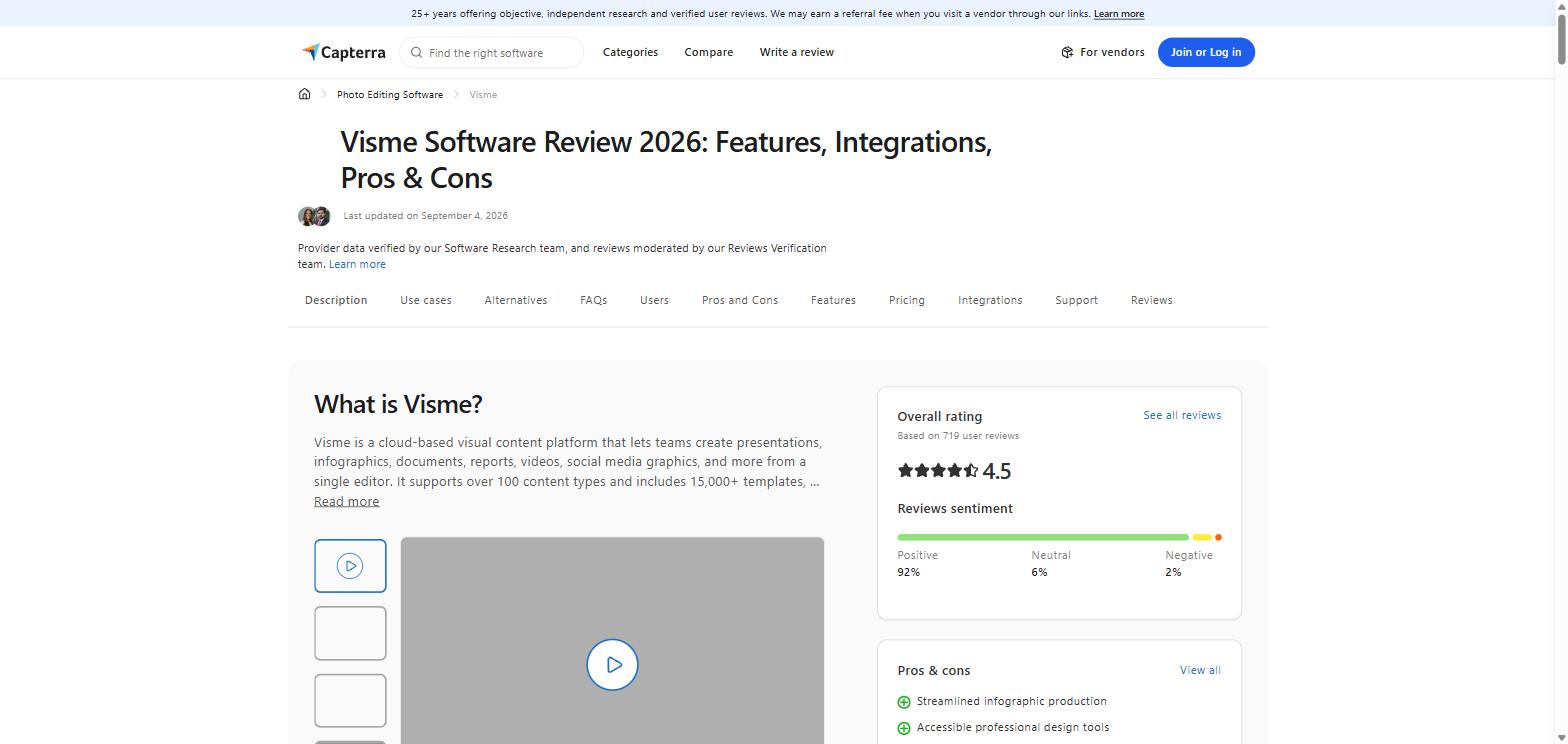
Visme scores 4.5/5 from 719 reviews on Capterra, with a sentiment split of 92% positive, 6% neutral and 2% negative, and sub-scores of 4.3 for ease of use, 4.3 for customer service, 4.3 for value for money and 4.2 for features — solid, and above average for the category. Capterra also lists the platform as carrying over 100 content types and 15,000+ templates.
4.5/5 from 719 reviews, 92% positive sentiment. Screenshot: capterra.com
The recurring complaints are worth reading before you commit to an annual plan. Capterra’s own review analysis flags glitches and slowdowns (83% negative across 72 mentions), cumbersome text editing with formatting inconsistencies and unreliable undo (71% of 51 mentions), and awkward object resizing (64% of 39 mentions). At least one reviewer raised billing concerns — continued charges after non-use, and an unsatisfactory refund response.
None of that is disqualifying for a 4.5-rated product, but it argues for using the free plan properly first, and for choosing monthly over annual if you are not yet sure.
How to get the most out of the Visme free plan
Build your project fully before you think about paying — the editor is not restricted, only the output is
Use the share-by-link and embed options, which cost nothing
Stay under 50 slides per project and watch the 500MB storage ceiling
If you eventually need files, work out first whether JPG/PNG/PDF is enough (Starter) or you need PPTX and video (Pro) — the gap between those two is $147 vs $297 a year
The category norm is to let free users export something, usually with a watermark stamped on it. Canva’s free tier allows PNG and PDF downloads. Piktochart and Venngage let free users export in at least one format, typically low-resolution or watermarked. Visme takes the opposite approach: the editor is unrestricted, the project count is unlimited, and the export button is simply off.
Which model is better depends entirely on your output. If you need a file, a watermarked export from a rival beats no export at all. If you need a polished interactive page to share by link — an online report, a live infographic, a linked presentation — Visme’s free tier gives you more room to build than most, because nothing caps the number of projects.
Where Visme genuinely separates itself is data. Its charts and data widgets are stronger than the design-first tools, which is why it shows up in business and reporting workflows rather than social-graphic ones. On Basic those widgets are marked “limited”, so you get a taste of the differentiator rather than the whole thing. That is a reasonable trial, and it is worth running before you decide between Starter and Pro — both are on the Visme plans and pricing page.
FAQ
Is Visme really free?
Yes, the Basic plan costs nothing and has no time limit. But you cannot download your work on it, and projects carry a Visme logo.
Can I remove the Visme logo for free?
No. Logo removal starts on the Starter plan, $12.25/month billed annually, or $29 month to month.
How much storage does the Visme free plan have?
500MB, versus 1GB on Starter, 10GB on Pro and 25GB per user on Enterprise.
Is there a slide limit?
50 slides or pages per project on Basic. Every paid plan is unlimited.
What is the cheapest way to download a PDF from Visme?
The Starter plan — $147 for a year, or $29 for a single month if you only need it once. You can check the live price on the Visme plans page.
Can I use Visme free for commercial work?
You can design, but you cannot export, and everything you publish carries a Visme logo and is public. For client-facing work that makes Starter the practical minimum.
The iPhone 18 no ports theory is suddenly everywhere. A video making the rounds on TikTok and social media appears to show something startling: an iPhone — labeled as the “iPhone 18” — charging through a small magnetic connector instead…
Hottest fashion trends 2026 reviewed honestly — which trending styles are actually wearable, which are overhyped, and what’s worth buying right now in the US market. Quick Verdict: 2026’s biggest fashion trends fall into two camps: genuinely wearable evolutions of…
PS5 Pro review 2026 — I tested it for 30 days. Here’s the honest verdict on performance, graphics, and whether upgrading from a standard PS5 is actually worth the money. Quick Verdict: The PS5 Pro is the most capable PlayStation…