QUICK VERDICT. Envato Elements gives you unlimited downloads from a catalogue of 29+ million creative assets, with a lifetime commercial licence on everything you download, starting at $16.50 a month. Four tiers run from $16.50 to $168 — but every tier ships the identical asset library. What the extra money buys is AI credits, nothing else. If you want stock and templates, buy the cheapest plan; if you want to generate, do the credit maths first.
Check current Envato Elements plans and pricing →
Stock subscriptions are one of the few software categories where the pitch has barely changed in a decade: pay a flat fee, download what you like, use it commercially. Envato Elements has been the aggressive-value option in that market for years, and it is still the cheapest way to get a genuinely broad catalogue.
What has changed is the pricing page. There are now four tiers instead of one, and the gap between the bottom and the top is a factor of ten. This review works out what that gap actually contains — plus the licensing mechanics that decide whether the subscription is safe to build client work on.
What Envato Elements Is and Who It Is For
Envato Elements is a subscription library rather than a marketplace. You do not buy items one at a time; you pay monthly and download as much as you want from a single pool covering video, audio, photos, graphics, fonts, presentations and 3D — plus editable templates built for the software people actually use.
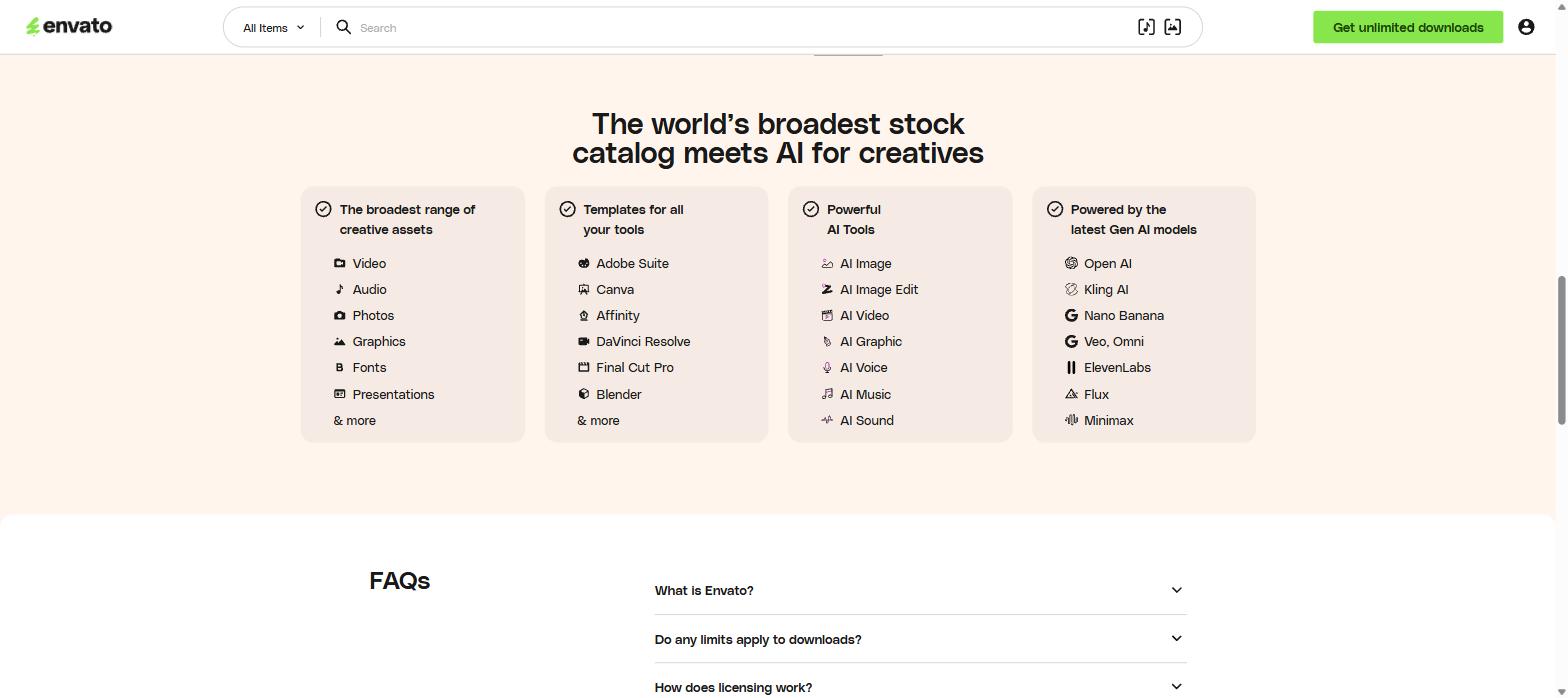
Asset types, supported tools and the AI models behind the generators, from the official pricing page
The template compatibility list is the part that separates it from a plain photo library: Adobe Suite, Canva, Affinity, DaVinci Resolve, Final Cut Pro and Blender. A video editor can pull a titles pack straight into After Effects; a designer can drop a layout into Canva. That is a different proposition from a site that only sells JPEGs.
The generative side is built on third-party models rather than in-house ones: Open AI, Kling AI, Nano Banana, Veo and Omni, ElevenLabs, Flux and Minimax, covering image, image editing, video, graphics, voice, music and sound.
The Price Ladder Is an AI Ladder
This is the single most useful thing to understand before choosing a plan. Read the four cards carefully and one line repeats in every single one: unlimited downloads of 29+ million creative assets. The library does not get bigger as you pay more.
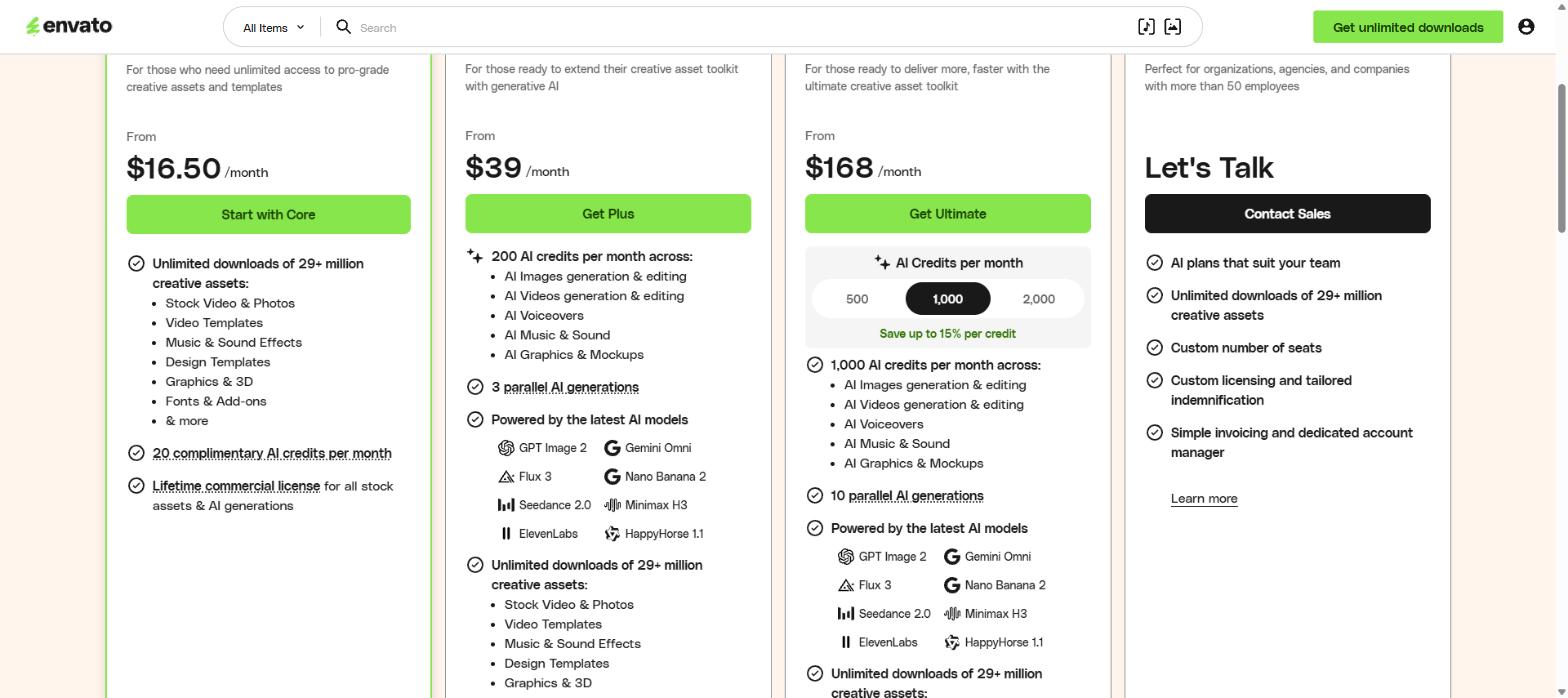
The four plans side by side — the asset library line is identical on all of them
| Plan |
From |
AI credits / month |
Parallel generations |
Asset library |
| Core (most popular) |
$16.50 |
20 |
— |
29+ million |
| Plus |
$39 |
200 |
3 |
29+ million |
| Ultimate |
$168 |
500, 1,000 or 2,000 (you choose) |
10 |
29+ million |
| Enterprise |
Contact sales |
Custom |
Custom |
29+ million |
So the honest framing is this: Core is the stock plan, and everything above it is a generative-AI plan that happens to include stock. Plus costs 2.4× Core for 10× the credits. Ultimate costs 4.3× Plus for 5× the credits at the 1,000 setting, with a note that buying more credits saves up to 15% per credit. Ultimate also lifts parallel generations from three to ten, which matters if you are batching work rather than making one image at a time.
Two discounts are published on the same page and are easy to miss: students get 30% off the Core plan, and Team accounts are advertised at up to 34% cheaper than the equivalent individual plans for groups that do not need Enterprise. Prices are quoted in US dollars and exclude local tax, and the current Envato Elements plan pricing is listed here.
What “Unlimited” Actually Means
The word survives contact with the terms, which is not always true in this category — but it comes with conditions worth knowing before you build a workflow on it.
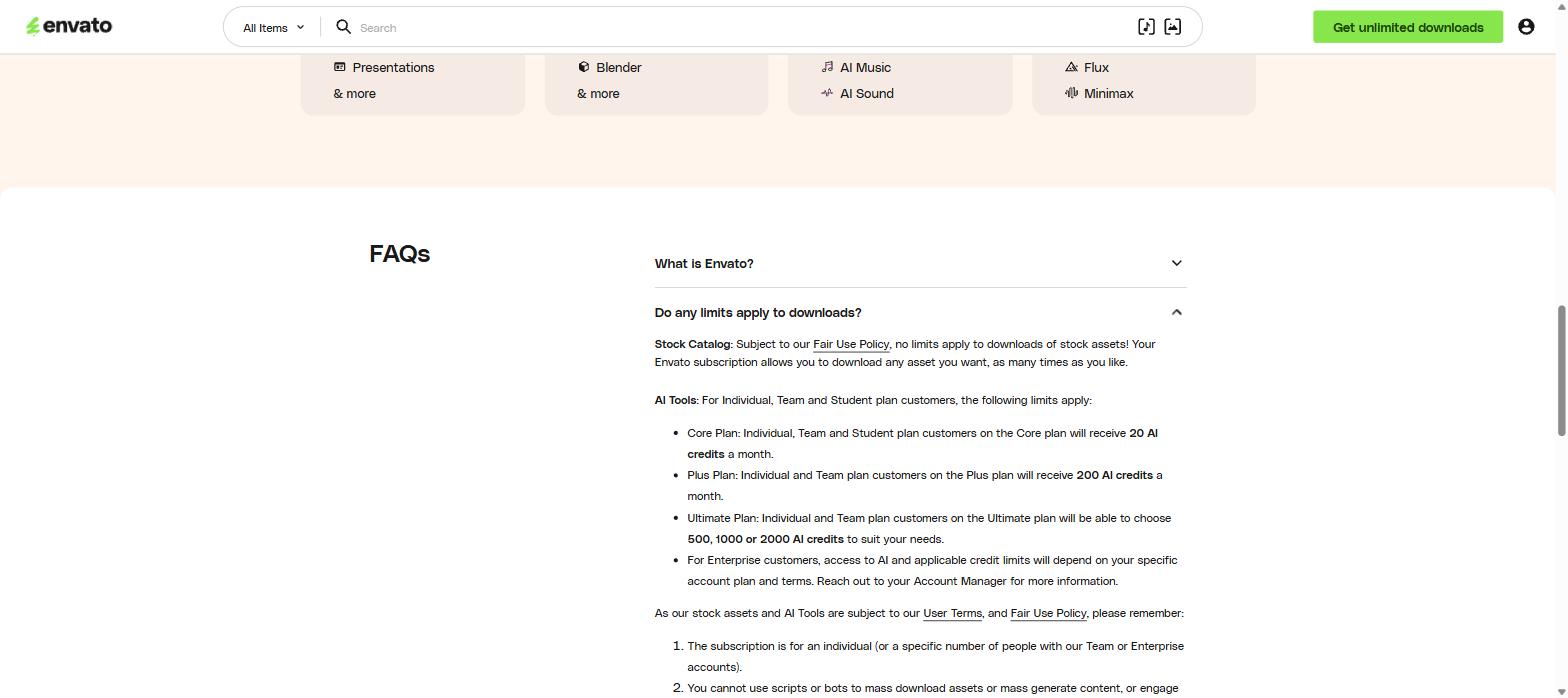
The download-limits answer: no cap on stock, hard caps on AI, and rules against bulk automation
On the stock catalogue, the answer is genuinely “no limits” — subject to a Fair Use Policy, you can download any asset you want, as many times as you like. On AI, the caps are explicit and are the numbers in the table above.
The conditions are the interesting part. The subscription is for one individual, unless you are on a Team or Enterprise account with a set number of seats. And you cannot use scripts or bots to mass-download assets or mass-generate content, or behave in ways that look “inappropriate, excessive, or unusual” — account sharing and very high download volumes in a short window are both named directly.
In practice that rules out the two things people most often try: splitting one login across a small studio, and scraping the library to build a local archive “just in case”. Neither is a grey area here.
The Licensing Detail Most Reviews Skip
If you do client work, this section matters more than the price.
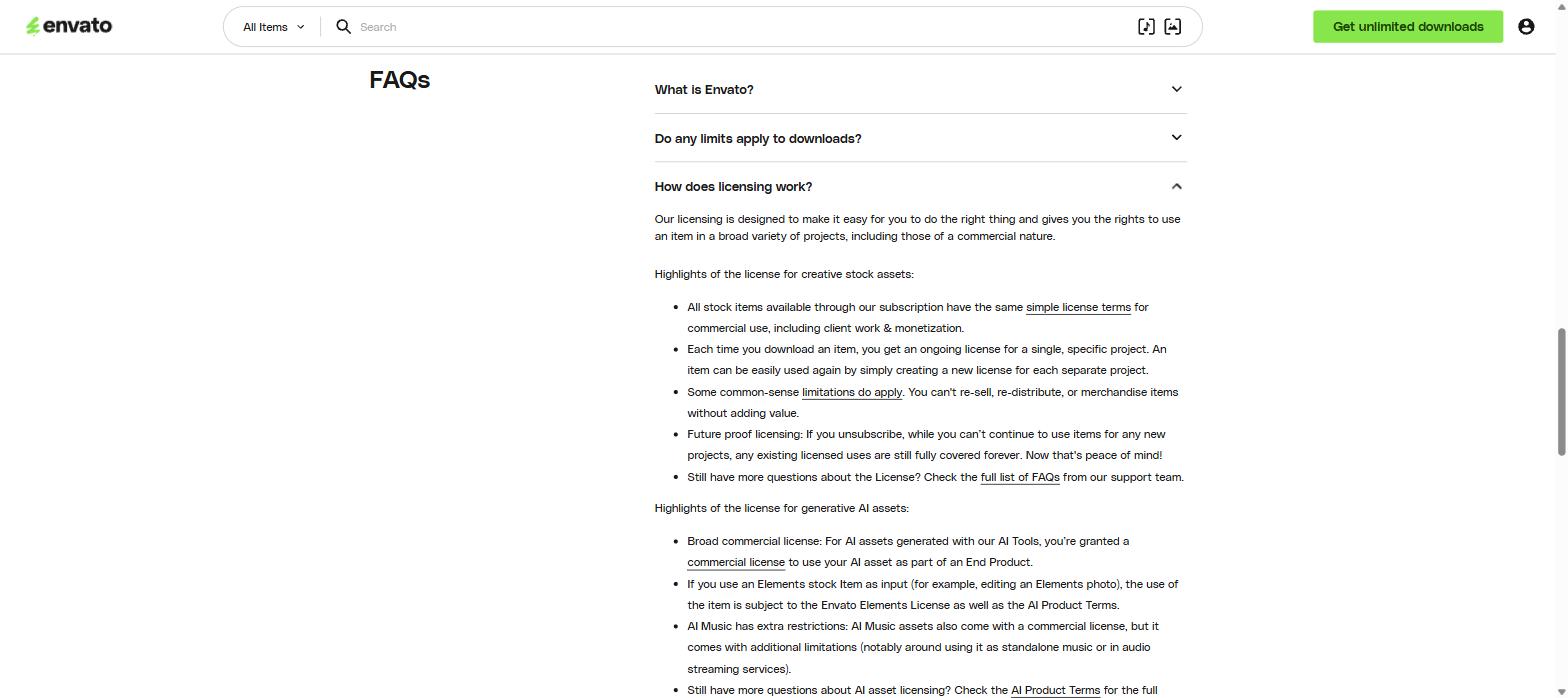
The licensing answer in full, covering both stock assets and AI generations
Every stock item carries the same simple licence terms, and commercial use — including client work and monetisation — is allowed. But the licence is granted per project, not per download. Each time you download an item you get an ongoing licence for one specific project; reusing that same item on a second project means registering a new licence for it. It is free to do, but it is a step, and forgetting it is how agencies end up technically out of compliance on old work.
The limitations are the common-sense ones: no re-selling, no re-distributing, and no putting items on merchandise without adding value. A stock illustration cannot simply be printed on a t-shirt and sold.
The best clause is the one on cancellation. Future-proof licensing means that if you unsubscribe, every existing licensed use stays fully covered forever. You lose the right to use items in new projects, but the logo you made for a client two years ago does not become a liability the month you stop paying. That is the clause that makes this safe to use on work you hand over to someone else.
For AI output the licence is broad and commercial, with two caveats. If you feed an Elements stock item into a generator — editing an Elements photo, for example — the result is governed by the Elements licence as well as the AI Product Terms. And AI Music carries extra restrictions, specifically around using it as standalone music or on audio streaming services. If your plan was to generate an album, read those terms first.
Where Envato Elements Falls Short
What works
- The entry price is genuinely low for a catalogue this broad — $16.50 buys the same 29 million assets as the $168 plan
- Licences survive cancellation, which makes it safe for client work and handovers
- Templates are built for real software, not just a web editor, so assets land in the tool you already use
- Stock and generative AI arrive on one invoice instead of three separate subscriptions
- Student and Team discounts are published openly rather than hidden behind sales
What does not
- Twenty AI credits a month on Core is a demo, not a working allowance — enough to try the tools and not much else
- The Plus-to-Ultimate jump is more than four times the price for five times the credits, which is a worse rate per credit at the entry setting than the headline “save up to 15%” suggests
- Per-project licensing is administrative overhead that scales badly for studios juggling many jobs
- One individual per subscription means a two-person shop needs a Team plan, not a shared login
- Prices are USD and exclude local tax, and the “from” figures do not state the billing term on the card
How Envato Elements Compares
|
Envato Elements |
Adobe Stock |
Shutterstock |
Freepik |
| Model |
Flat subscription, unlimited downloads |
Credit or download packs |
Tiered download packs |
Flat subscription |
| Catalogue breadth |
Video, audio, photos, graphics, fonts, 3D, templates |
Photos, video, audio, templates |
Photos, video, audio, music |
Vectors, photos, templates, AI |
| Generative AI |
Included, credit-metered by plan |
Included via Firefly |
Included |
Included |
| Licence after cancelling |
Existing uses covered forever |
Perpetual on purchased assets |
Perpetual on purchased assets |
Varies by plan |
| Entry price shown |
From $16.50/month |
Varies by pack |
Varies by pack |
Varies by plan |
The structural difference is download economics. Pack-based competitors punish volume; a flat subscription does not. If you download five assets a month, packs are fine. If you download fifty, Envato Elements is the cheaper shape by a wide margin.
Which Plan to Actually Buy
- Core, $16.50 — freelancers, solo creators and anyone who wants the library and treats AI as a bonus. This is the right default for most people
- Plus, $39 — you generate images or short video regularly and 200 credits maps to your actual monthly output
- Ultimate, $168 — production studios running batches, where ten parallel generations and 1,000+ credits are a workflow requirement rather than a nice-to-have
- Enterprise — organisations over 50 people who need custom seats, tailored indemnification and an account manager
- Students — take the 30% off Core before considering anything else
The mistake to avoid is buying a higher tier for the library. It is the same library. Count the AI generations you realistically make in a month, then pick the smallest plan that covers them.
Verdict
Envato Elements remains the best value entry point in stock subscriptions, and the licensing is unusually honest for the category — the future-proof clause on cancellation is a real protection, not marketing language. The catalogue is broad enough that most projects can be finished without a second subscription, and the template-to-software pipeline saves more time than the price difference with competitors.
The four-tier structure is where it gets slippery. Presented as good, better, best, it reads like the top plan has more of everything. It does not. Once you see that the only variable is AI credits, the decision gets simple — and for a lot of people it ends at the cheapest plan.
Compare Envato Elements plans and start a subscription →
Rating: 4.5 / 5
Frequently Asked Questions
How much does Envato Elements cost?
Four tiers: Core from $16.50 a month, Plus from $39, Ultimate from $168, and Enterprise on request. Prices are in US dollars and exclude local tax. Students get 30% off Core.
Is Envato Elements really unlimited?
For stock assets, yes — subject to a Fair Use Policy there is no cap on how many items you download or how often. AI generation is capped by credits: 20 a month on Core, 200 on Plus, and 500, 1,000 or 2,000 on Ultimate.
What happens to my downloads if I cancel?
Existing licensed uses stay covered forever. You cannot use downloaded items in new projects after unsubscribing, but work you already licensed and delivered remains fully licensed.
Can I use Envato Elements for client work and monetised content?
Yes. All stock items carry the same commercial licence covering client work and monetisation. Each download licenses one specific project, so reusing an item on another project means registering a new licence for it. Full plan and licence details are here.
Can two people share one Envato Elements account?
No. The subscription is for a single individual unless you buy a Team or Enterprise plan with a set number of seats. Account sharing is named in the terms as prohibited, and Team plans are advertised at up to 34% off individual pricing.
All prices, credit allowances and licence terms in this Envato Elements review were taken from the official pricing page on 16 September 2026 and are subject to change. Check current terms before subscribing.