Scrimba is a browser-based platform for learning to code whose lessons are not videos you watch but recordings you can pause and type into. It calls them scrims, and the whole product is built around them.
That design choice is the reason Scrimba keeps coming up whenever someone asks which coding course actually keeps you practising rather than passively watching. This review looks at what the platform contains right now, what the free tier really gives you, what Scrimba Pro costs, and the places where the small print turns out to be more generous than the sales page.
A normal coding tutorial is a video. The instructor types, you watch, then you alt-tab to your own editor and try to reproduce it from memory. Scrimba removes that gap.
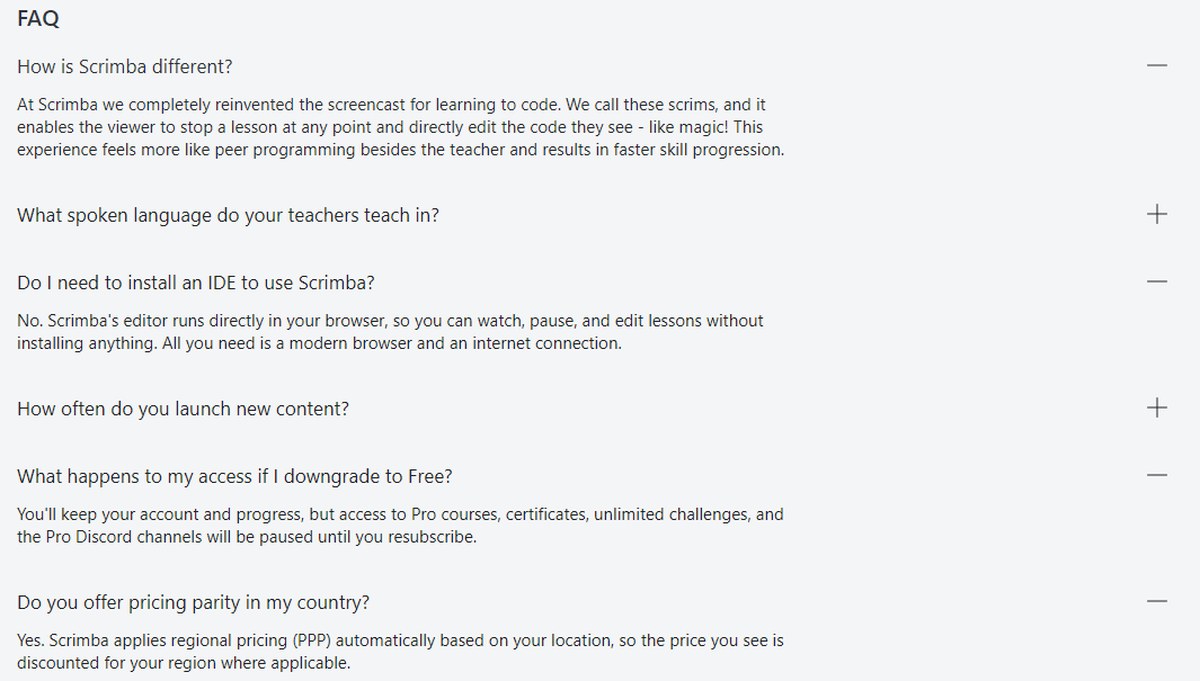
In the company’s own words: “At Scrimba we completely reinvented the screencast for learning to code. We call these scrims, and it enables the viewer to stop a lesson at any point and directly edit the code they see – like magic! This experience feels more like peer programming besides the teacher and results in faster skill progression.”
The practical consequence is that there is nothing to install. Asked whether you need an IDE, Scrimba answers: “No. Scrimba’s editor runs directly in your browser, so you can watch, pause, and edit lessons without installing anything. All you need is a modern browser and an internet connection.”
Scrimba’s own FAQ sets out the scrim concept, the no-install promise and the regional pricing policy.
For a beginner on a borrowed laptop, a school Chromebook or a work machine with locked-down software installation, that is not a small detail. It is the difference between starting today and spending an evening fighting Node versions.
What the Scrimba catalogue actually contains
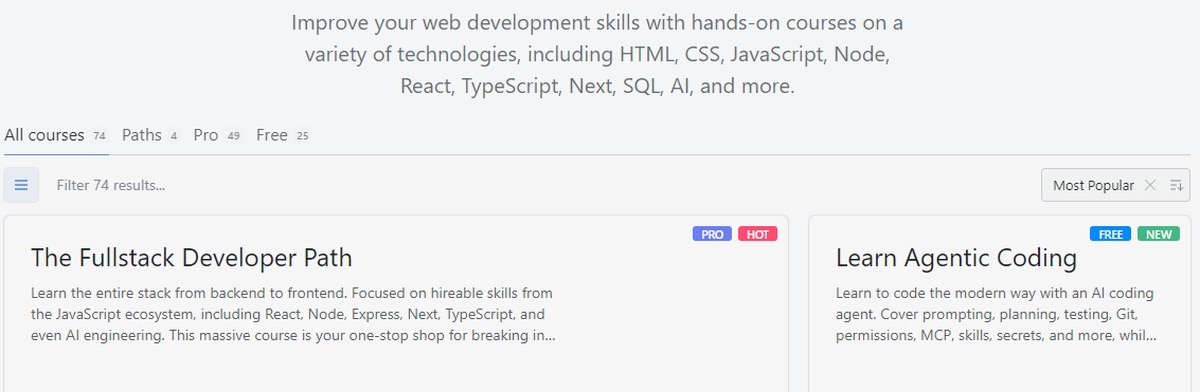
This is where Scrimba is unusually easy to verify, because the catalogue page counts itself. The tabs across the top of the course listing read:
All courses — 74
Paths — 4
Pro — 49
Free — 25
The Scrimba catalogue counts itself: 74 courses in total, 49 behind Pro and 25 free.
Those numbers reconcile cleanly. Forty-nine plus twenty-five is seventy-four, and the four career paths sit inside the forty-nine Pro items rather than alongside them. The pricing page’s claim of “All 70+ courses” is therefore conservative rather than inflated, which is a better sign than the reverse.
The stated subject range is HTML, CSS, JavaScript, Node, React, TypeScript, Next, SQL and AI. That is a focused JavaScript-ecosystem curriculum with an AI wing bolted on, not an everything-store.
The free tier is a third of the catalogue, not a teaser
Most platforms call one introductory lesson a free trial. Twenty-five of Scrimba’s seventy-four courses carry a FREE badge — roughly a third of everything on the site.
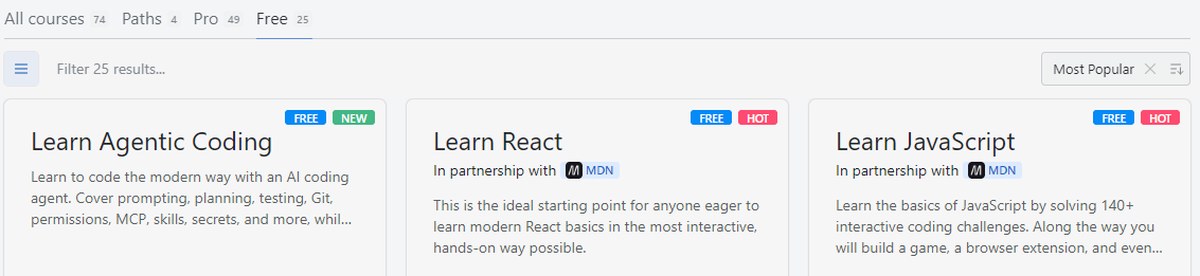
More to the point, these are not the leftovers. Three of the free courses are built with Mozilla’s MDN Web Docs:
Learn React — In partnership with MDN — 13 modules, Intermediate, 15.1 hrs
Learn JavaScript — In partnership with MDN — 9 modules, Beginner, 9.4 hrs
Learn HTML and CSS — In partnership with MDN — 7 modules, Beginner, 5.7 hrs
Three of the free courses carry an MDN partnership badge, including React and JavaScript.
Also free: Learn Python (133 lessons, 4.1 hrs), Learn SQL (50 lessons, 3.8 hrs) and Learn Agentic Coding, a new course covering prompting, planning, testing, Git, permissions and MCP. Those six alone come to well over forty hours of material at no cost.
The free Learn JavaScript course is worth a closer look because it shows the house teaching style. It advertises 140+ interactive coding challenges and 200,000+ students, offers subtitles in 10 languages, and its curriculum is a list of things you build rather than topics you cover: a passenger counter app, a blackjack game, a Chrome extension and a mobile app, with three “Practice Time” blocks wedged between them. Counting the lessons in those modules gives 143, which matches the 140+ claim.
Two things to check for yourself before you count on the free tier. First, the player will let an anonymous visitor open only a couple of locked scrims before asking you to sign in with GitHub, Google or email — free means free of charge, not free of an account. Second, the free JavaScript curriculum ends with a Certificate of Completion step, while the pricing page lists course certificates as a Pro feature and the FAQ says certificate access is paused if you downgrade to Free. Both statements are published by Scrimba; this review reports both rather than guessing which one governs.
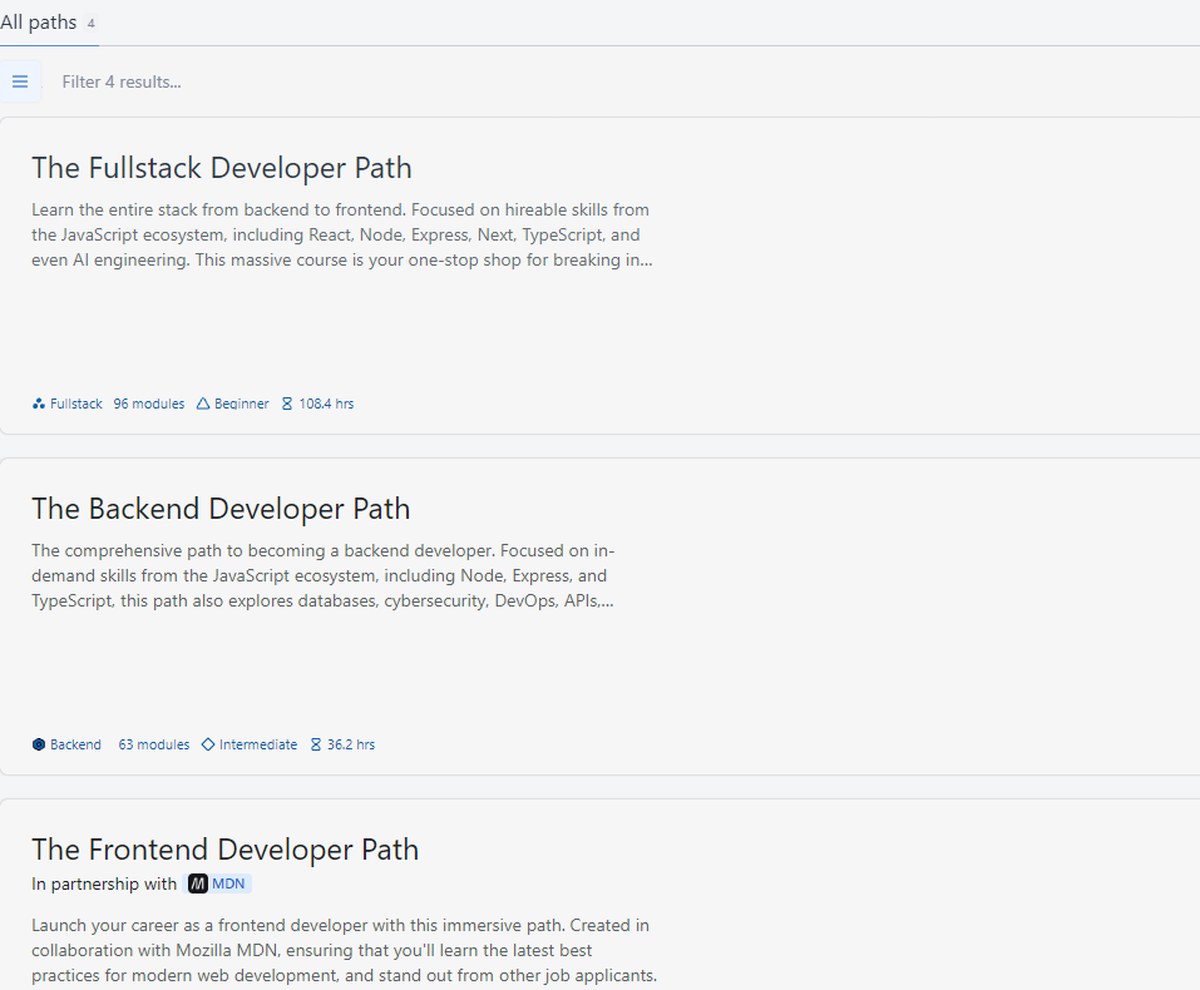
The four Scrimba career paths, measured
Scrimba’s paths are pitched as “one-stop-shops to become hireable within a given role” and explicitly as “low-cost alternatives to university degrees or bootcamps.” There are four, and each publishes its size:
The Fullstack Developer Path — Beginner — 96 modules — 108.4 hrs — React, Node, Express, Next, TypeScript and AI engineering
The Frontend Developer Path — Beginner — 70 modules — 81.6 hrs — created in collaboration with Mozilla MDN
The AI Engineer Path — Intermediate — 13 modules — 13.4 hrs — agents, RAG, MCP, multimodality, context engineering
Each Scrimba path publishes its module count, difficulty and total hours.
There is a useful piece of arithmetic hiding in that table. Frontend plus Backend comes to 117.8 hours, while the Fullstack path is 108.4. Fullstack is therefore not the two specialist paths stapled together — it is a curated route that drops roughly ten hours of overlap. If you already know you want one side of the stack, the specialist path is the shorter road; if you do not know yet, Fullstack is the one Scrimba marks for beginners.
The AI Engineer Path is the newest and by far the smallest at 13.4 hours. Read it as a focused add-on for someone who can already build apps, not as a standalone career route.
Each path lists its full module breakdown on the Scrimba site, which is worth skimming before you commit to one.
Scrimba Explain: a question in, a video out
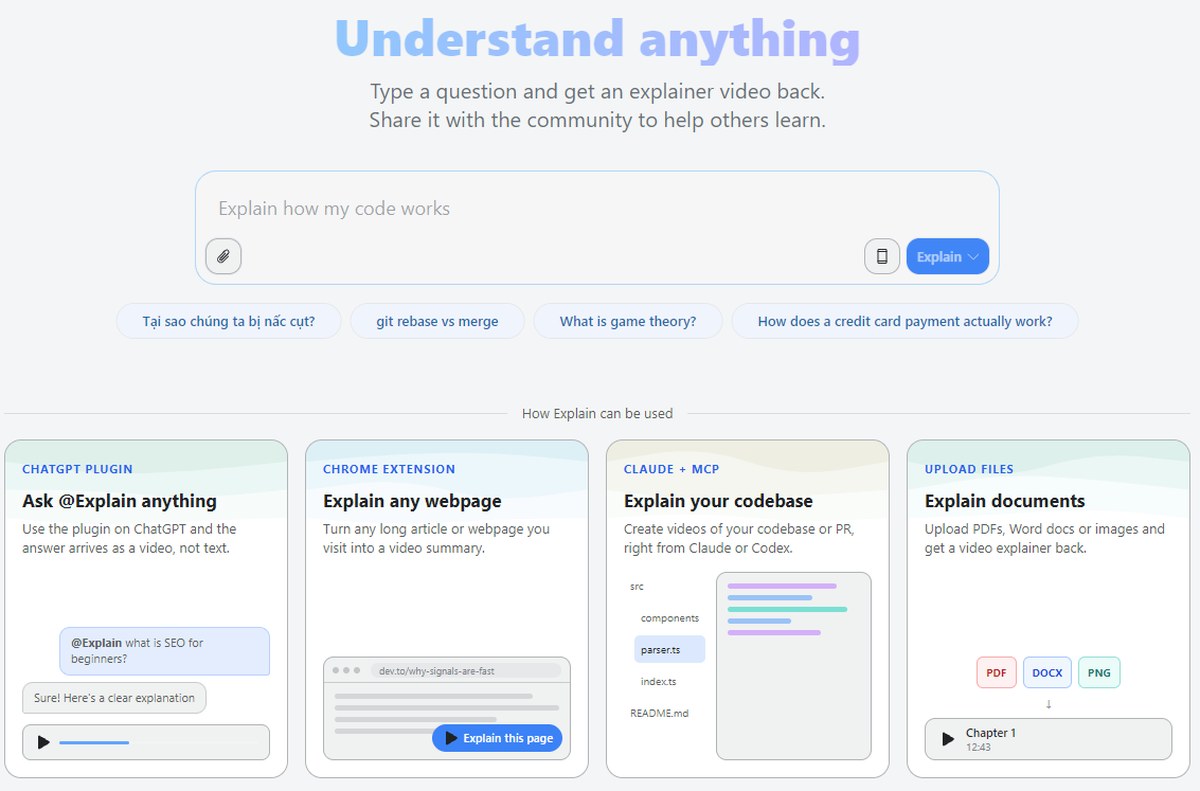
The newest thing on the platform is Explain, currently in beta. The idea is literal: type a question, get an explainer video back rather than a wall of text.
Scrimba exposes it in four places, which is what makes it more than a gimmick:
ChatGPT plugin — “Use the plugin on ChatGPT and the answer arrives as a video, not text.”
Chrome extension — “Turn any long article or webpage you visit into a video summary.”
Claude + MCP — “Create videos of your codebase or PR, right from Claude or Codex.”
File upload — “Upload PDFs, Word docs or images and get a video explainer back.”
Explain plugs into ChatGPT, Chrome, Claude via MCP, and direct file uploads.
Pro members get 100 Explainers per month; the free tier gets 10. Being able to point an AI assistant at an unfamiliar pull request and get back a narrated walkthrough is a genuinely different use of the scrim format, and it is the clearest sign that Scrimba is still building rather than coasting on a 2018 idea.
What Scrimba Pro costs, with the currency caveat said out loud
Scrimba applies purchasing-power parity, and says so plainly: “Scrimba applies regional pricing (PPP) automatically based on your location, so the price you see is discounted for your region where applicable.” The Terms of Service add that “Unless otherwise agreed, prices are in US Dollars (USD).”
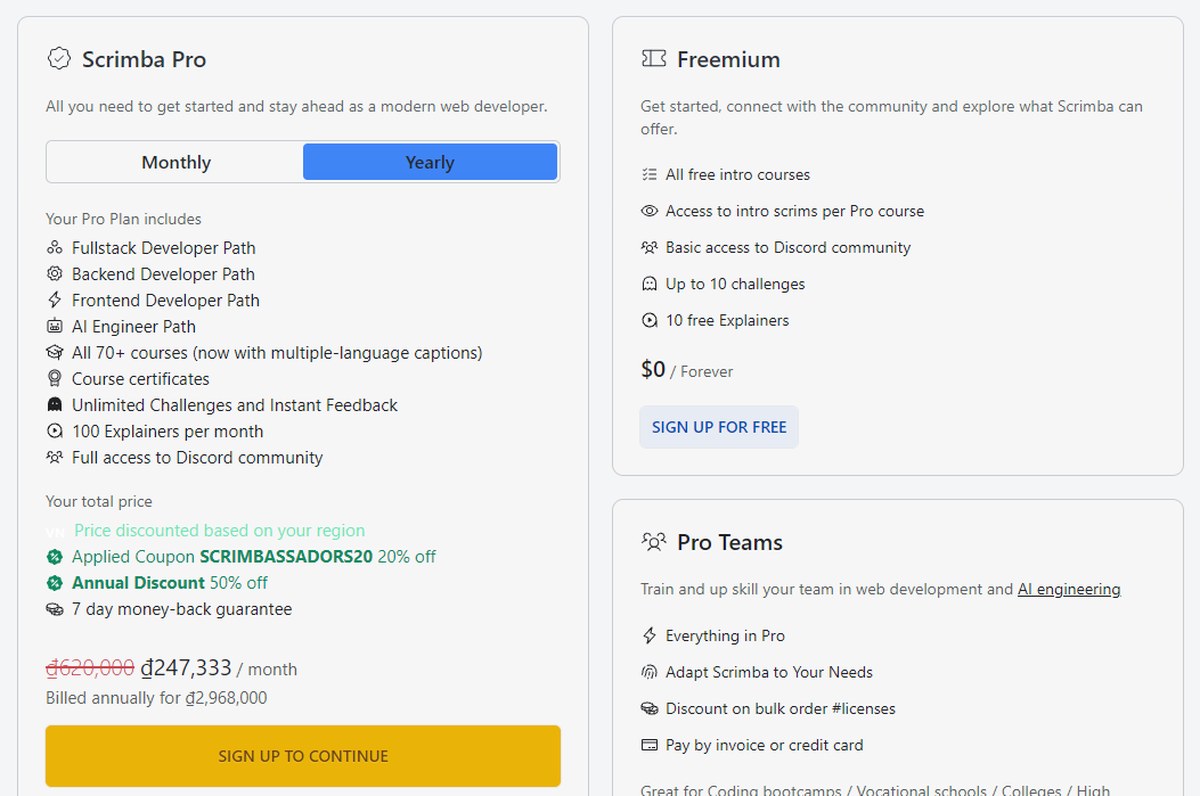
So the figures below are what the page showed to a visitor in Vietnam on 15 October 2026, and your own numbers will differ. Read them as a worked example of how the discounts stack, not as a global price list.
List price: ₫620,000 / month
With the coupon shown as auto-applied, `SCRIMBASSADORS20`, at 20% off: ₫496,000 / month on monthly billing
With the additional annual discount of 50%: ₫247,333 / month, billed annually at ₫2,968,000
Scrimba Pro, Freemium and Pro Teams, with the regional discount and coupon shown on the card.
Twelve months of monthly billing at ₫496,000 would be ₫5,952,000, against ₫2,968,000 paid annually — a saving of ₫2,984,000, almost exactly half. Annual billing is not a marginal nudge here; it is the whole pricing strategy.
Scrimba Pro covers all four career paths, all 70+ courses with multiple-language captions, course certificates, unlimited challenges with instant feedback, 100 Explainers a month and full Discord access. Freemium is $0 forever and covers all free intro courses, the intro scrim of every Pro course, basic Discord access, up to 10 challenges and 10 Explainers. Pro Teams adds bulk-licence discounts, invoice payment and customisation, and is aimed at bootcamps, colleges, universities, non-profits, startups, corporates, dev shops and consultancies.
Where the fine print is kinder than the sales page
This is rare enough to be worth its own section.
The pricing page advertises a 7 day money-back guarantee and describes it as a “Full 7-day guarantee, no questions asked.” The Terms of Service then grant consumers something longer: “If you are a consumer, you have the right to withdraw from this contract within 14 days without giving any reason.” The withdrawal period runs from the day the contract is concluded, and you exercise it by writing to Scrimba.
Both are published by the same company, and the second is the broader protection. Two qualifications keep this honest. The right of withdrawal applies to consumers, meaning natural persons acting outside their trade or profession; the Terms state explicitly that business customers, including those buying team seats, are not entitled to it. And outside those rights, fees are non-refundable with no proration for unused time — cancelling stops future renewals rather than clawing back a period already paid for.
Keeping the price you signed up at
The pricing page makes three promises under “Buy with confidence”: the money-back guarantee above, “Keep your price — the price you pay today will stay, even if we increase prices in the future,” and “Cancel any time — no lock-in period.”
The Terms fill in the mechanics. Scrimba can change subscription prices, but will give at least 14 days’ notice and apply the change only from your next renewal. And the locked-in rate is tied to continuous membership: “If you subscribe with a discount, you will keep this rate as long as your Subscription remains active. Unsubscribing forfeits the discount, and resubscribing will be at the current rate without the original discount.”
That is not a catch so much as an instruction. If you take an annual plan at a heavy discount, the discount is attached to not letting it lapse. Pausing for a few months and coming back costs you the rate, not just the gap.
Free versus Pro, drawn precisely
Putting the two tiers side by side:
Freemium ($0 forever) — all free intro courses, the intro scrim of every Pro course, basic Discord access, up to 10 challenges, 10 Explainers. An account is required.
Scrimba Pro — the four career paths, all 70+ courses with multiple-language captions, course certificates, unlimited challenges with instant feedback, 100 Explainers per month, full Discord access.
If you downgrade, Scrimba says “You’ll keep your account and progress, but access to Pro courses, certificates, unlimited challenges, and the Pro Discord channels will be paused until you resubscribe.” Progress is preserved rather than deleted, which makes stopping for a while less costly than it is on platforms that wipe your history.
The sensible way to buy Scrimba, then, is backwards: work through the free JavaScript and HTML/CSS courses first, find out whether the scrim format suits how you learn, and only then decide whether a path is worth an annual commitment. The free tier is large enough to answer that question properly.
Scrimba suits a self-taught beginner who keeps bouncing off video courses because watching feels like progress until you open a blank file. It suits someone learning on a machine they cannot install software on. It suits a career-changer who wants a defined route with a published hour count rather than an infinite playlist. And it suits a working developer who needs the AI Engineer Path’s thirteen hours on agents, RAG and MCP without sitting through a beginner curriculum first.
It is a weaker match if you want a language outside the JavaScript ecosystem beyond the standalone Python and SQL courses, if you need accredited qualifications rather than platform certificates, if you prefer learning in a language other than English — teaching is in English with subtitles in multiple languages — or if you want live cohort-based instruction with a human reviewing your work, which is a different product category.
Company, partners and credibility
The platform is operated by Scrimba AS, the entity named in its own Terms of Service.
The credibility signal that matters most is who builds the curriculum with them. Scrimba names its curriculum partners as MDN, Cloudflare, LangChain, Netlify and Hugging Face, and MDN goes further by publicly describing Scrimba as its recommended course partner. MDN — the Mozilla Developer Network web documentation that practically every working web developer has open in a tab — does not attach its name casually, and the MDN badge appears on the Frontend Developer Path as well as on the free React, JavaScript and HTML/CSS courses.
That is a more meaningful endorsement than a star rating, because it is checkable in two directions: the badge is on Scrimba’s pages, and the partnership is acknowledged on MDN’s side too.
How this review was done
This is a desk review. Every figure above — course counts, path lengths, plan contents, prices, guarantee terms — was read directly from Scrimba’s own published pages on 15 October 2026: the course catalogue, the career paths listing, individual course pages, the pricing page and its FAQ, the Explain page, and the Terms of Service.
No paid subscription was bought and no account was created for this article, so nothing here measures teaching quality, support responsiveness or how a certificate is received by an employer. Prices are region-dependent by Scrimba’s own policy and were observed from Vietnam; catalogue counts and promotional coupons change. Where two of Scrimba’s own pages said different things — the certificate question, and 7-day guarantee against 14-day withdrawal — both versions are reported as published.
The short version
Scrimba earns its reputation on one design decision that it has executed better than anyone else: a lesson you can stop and type into. Everything else follows from that, including why the free tier is credible rather than decorative.
The numbers that make the case are all checkable in a couple of minutes. Seventy-four courses, twenty-five of them free, three of those free ones co-built with MDN. Four career paths with published module counts and hour totals rather than vague promises. A new Explain feature that plugs into ChatGPT, Chrome and Claude. Annual billing that genuinely halves the monthly rate. And a Terms of Service that gives consumers fourteen days to change their mind when the marketing only promised seven.
Go in knowing that pricing is regional, that free still needs an account, that the discount is tied to staying subscribed, and that the certificate question is worth confirming for your own plan. Then start with the free JavaScript course — it costs nothing to find out whether this is how your brain wants to learn.
The iPhone 18 no ports theory is suddenly everywhere. A video making the rounds on TikTok and social media appears to show something startling: an iPhone — labeled as the “iPhone 18” — charging through a small magnetic connector instead…
Hottest fashion trends 2026 reviewed honestly — which trending styles are actually wearable, which are overhyped, and what’s worth buying right now in the US market. Quick Verdict: 2026’s biggest fashion trends fall into two camps: genuinely wearable evolutions of…
PS5 Pro review 2026 — I tested it for 30 days. Here’s the honest verdict on performance, graphics, and whether upgrading from a standard PS5 is actually worth the money. Quick Verdict: The PS5 Pro is the most capable PlayStation…