ContentStudio is a social media management platform, and ContentStudio AI is the part of it that writes captions, generates images, makes video, cuts long footage into clips and answers comments. What makes it worth a close read is that none of that is sold as a vague “AI included” line. Every piece of ContentStudio AI is metered, and the meters are printed on the pricing page.
The ContentStudio wordmark, taken from the company site.
ContentStudio AI has five separate meters, not one: AI text credits, AI image credits, AI video credits, AI video clipping credits and API requests. A sixth, AI auto replies, appears only from the middle tier up. This review reads those numbers against the three published prices, does the division the pricing page does not do, and sets the plan page beside the separate API plan that sits further down the same page.
How this review was done
This is a desk review. No account was created, no card was entered, no trial was started and not a single ContentStudio AI credit was spent inside the product. Everything below comes from material ContentStudio publishes itself: the pricing page and its four plan cards, the AI Studio, clip maker and MCP server feature pages, and the API plan panel, all read on 29 October 2026. The screenshots are of those public pages, including the interface mock-ups the company uses to illustrate ContentStudio AI.
Where the company makes a claim it is reported as a claim. Every ContentStudio AI price, quota and per-unit figure in the tables below comes either straight off the page or from arithmetic on numbers that are straight off the page, so any reader can check them in about five minutes. The MCP page gives instructions for wiring the platform into an AI assistant; those were read as page content, not followed.
Three plans, five separate ContentStudio AI meters
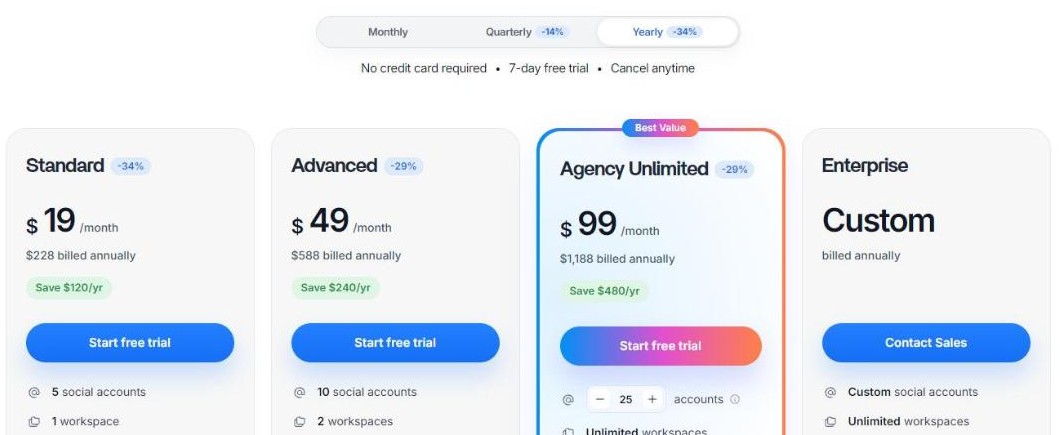
The ContentStudio AI pricing page shows four columns. Three carry a number, the fourth says Custom. Prices below are the yearly-billing figures the page shows by default.
The four plan cards, with the billing toggle and the per-plan discount badges above them.
Plan
Per month, billed yearly
Billed annually
Social accounts
Workspaces
Users
Standard
$19
$228
5
1
1
Advanced
$49
$588
10
2
2
Agency Unlimited
$99
$1,188
slider, starts at 25
Unlimited
Unlimited
Enterprise
Custom
billed annually
Custom
Unlimited
Unlimited
Figures as printed on the ContentStudio pricing page, yearly billing selected.
A seven-day free trial covers ContentStudio AI on all of them with no credit card required, and the page says you can cancel at any time. That is the easy part. The interesting part is what each of those three prices buys in ContentStudio AI terms, because the seat counts and the credit counts do not move at the same rate.
The full ContentStudio AI quota table
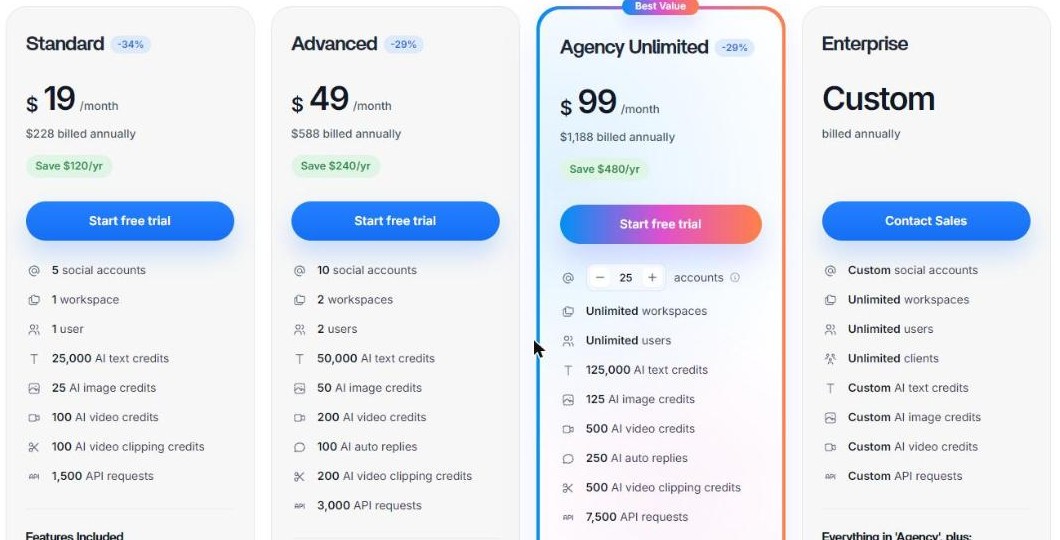
Here is every metered ContentStudio AI line, copied from the three plan cards. Nothing is inferred; the Enterprise column simply reads Custom on all of them.
The quota block each plan card carries, from AI text credits down to API requests.
Meter
Standard $19
Advanced $49
Agency Unlimited $99
AI text credits
25,000
50,000
125,000
AI image credits
25
50
125
AI video credits
100
200
500
AI video clipping credits
100
200
500
AI auto replies
not listed
100
250
API requests
1,500
3,000
7,500
All six metered ContentStudio AI lines, exactly as the plan cards print them.
Two things stand out in the ContentStudio AI numbers before any arithmetic. The first is the spread between the units: 25,000 text credits sit next to 25 image credits on the same card, a thousand to one. The second is that AI auto replies are simply absent from the cheapest card rather than shown at zero, so a Standard subscriber reading top to bottom may not notice the feature exists at all.
Inside AI Studio: chat, images and video in one place
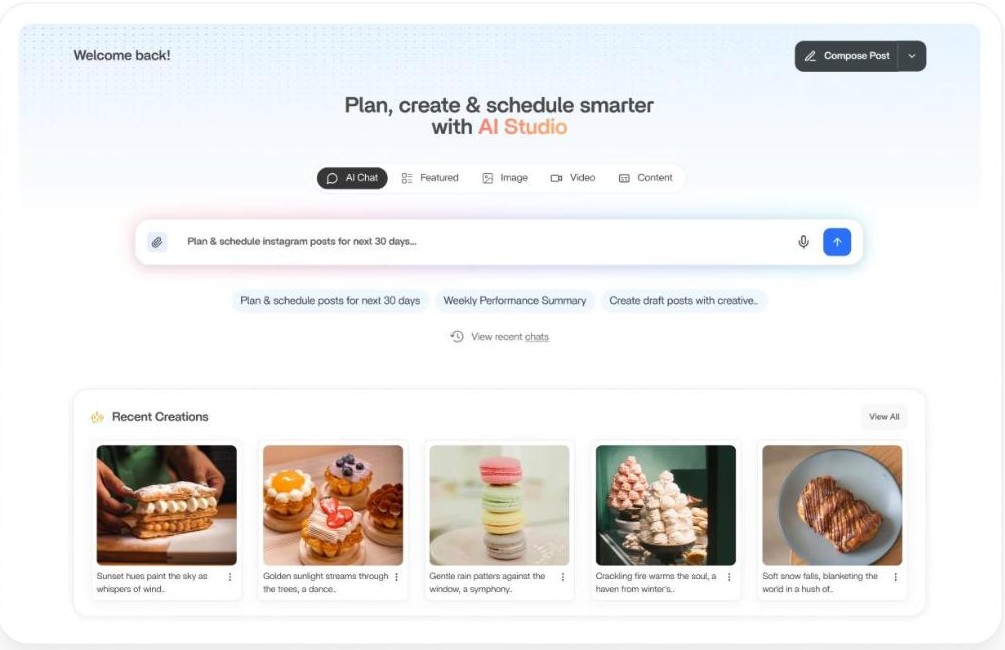
AI Studio is the surface where most ContentStudio AI credits get spent. The feature page describes it as a social media AI assistant that combines image generation, video generation, AI writing and smart scheduling, so the draft, the artwork and the slot on the calendar all happen without leaving the screen. The company mock-up shows the shape of it clearly: a chat box with suggested prompts, tabs for Featured, Image, Video and Content, and a row of recent creations underneath.
AI Studio as the feature page presents it, with the prompt box and a recent-creations shelf.
Three ContentStudio AI claims on that page are specific enough to hold the company to. Images can be generated from a description or produced by refining a photo you already have. Generation is multilingual, which the page frames as on-brand images in any language the audience speaks. And output is described as high resolution, sharp enough to stay clean across feeds and stories. There is also an AI brand knowledge and voice feature listed on every plan, which is what stops the writing half of ContentStudio AI from sounding like a generic assistant.
The ContentStudio AI image credit is the scarce unit
Of the six ContentStudio AI meters, one runs out far sooner than the rest. Twenty-five image credits on the entry plan is not a month of daily posting with fresh artwork; it is roughly one generated image every working day with five to spare. The text allowance on the same plan, 25,000 credits, is the sort of number most solo users will never see the bottom of.
That ContentStudio AI imbalance is worth planning around rather than complaining about, because it points at how the platform expects to be used: write freely, generate images deliberately, and lean on the media and assets library and the audio library, both of which are on every plan and neither of which costs a credit. If artwork is the bottleneck in your workflow, the image credit line is the number to read first, not the price.
AI video credits and the clip maker
ContentStudio AI meters video twice. AI video credits cover generation, and AI video clipping credits cover the clip maker, which is a separate tool with its own feature page. That page describes feeding in one long recording, a webinar, podcast or interview, and getting a batch of short clips back, with the AI scanning the footage for the strongest moments and hooks and adding captions to each cut.
Source files do not have to live inside the platform. The page lists pasting a video URL, pulling from the media library, or connecting Google Drive or Dropbox, which is the detail that decides whether a studio has to duplicate its archive to use the feature. On the entry plan the two ContentStudio AI video meters are 100 each, which is enough to test the workflow properly before committing to a tier.
What a ContentStudio AI credit costs on each plan
This is the ContentStudio AI arithmetic the pricing page leaves to the reader, and the result is consistent enough to be worth a table. Divide each monthly price by the quota it buys and the middle plan is the most expensive per unit on every single meter.
Unit
Standard $19
Advanced $49
Agency Unlimited $99
1,000 AI text credits
$0.76
$0.98
$0.79
1 AI image credit
$0.76
$0.98
$0.79
1 AI video credit
$0.19
$0.245
$0.198
1 AI video clipping credit
$0.19
$0.245
$0.198
1,000 API requests
$12.67
$16.33
$13.20
Monthly price divided by the published quota. Every row has the same shape: cheapest, dearest, middle.
That is not a flaw in ContentStudio AI pricing so much as a statement about what the Advanced tier is for. Moving from Standard to Advanced doubles every quota and doubles the seats, but the price goes up two and a half times, and the gap is paid for in features rather than volume: the social inbox, competitor analytics, campaign and label analytics, Meta Ads Analytics, Google Ads Analytics, post recycling, bulk scheduling via CSV, RSS autoposting, team collaboration, the approval workflow and scheduled report exports all arrive at that tier.
The practical reading is simple. If you are buying ContentStudio AI for raw output, Standard is the cheapest credit on the board and Agency is the second cheapest. If you are buying Advanced, buy it for the inbox and the analytics, and treat the extra credits as a side effect. You can check the current numbers on the ContentStudio pricing page in a couple of minutes.
AI auto replies, and the tier where they start
AI auto replies are the one ContentStudio AI meter that does not exist on the entry plan. They appear at 100 a month on Advanced and 250 on Agency Unlimited, and they sit logically beside the social inbox, which arrives on the same tier. Together they are the customer-care half of the product rather than the publishing half.
Worth noting plainly: 100 auto replies a month is a small allowance for a busy brand page, and the page does not say what happens when the allowance runs out, whether replies simply stop or can be topped up. That is a question for the demo rather than something to infer.
The MCP server: ContentStudio AI inside your own assistant
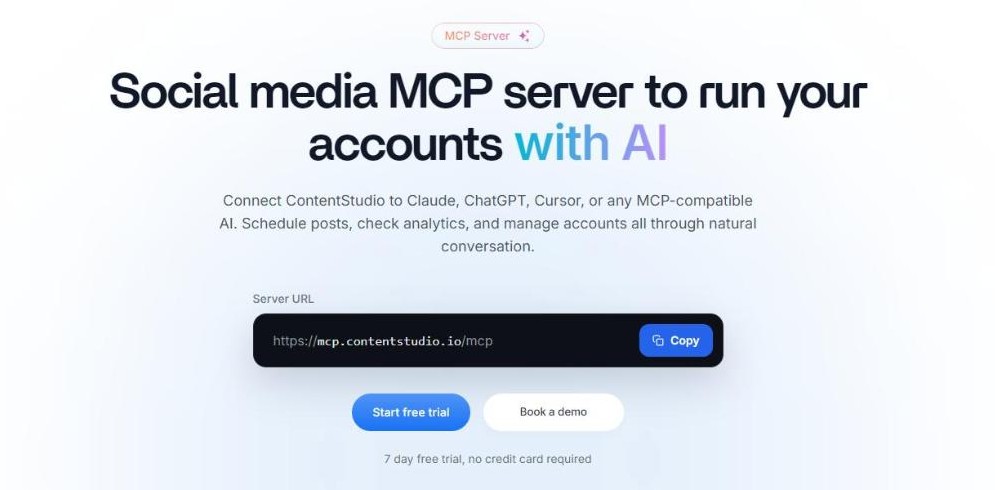
This is the piece that makes ContentStudio AI unusual in its category. ContentStudio publishes an MCP server at mcp.contentstudio.io/mcp, and the page describes connecting it to Claude, ChatGPT, Cursor or any MCP-compatible assistant in order to schedule posts, check analytics and manage accounts through conversation rather than through the dashboard.
The MCP server page, with the server URL printed in the open.
The setup described is a copy of that URL into the assistant plus a single browser sign-in, with a fallback of passing an API key in the URL for clients that cannot sign in through a browser. MCP Integration and API access are both listed in the Features Included block on the entry plan, so this ContentStudio AI capability is not enterprise-only. For anyone already running an assistant as part of their daily work, that is the most interesting line on the whole pricing page, and it is also a good reason to think about who holds the key: an assistant with that connection can post on your accounts.
The separate API plan, and the arithmetic worth checking
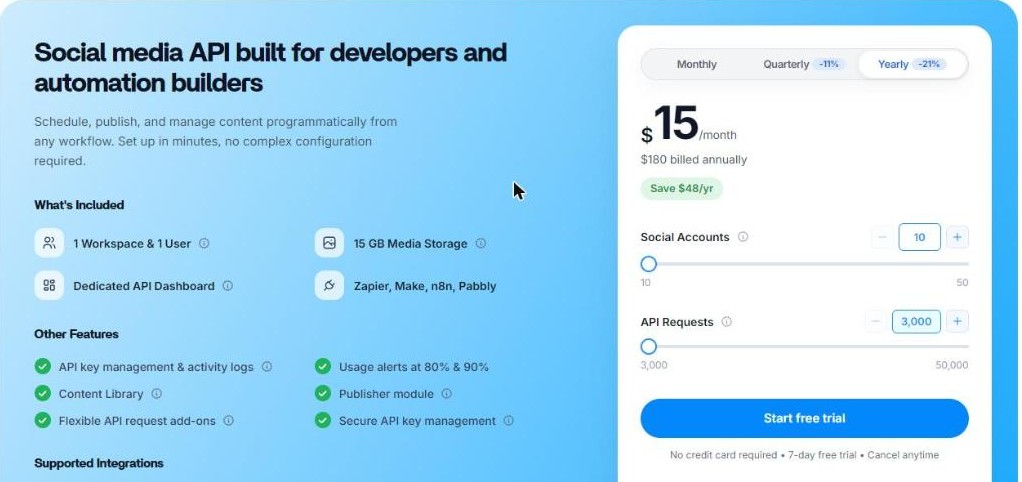
Further down the same page sits a second product with its own price and its own billing toggle: a social media API plan at $15 a month, $180 billed annually, aimed at developers and automation builders. It includes one workspace and one user, 15 GB of media storage, a dedicated API dashboard and connections to Zapier, Make, n8n and Pabbly, with sliders for social accounts from 10 up to 50 and API requests from 3,000 up to 50,000.
The API plan panel, with its own billing toggle and its own request slider.
Put the two side by side and a comparison falls out that neither panel makes for you.
API plan $15/mo
Standard $19/mo
API requests included
3,000
1,500
Social accounts
10, adjustable to 50
5
Workspaces and users
1 and 1
1 and 1
AI text, image, video credits
not listed on the panel
25,000 / 25 / 100
Media storage
15 GB
not stated as a figure
Built from the two panels on the same pricing page, both at yearly billing.
The API plan is four dollars a month cheaper than Standard, carries twice the API requests and twice the social accounts, and lists no ContentStudio AI credit allowance at all. These are two different products for two different buyers, and the page never claims otherwise, but a developer who skims the top of the page and stops at Standard is paying more for half the requests. The same panel also lists API key management and activity logs, usage alerts at 80 and 90 per cent, and flexible request add-ons, which is a more complete operational picture than most tools publish.
Add-ons: listening, white-label and SSO
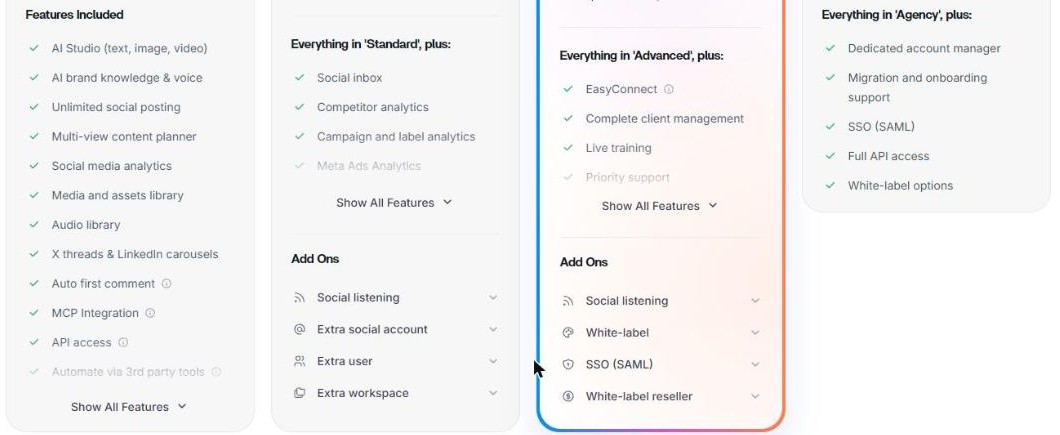
Several capabilities sit outside the ContentStudio AI plans and are sold alongside it. Social listening is the big one, and it is priced twice, differently, depending on which card you are standing on.
The Add Ons block that sits under the feature list on each plan card.
Add-on
Price
What it covers
Social listening (Advanced card)
$99/mo or $950/yr
3 topics, up to 5,000 mentions
Social listening (Agency card)
$150/mo or $1,440/yr
5 topics, up to 10,000 mentions
White-label
$50/mo or $500/yr
own logo, domain, email identity, client dashboard
White-label reseller
$50/mo or $500/yr
resell the platform under your own brand
SSO (SAML)
$150/mo or $1,440/yr
connect your own identity provider
Extra social account / user / workspace
$5 / $10 / $10 per month
beyond the plan limit
Add-on pricing as printed on the plan cards.
Two observations, both checkable. The bigger listening tier is better value per unit, not worse: $30 a topic against $33, and $15 per thousand mentions against $19.80. And the smaller listening add-on at $99 a month costs more than five times the $19 entry plan it would be bolted onto, which makes listening a deliberate purchase rather than an upgrade you drift into. Both yearly listening prices work out at exactly a 20 per cent saving on twelve months, and all of it is itemised on the add-on panels of each plan card.
What Unlimited means on the Agency plan
The top named tier is called Agency Unlimited, and the word is accurate about the things it describes: workspaces and users are both unlimited, and the social account count is a slider rather than a fixed ceiling, starting at 25. Client management is complete at that tier, with EasyConnect, live training, guided onboarding, priority support and a dedicated account manager.
What is not unlimited is ContentStudio AI. Every meter stays a hard number: 125,000 text credits, 125 image credits, 500 video credits, 500 clipping credits, 250 auto replies and 7,500 API requests. An agency with unlimited users sharing 125 image credits a month will feel that ceiling long before it feels the seat limit, so the name describes the team side of the plan rather than the ContentStudio AI side. Only the Enterprise column replaces those numbers with Custom.
Billing cycles and the ContentStudio AI discount that is not 34 per cent everywhere
The ContentStudio AI billing toggle above the cards offers Monthly, Quarterly at minus 14 per cent and Yearly at minus 34 per cent. Each card then carries its own badge, and the badges do not all say 34. Standard shows minus 34 per cent; Advanced and Agency Unlimited both show minus 29 per cent. The page prints enough information to check it.
Plan
Yearly total
Stated saving
Implied monthly list
Actual discount
Standard
$228
$120/yr
$29
34.5 per cent
Advanced
$588
$240/yr
$69
29.0 per cent
Agency Unlimited
$1,188
$480/yr
$139
28.8 per cent
API plan
$180
$48/yr
$19
21.1 per cent
Yearly total plus stated saving, divided by twelve, gives the monthly list price the discount is measured against.
The badges are accurate per plan; it is the headline on the toggle that is generous, because the full 34 per cent applies only to the cheapest tier. The API plan runs on its own cycle entirely, with Quarterly at minus 11 per cent and Yearly at minus 21 per cent. None of this is hidden, and the page even offers a link to machine-readable pricing for AI agents, which is a candid touch from a company whose own product is partly about letting assistants read things.
Who each plan fits
The ContentStudio AI quota table answers this more cleanly than any feature list, so here it is read straight off the numbers.
Situation
Plan the numbers point to
Why
Solo creator, one brand, heavy writing and light artwork
Standard $19
cheapest credit on the board and 25,000 text credits
You need the social inbox, competitor data or ads analytics
Advanced $49
those features start there; the extra credits are a side effect
Agency with many clients and many seats
Agency Unlimited $99
unlimited workspaces and users, plus client management
Developer or automation builder, no AI needed
API plan $15
twice the requests and twice the accounts of Standard
Monitoring conversations, not just publishing
add social listening
it is an add-on on both paid tiers, never included
Reselling the platform under your own brand
Agency plus white-label
white-label and reseller are Agency-side add-ons
Read from the published quotas and add-on lists rather than inferred.
One more thing belongs in a review of a tool that generates images and text for publication. Ownership of AI output is still an unsettled area, and the US Copyright Office guidance on copyright and artificial intelligence is the right first stop before a brand builds its whole visual identity on generated artwork. That is a point about the category, not about this platform.
The short version on ContentStudio AI
ContentStudio publishes more of its own numbers than most platforms in this bracket, and the numbers survive scrutiny. The quotas are printed in the open, the add-on prices are printed in the open, the MCP server URL is printed in the open, and the one headline that overstates things, the minus 34 per cent on the billing toggle, is corrected by the badge on each card a few centimetres below it. The company says it is trusted by more than 16,500 brands and agencies; that figure is its own, and is reported here as its own.
Clearest strength: every ContentStudio AI capability is metered in the open, so you can budget before you buy
Best-value tier for output: Standard, at $0.76 per image credit against $0.98 on Advanced
Most distinctive feature: an MCP server on every plan, including the $19 one
Watch the number: 25 image credits a month on Standard, 125 on Agency Unlimited
Ask in the demo: what happens when a meter runs out mid-month
Overall: 4.7 / 5. A well-documented platform with unusually honest ContentStudio AI metering and a genuinely forward-looking automation story, marked down slightly because the image allowance is tight at every tier and because the middle plan is the worst value per credit on all five meters. If you want to see the current quotas for yourself, the ContentStudio plans and API panel are public and take no account to read.
Disclosure: this article contains affiliate links. If you subscribe through them, Review King may earn a commission at no extra cost to you. Visit ContentStudio
The iPhone 18 no ports theory is suddenly everywhere. A video making the rounds on TikTok and social media appears to show something startling: an iPhone — labeled as the “iPhone 18” — charging through a small magnetic connector instead…
Hottest fashion trends 2026 reviewed honestly — which trending styles are actually wearable, which are overhyped, and what’s worth buying right now in the US market. Quick Verdict: 2026’s biggest fashion trends fall into two camps: genuinely wearable evolutions of…
PS5 Pro review 2026 — I tested it for 30 days. Here’s the honest verdict on performance, graphics, and whether upgrading from a standard PS5 is actually worth the money. Quick Verdict: The PS5 Pro is the most capable PlayStation…