SUNLU, whose Materials Lab publishes the numbers this review reads
Most brands publishing filament specs give you a product page, a colour swatch and a temperature range on the box. SUNLU publishes a comparison engine. You pick up to ten materials, choose a property, and it draws you a chart of what each one is rated at.
That tool is the reason this SUNLU filament specs review exists in the form it does. Rather than describe how the spools feel, we read the published numbers, lined them up, and checked the arithmetic. Everything below came off sunlu.com on 6 November 2026, so every figure is something you can pull up yourself in a couple of minutes.
Where the SUNLU filament specs actually live
The SUNLU filament specs live in the Materials Lab, not on the product pages. The comparison tool carries 39 filaments sorted into five families, and lets you put up to ten of them on the same axis at once.
High Speed PLA+2.0, PLA+, PLA, Matte PLA, Marble PLA
The 39 filaments in the SUNLU comparison tool, read 6 November 2026
A set of SUNLU filament specs carrying PEEK and PCL in the same catalogue as glow-in-the-dark PLA is telling you something about who it is selling to. PEEK is an aerospace-grade polymer that needs a very hot hotend; PCL melts at around the temperature of a hot drink. Both are listed, and both have published numbers.
The four parameter groups behind the SUNLU filament specs
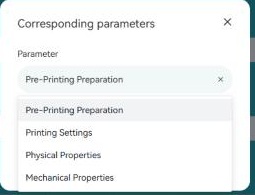
The four parameter groups you can chart in the comparison tool
Pick a material and the SUNLU filament specs tool offers four groups of properties, each with its own list of measurements. This is the structure worth knowing before you go looking for a specific figure.
Parameter groups in the SUNLU Materials Lab comparison tool
Five separate mechanical measures is more than most consumer filament specs publish at all, and it matters because they do not move together. A material can be strong in tension and poor under impact, and the tool will show you both if you ask it.
SUNLU filament specs for four common materials, side by side
Here are the SUNLU filament specs most people actually want, built from three separate runs of the tool: the workhorse PLA, the tougher PETG, the classic ABS, and a carbon-filled nylon from the engineering shelf.
Material
Nozzle temp
Drying time
Tensile strength
PLA+2.0
205 C
6 hours
46 MPa
PETG
240 C
6 hours
48 MPa
ABS
250 C
6 hours
35 MPa
PA6-CF
280 C
7 hours
112 MPa
All figures as published in the SUNLU comparison tool on 6 November 2026
Three things fall out of those SUNLU filament specs immediately, and we will take them one at a time.
The SUNLU filament specs tensile number that goes against folklore
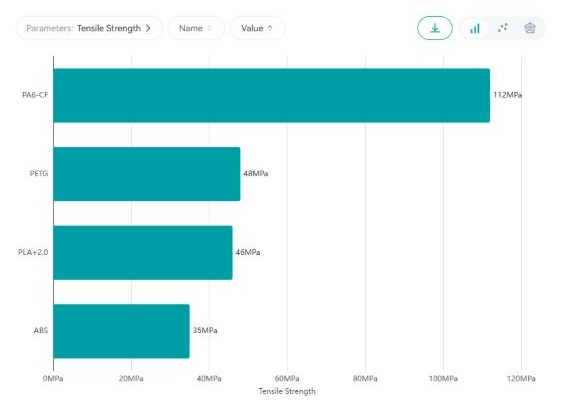
Tensile strength as the tool charts it: PA6-CF 112MPa, PETG 48MPa, PLA+2.0 46MPa, ABS 35MPa
Ask around in any printing forum and you will hear that PLA is the stiff, brittle one and ABS is the tough one you move up to. On SUNLU own published figures, ABS is the weakest of the four in tension at 35 MPa, below PLA+2.0 at 46 MPa and PETG at 48 MPa.
PETG also edges out PLA+2.0, 48 MPa against 46 MPa. The gap is small, about four per cent, but it runs the opposite way to how most beginners rank the two.
We want to be careful reading SUNLU filament specs here, because this is exactly the kind of number that gets quoted out of context. Tensile strength is one axis. ABS is usually chosen for heat resistance and impact behaviour rather than pulling strength, and the same tool publishes Notched Izod Impact Strength and Elongation at Break as separate measures. The honest reading is that the SUNLU filament specs do not support “ABS is simply stronger”, not that ABS is a bad material.
The outlier in the SUNLU filament specs is PA6-CF at 112 MPa, which is 2.3 times PETG and 3.2 times ABS. That is the number that explains why the engineering shelf exists.
Drying time is almost flat across the SUNLU filament specs
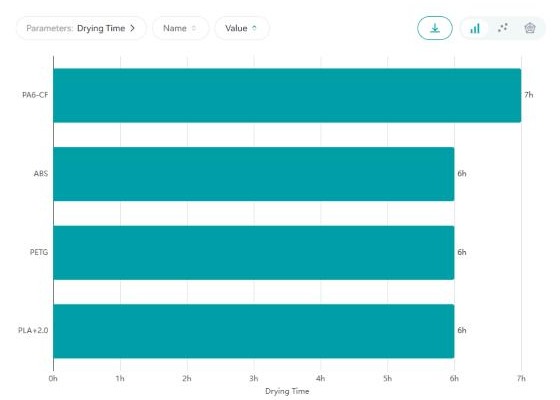
Drying time charted for the same four materials
This corner of the SUNLU filament specs surprised us in the other direction. We expected a wide spread, because the materials behind the SUNLU filament specs absorb moisture at very different rates. What the tool publishes is 6 hours for PLA+2.0, PETG and ABS alike, with only the carbon-filled nylon moving, to 7 hours.
One extra hour for a material famous for drinking moisture out of the air is a modest step. Read it as a baseline rather than a ceiling: it is the time SUNLU publishes, and the drying temperature is a separate figure in the same group.
The practical takeaway is simpler than the numbers. If you are buying a dryer alongside the filament, a 6 to 7 hour cycle covers everything in this comparison, so you can plan around one overnight run rather than material-by-material schedules.
It is also worth saying what a drying figure is and is not. It is a recommended cycle for filament that has been sitting in air, not a promise about how long a spool stays dry afterwards. SUNLU sells dryers of its own, so the number has a commercial context, and the honest way to read it is as the company stated starting point. You can check the current drying figures per material in the same tool we used.
The nozzle temperature ladder in the SUNLU filament specs
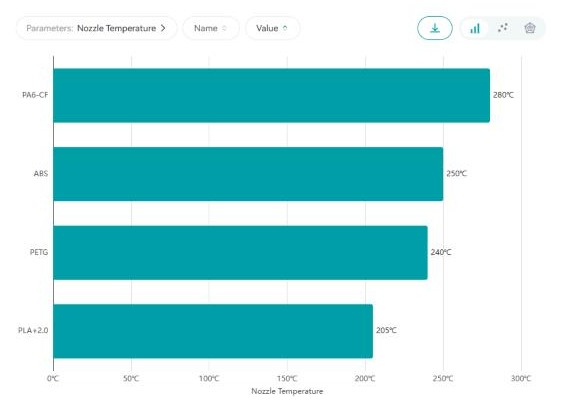
Nozzle temperature from 205C for PLA+2.0 up to 280C for PA6-CF
Nozzle temperature is where the SUNLU filament specs separate the four materials cleanly, and it is the figure that decides whether your printer can run a given spool at all.
Material
Nozzle temp
What that implies
PLA+2.0
205 C
Runs on essentially any printer, stock hotend
PETG
240 C
Fine on most stock hotends, benefits from an all-metal one
All-metal hotend plus a hardened nozzle for the carbon fill
Published nozzle temperatures and what they mean for hardware
The 75 degree spread in SUNLU filament specs between the cheapest and most demanding material in this set is the real buying constraint. Before any of the SUNLU filament specs matter to you, your hotend has to reach the number.
Five mechanical measures, not one
Mechanical Properties is the part of the SUNLU filament specs we would point a new buyer at first, because it publishes measurements that are defined by standard test methods rather than marketing adjectives:
Tensile Strength — how hard you can pull before it fails
Flexural Strength — how it behaves in bending
Notched Izod Impact Strength — resistance to a sudden blow
Elongation at Break — how far it stretches first
Shore Hardness — surface hardness, the number that matters for the TPUs
Those measures in the SUNLU filament specs are not company inventions. They are the vocabulary of polymer testing, and additive manufacturing has its own standards body work in the same area: ASTM runs Committee F42 on Additive Manufacturing Technologies, which develops standards for the field including test methods for extruded polymer parts. A brand publishing against those measures is making claims that can be checked, which is more than a colour swatch does.
Printing Settings gives you four numbers, not a range
The Printing Settings corner of the SUNLU filament specs covers Nozzle Temperature, Print Speed, Retraction Speed and Retraction Distance. That last pair is the useful surprise: retraction is where most stringing problems live, and most brands say nothing about it on the spool.
Having SUNLU filament specs that include a starting retraction distance per material saves the usual evening of calibration towers. It will not be perfect for your specific machine, but it beats starting from zero.
Presets for the SUNLU filament specs, and the gap nobody mentions
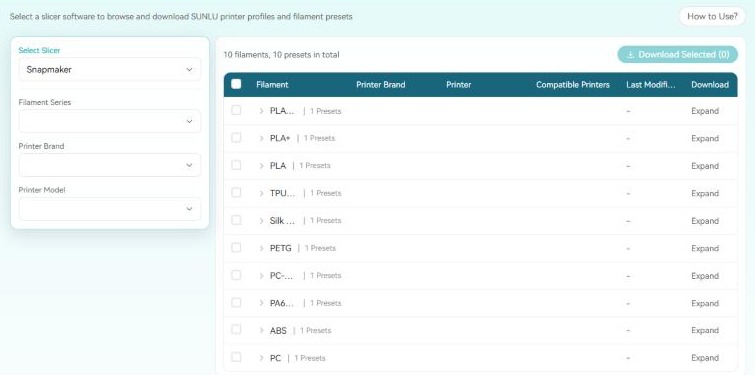
The printer presets page, filtered by slicer, filament series, printer brand and model
Alongside the SUNLU filament specs, the company publishes downloadable slicer profiles. Five slicers are offered for the SUNLU filament specs. The coverage behind each one is wildly uneven, and this is the single most useful thing we found.
Slicer
Filaments listed
Presets available
Bambu Studio
53
194
PrusaSlicer
21
9
Creality
11
10
Snapmaker
10
10
Anycubic
9
0
Preset coverage per slicer, counted from the page on 6 November 2026
Bambu Studio has 194 presets. Anycubic has none. Between the best and the worst supported slicer there is not a gap so much as a cliff: Bambu Studio alone carries more than four times the presets of the other four slicers combined, while the Anycubic option lists nine filaments and zero downloadable profiles behind them.
PrusaSlicer is the other one to watch, with 21 filaments listed but only 9 presets. Creality shows 11 filaments against 10 presets, so one filament there has no profile either.
None of this makes the filament behind the SUNLU filament specs worse. It does change which spool is convenient for you. If you run Bambu Studio, the SUNLU filament specs arrive with a profile already written; if you run Anycubic slicer, you are dialling it in yourself. Worth checking which presets exist for your slicer before you order a material you have never printed.
Getting presets to match the SUNLU filament specs is four dropdowns and a download button, in this order:
Select Slicer — Bambu Studio, PrusaSlicer, Creality, Snapmaker or Anycubic
Filament Series — narrows the list to one material family
Printer Brand — filters to profiles built for that manufacturer
Printer Model — the final filter, then Expand to see compatible printers
Each row of presets matched to the SUNLU filament specs carries a Last Modified column, so you can see whether a profile has been touched recently or has been sitting since it was first published. You can tick several rows and pull them down in one go with Download Selected.
The Extreme Test Zone is built but empty
The home of the SUNLU filament specs has a fourth section called the Extreme Test Zone. At the time of writing it contains exactly one line: “No videos yet.”
We mention it because the navigation around the SUNLU filament specs promises stress-test footage and the page currently has none, so do not go looking for it expecting to find torture tests. The comparison tool and the preset library are the two parts of the Lab that are actually populated today.
What the warranty behind the SUNLU filament specs covers
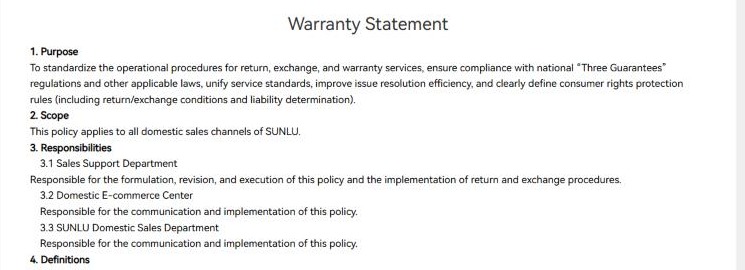
The SUNLU warranty statement, scoped in section 2 to domestic sales channels
This is the section international buyers should read before any of the SUNLU filament specs, and it is the finding we did not expect to make. The warranty page on the English-language global site opens by anchoring itself to Chinese consumer law:
To standardize the operational procedures for return, exchange, and warranty services, ensure compliance with national “Three Guarantees” regulations and other applicable laws…
And then section 2, headed Scope, says in a single sentence:
This policy applies to all domestic sales channels of SUNLU.
The three departments named as responsible for the SUNLU filament specs warranty are the Sales Support Department, the Domestic E-commerce Center and the SUNLU Domestic Sales Department. Read plainly, the published warranty statement is a domestic-market document presented in English.
We are not going to tell you what that means for your own order, because it depends entirely on where you bought the spool. The practical move is to find the returns terms of the specific channel you are buying through and keep those, rather than assuming this page governs an international purchase.
Returns: seven days, original channel, and a long refusal list
Within that scope the terms behind the SUNLU filament specs are specific. The return window is 7 calendar days from the day following receipt, handled through the original purchase channel, and it covers three situations: a quality problem not caused by the user, a change of mind where everything is unused and complete, and receiving the wrong item.
The refusal list behind the SUNLU filament specs is longer and worth knowing in advance:
Past the return window, or no valid proof of purchase
Missing original accessories or packaging, or user-caused damage
No quality defect found after inspection
Damage from improper use, unauthorised modification, moisture, mould or foreign objects
Altered product labels or serial numbers
Damage from force majeure, or from unauthorised repair before the return
Opened and used products where resale value is affected
Products not bought from the official site or an authorised channel, unless the original buyer requests it
Shipping costs fall on the buyer in several listed cases, including a return requested late for personal reasons and a product sent back as faulty that tests as working. For filament specifically, the moisture clause is the one to note, since an opened spool left out is exactly the scenario it describes.
Two corners of the SUNLU filament specs worth knowing
Two corners of the SUNLU filament specs are worth naming, both of them about what is published rather than what is sold.
The Physical Properties group is the thinnest of the four. Density is the headline measure, and for a buyer choosing between two spools that is useful mainly for working out how many metres you are getting per kilogram rather than how the part will behave.
The second corner of the SUNLU filament specs is that Shore Hardness, the measure that actually matters when you are picking between TPU 90A, TPU 95A and Silk TPU, sits in the Mechanical Properties group alongside tensile figures aimed at rigid plastics. It is there and it is charted, but a flexible filament buyer has to know to go looking for it rather than being led to it.
Who this fits
You are
Verdict
Why
Running Bambu Studio
Easiest fit by a distance
194 ready-made presets, more than the other four slicers combined
New to printing and comparing materials
Worth using the Lab even before you buy
Published numbers for 39 filaments beats guessing from a box
Moving up to engineering materials
Check your hotend first
PA6-CF wants 280 C and a hardened nozzle; PEEK is hotter still
Running the Anycubic slicer
Expect to tune it yourself
Nine filaments listed, zero downloadable presets behind them
Buying outside mainland China
Read your channel terms, not just this page
The published warranty statement scopes itself to domestic sales channels
Hoping to watch stress tests first
Not yet
The Extreme Test Zone is live but has no videos
Matching the SUNLU range to how you actually print
This is a desk review of the SUNLU filament specs. We did not buy a spool, print a benchy or run a tensile test, and we are not going to pretend otherwise.
Every one of the SUNLU filament specs above was read from two public sources on 6 November 2026: the SUNLU Materials Lab, specifically the material comparison tool and the printer presets page, and the company own warranty statement. The four-material table was built by running the comparison tool three times, once per property, with the same four filaments selected each time. The preset counts are the totals the page itself prints above the table for each slicer.
Where SUNLU publishes a number we have attributed it to SUNLU, and where a reading cuts against common assumptions, as the ABS tensile figure does, we have said what the number is and what it does not prove. We have not reproduced community posts, user photographs or any other personal material from the site.
This article contains affiliate links. The price you pay does not change, and nothing above was altered because of them.
The short version
The SUNLU filament specs are more checkable data than almost anyone else publishes at this end of the filament market: 39 materials, four parameter groups, five separate mechanical measures, and a preset library you can download. That transparency is the product as much as the plastic is.
What costs the SUNLU filament specs points is coverage rather than quality: the preset library is excellent for one slicer and absent for another, the Extreme Test Zone has nothing in it yet, and the warranty statement on the global site is scoped to domestic channels. The things that earn them are a comparison tool that actually answers questions, numbers published against standard test measures, and policy pages that state the awkward parts plainly.
Overall: 4.3 out of 5. Before you buy, chart your shortlist and check the preset count for your slicer, then compare the current SUNLU filament specs for yourself, because the Lab gets updated and the snapshot above will move.
The iPhone 18 no ports theory is suddenly everywhere. A video making the rounds on TikTok and social media appears to show something startling: an iPhone — labeled as the “iPhone 18” — charging through a small magnetic connector instead…
Hottest fashion trends 2026 reviewed honestly — which trending styles are actually wearable, which are overhyped, and what’s worth buying right now in the US market. Quick Verdict: 2026’s biggest fashion trends fall into two camps: genuinely wearable evolutions of…
PS5 Pro review 2026 — I tested it for 30 days. Here’s the honest verdict on performance, graphics, and whether upgrading from a standard PS5 is actually worth the money. Quick Verdict: The PS5 Pro is the most capable PlayStation…