Most knowledge tools in 2026 want a monthly card number and a copy of your files on somebody else server. DEVONtechnologies has spent more than two decades going the other way: a one-time licence, documents that stay on your own Mac as ordinary files, and an engine that reads them locally. The DEVONtechnologies team is small, the apps are Mac-only, and the pricing page is unusually blunt about what you get for the money.
This review walks the whole DEVONtechnologies catalogue as it stands in November 2026 – four paid apps, eight free ones – and then does the arithmetic the pricing page does not do for you. Along the way the published numbers threw up a few things worth knowing before you buy, including one place where DEVONtechnologies charges a dollar less than its own stated rule, and one row in the comparison table that answers the same question twice in two different ways.
What DEVONtechnologies actually makes
The DEVONtechnologies line-up is narrower than the company website first suggests. There are four DEVONtechnologies products you pay for and a shelf of utilities you do not. Everything runs on macOS except the iPad and iPhone companion.
App
What it does
Version
Minimum OS
Price
DEVONthink
Document and knowledge manager
4.4.2
macOS Ventura
from $99
DEVONthink To Go
iPad and iPhone companion
4.2.3
iOS 26.0
$19 a year or free with Pro
DEVONagent Pro
Multi-engine web research
3.12
macOS Ventura
$49.95
DEVONsphere Express
Menu bar search utility
1.9.10
macOS Ventura
$9.95
The four paid DEVONtechnologies apps, with versions and minimum OS as published on the download page in November 2026.
Two details in that table are easy to skim past. DEVONthink To Go 4 asks for iOS 26.0, which is a far newer floor than the Mac apps demand – macOS Ventura shipped three generations ago. And DEVONsphere Express at $9.95 is the cheapest way to put a DEVONtechnologies search engine on a Mac without touching DEVONthink at all.
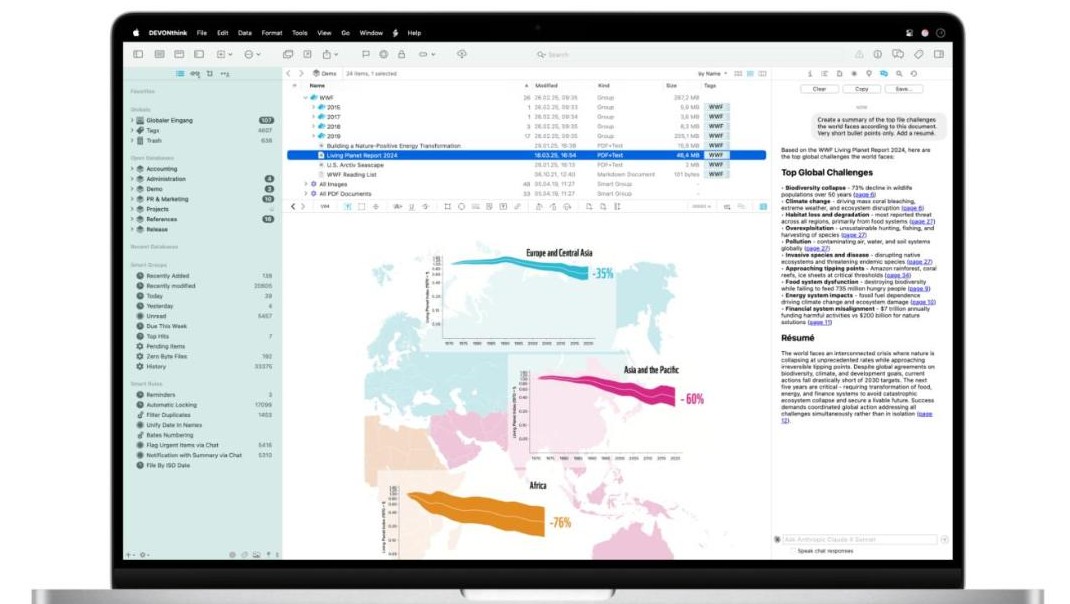
DEVONthink 4, the app the rest of the DEVONtechnologies range orbits (screenshot from devontechnologies.com).
Inside DEVONthink 4, the DEVONtechnologies flagship
DEVONthink is the reason most people arrive at DEVONtechnologies. It stores documents of any kind – PDFs, web pages, email, Markdown, images, spreadsheets – inside databases that the Finder treats as single files, so they drop straight into whatever backup routine you already run. If you would rather not move anything, DEVONthink can index folders in place and only store references.
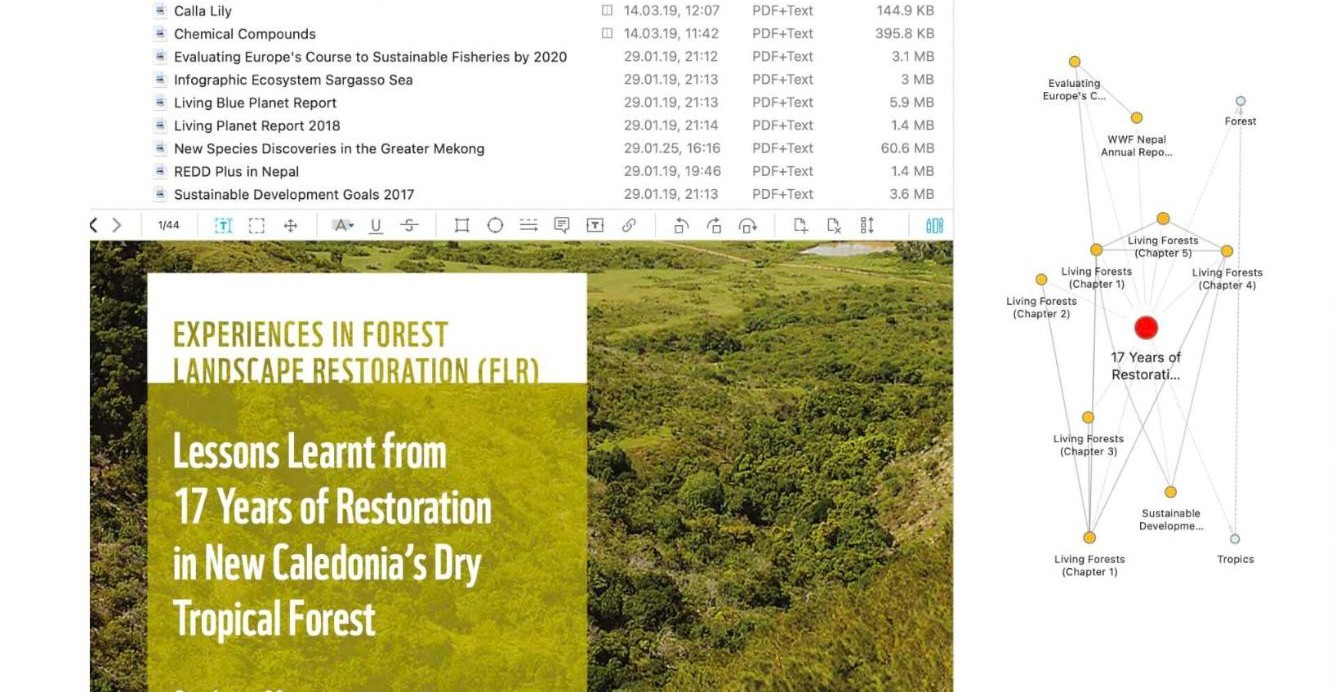
What separates DEVONtechnologies from a folder of PDFs is the linking layer. You can cross-reference any two items, build a wiki out of your own notes, and point at a document from your calendar or task list using a universal item link. The See Also feature surfaces documents that look related to the one you are reading, which is the part of DEVONtechnologies that people tend to describe as uncanny the first time it works.
A DEVONthink document list beside the relationship graph (screenshot from devontechnologies.com).
Version 4.4.2 is the current DEVONtechnologies release. The company says this generation brought a reworked interface, automatic versioning so you can roll a document back, revision-proof databases, a web interface in the top edition, and the AI chat assistant covered further down. The most recent maintenance release added native editing for BibTeX and RIS files, which matters if your documents arrive out of a reference manager.
How DEVONtechnologies licences actually work
This is the part worth reading twice, because it is not a subscription and it is not a classic perpetual licence either. Buying a DEVONtechnologies licence gives you the app plus two seats, valid on two Macs, plus one year of updates.
When that year is up you can extend it. The company is explicit that you do not have to:
When the year of updates is up, you can extend it to continue receiving updates – but you do not have to. The app will always be yours and fully functional.
You can also pause and extend later. DEVONtechnologies states that skipping updates will not result in higher prices, and that extending before the time is up earns a discount plus access to multi-year options. Extra seats can be added at any time, and each one adds three months of update time to the licence as a side effect – a small detail that quietly rewards buying seats before buying time.
What the three DEVONtechnologies editions cost
DEVONthink from DEVONtechnologies comes in three editions. The headline numbers, the price of a third Mac, and the price of another year of updates all sit on the same page.
The three DEVONthink editions as priced in November 2026 (screenshot from devontechnologies.com).
Edition
Licence
Extra seat
Update extension
Extension as share of licence
Standard
$99
$49
$49
49.5%
Pro
$199
$99
$99
49.7%
Server
$499
$99
$149
29.9%
Published DEVONtechnologies prices, with the extension cost expressed as a share of the licence price.
That last column is the first thing the pricing page does not spell out. Standard and Pro both charge roughly half the licence price for another year of updates. Server charges under a third. The most expensive edition is the one whose upkeep is proportionally cheapest, which inverts the usual shape of software pricing.
The seat column does something similar. An extra Server seat is $99 – exactly the same dollar figure as an extra Pro seat, even though the Server licence costs two and a half times as much. And an extra Pro seat costs exactly what a whole Standard licence costs, which is worth a thought if the second person on your team does not need the Pro feature set. You can check all of it on the official DEVONtechnologies pricing page before committing.
The one dollar DEVONtechnologies leaves on the table
The DEVONtechnologies business principles page makes a promise about moving between editions: “We charge only the price difference for upgrades from one edition to the others.” Set that sentence beside the published upgrade prices and a small gap appears.
Upgrade
Price difference between editions
Price DEVONtechnologies charges
Gap
Standard to Pro
$100
$99
-$1
Standard to Server
$400
$399
-$1
Pro to Server
$300
$299
-$1
Every published DEVONtechnologies edition upgrade lands exactly one dollar below the stated rule.
Three for three, always in the customer direction. It is a rounding habit rather than a promotion, and it is small money, but it has a practical consequence worth noticing: because the arithmetic runs one dollar short at every step, the stepped route never costs more than the direct one. Buying Standard at $99 and then upgrading to Pro at $99 totals $198 against the $199 Pro licence. DEVONtechnologies also states that every edition upgrade includes the latest version plus one year of updates, so the stepped route carries its own update time with it.
None of that makes a two-step purchase automatically the right move – the company does not publish any rule about how soon after buying you may upgrade, and the extra year of updates may simply replace rather than extend what you already hold. It is an observation about the published numbers, not a loophole, and a question worth putting to DEVONtechnologies sales support before you plan a purchase around it.
What update time costs across the DEVONtechnologies range
Extending a DEVONtechnologies licence before the year expires unlocks three options instead of one. The discounted numbers are not advertised anywhere near the headline prices.
Discounted DEVONtechnologies update extensions for one, two and three years (screenshot from devontechnologies.com).
Edition
List price, 1 year
Early renewal, 1 year
2 years
3 years
Per year on the 3-year option
Standard
$49
$44
$79
$104
$34.67
Pro
$99
$89
$159
$209
$69.67
Server
$149
$134
$239
$314
$104.67
Published DEVONtechnologies extension pricing, with the per-year cost of the three-year option worked out.
Run the percentages and the structure turns out to be almost mechanically consistent. Early renewal shaves almost exactly 10% off the list price in all three editions: 44 against 49, 89 against 99, 134 against 149. And the three-year option saves 21.2%, 21.7% and 21.9% respectively against three separate early renewals – a spread of seven tenths of a percentage point across a range where the prices themselves differ by a factor of three.
Measured against the plain list price instead, the three-year bundle comes in around 29% to 30% cheaper. For a Standard owner that is $34.67 a year rather than $49, which is roughly what one month of a mid-market note-taking subscription costs – for twelve.
Where the three editions diverge
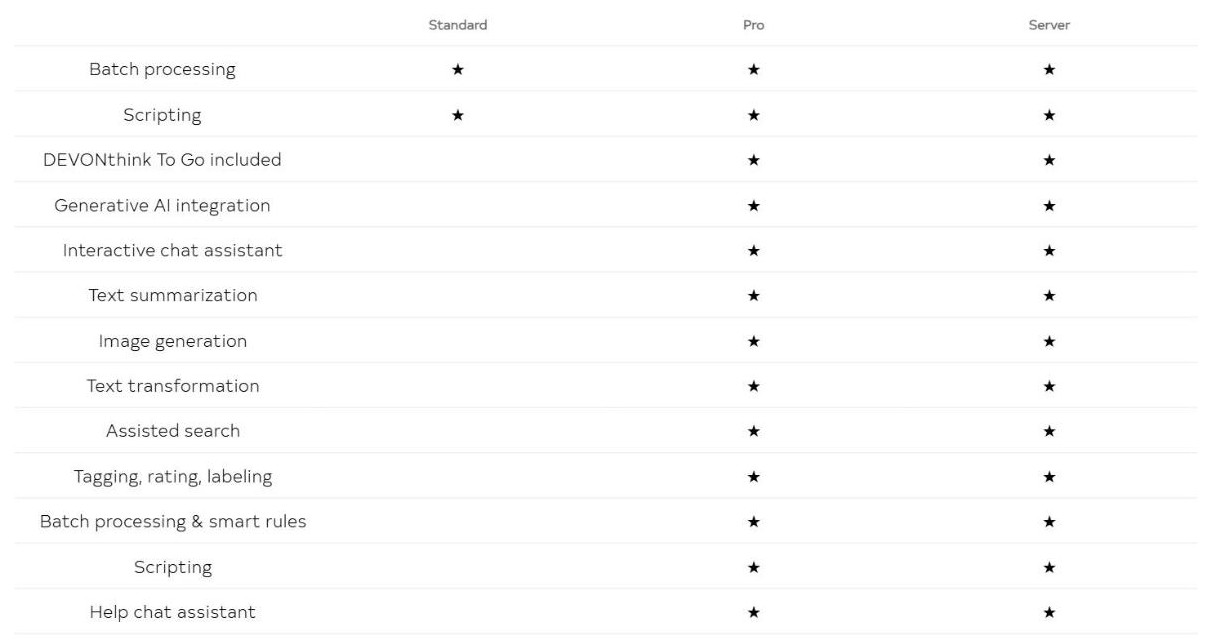
The DEVONtechnologies comparison table lists 45 features. Eighteen of them are shared by all three editions, twenty-five are reserved for Pro and Server, and two belong to Server alone: the web interface and granular access management.
The editions table, with Scripting appearing in both the shared block and the Pro-only block (screenshot from devontechnologies.com).
Reading it row by row turns up something odd, and the screenshot above captures it. Scripting appears twice. In the shared block it carries three stars, meaning every edition including Standard has it. Eleven rows further down, inside the Pro and Server block, “Scripting” appears again with two stars, meaning Standard does not. The same page answers the same question both ways.
Batch processing has the same problem in a slightly different shape: “Batch processing” carries three stars near the top, while “Batch processing and smart rules” carries two further down – and “Smart groups and smart rules” carries three. We have not tested which behaviour the app actually ships, and DEVONtechnologies has not published a correction, so the honest answer is that anyone buying Standard specifically for AppleScript or smart rules should ask support to confirm in writing first.
DEVONthink To Go and the mobile seat arithmetic
The DEVONtechnologies iPad and iPhone app is sold two ways. On its own it is $2.99 a month or $19 a year through the App Store, both with Family Sharing. Bought as part of a Mac licence it is $0 – Pro includes five mobile seats, Server includes twenty-five, valid for as long as the Mac licence is still eligible for updates. Standard includes none.
Route
Year one
Each year after
Mobile devices covered
DEVONthink To Go monthly
$35.88
$35.88
1 (plus Family Sharing)
DEVONthink To Go yearly
$19
$19
1 (plus Family Sharing)
Standard licence plus yearly mobile
$118
$63
1 (plus Family Sharing)
Pro licence
$199
$89
5
Twelve monthly payments cost 1.89 times the yearly plan. Figures use the early-renewal extension price.
Two things fall out of that table. Paying monthly costs $35.88 a year against $19 for the annual plan – nearly double, for the same app. And a Pro licence holder renewing early pays $89 a year while the five mobile seats that licence includes would cost $95 as separate annual subscriptions, so the whole Pro upkeep bill is less than the mobile component alone at retail. For Server the gap is wider: twenty-five seats at $19 would be $475 a year against a $134 extension.
One restriction to plan around: Mac seats and mobile seats are separate pools and cannot be exchanged or transferred, and DEVONtechnologies does not sell additional mobile seats. If you need a sixth iPad on a Pro licence, the answer is a separate App Store subscription.
There is also a deadline attached to the older app. DEVONtechnologies states that legacy one-time purchases of DEVONthink To Go bought on or after 1 January 2024 became free licences valid until the end of 2026. If you are reading this in November 2026 and still running on one of those, that is weeks rather than months away. The current DEVONthink To Go listing spells out which route replaces it.
The AI layer: local first, bring your own model
DEVONthink 4 has two different things DEVONtechnologies calls AI and the difference matters for anyone who cares where their documents go.
The first is the engine the company has been building since the start – a local machine learning system that powers See Also, Classify and the search ranking. DEVONtechnologies is unambiguous about where it runs: everything is calculated exclusively on your device. Nothing leaves the Mac for this layer to work.
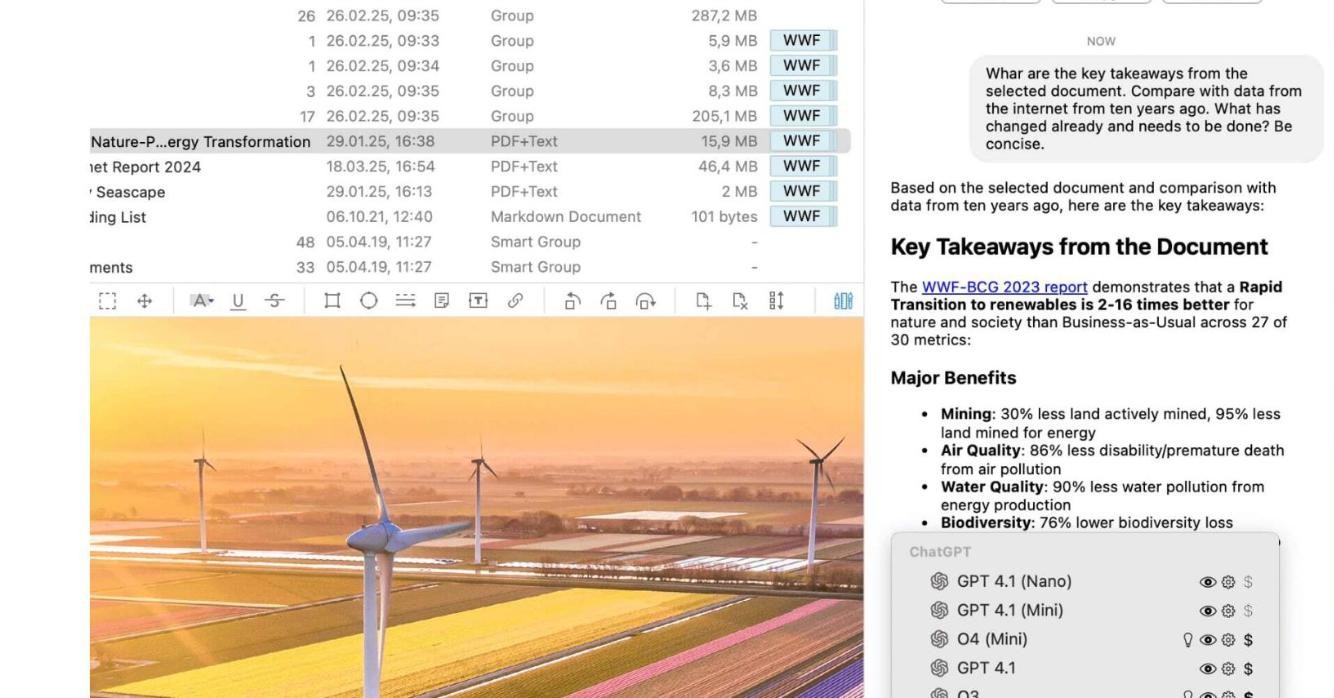
The DEVONthink chat panel with the model picker open (screenshot from devontechnologies.com).
The second is generative AI, and here you supply the model. DEVONthink connects to an outside provider of your choosing – the company own screenshots show both OpenAI and Anthropic models in the picker, with a cost indicator beside each – and then lets it summarise documents, transform text, describe images, suggest tags, and translate a plain-English question into DEVONthink own search syntax. Chat actions can be wired into smart rules and scripts, and prompts and roles live in an AI library synced over iCloud.
That second layer is a normal third-party API call, so documents you hand to it do travel. DEVONtechnologies also supports the Model Context Protocol, which lets an outside chat client read a DEVONthink database directly; the company says it built that with access control, redaction of private information and exclusion of sensitive documents. Generative AI is a Pro and Server feature – Standard gets the local engine only.
Privacy and storage in DEVONtechnologies apps
The storage model is the quiet argument for DEVONtechnologies over a cloud notebook. Documents live in databases on your Mac in their original format, and the folder structure you build inside DEVONtechnologies is mirrored as real files and folders. If you ever stop paying, stop updating, or simply stop liking the app, the PDFs are still PDFs.
Encryption – databases can use AES 256-bit encryption, opened only with a key you set. The company states there is no back door. Sync between devices can be encrypted too.
Revision-proof databases – for retention obligations, these prevent changes to the content of imported documents and log deletions.
Indexing instead of importing – point DEVONthink at existing folders and it stores references, leaving your files where they are.
No data business – DEVONtechnologies says it stores customer details only for support, never shares them, and runs a locally installed copy of Matomo for site analytics.
That last point comes with a line most companies would never print: DEVONtechnologies tells visitors they are welcome to block its own analytics with Ghostery or a similar extension if they are uneasy with it.
If archival is the reason you are shopping, it is worth knowing what the format itself guarantees. The Library of Congress format description for PDF/A-1 sets out why a constrained PDF profile is the one archivists reach for, and a revision-proof database full of ordinary PDFs sits comfortably inside that thinking.
DEVONagent, DEVONsphere Express and eight free apps
DEVONagent Pro at $49.95 is the research half of the DEVONtechnologies catalogue. It queries several search engines at once, strips the junk out of the results, supports Boolean and proximity operators and wildcards of unlimited complexity even where the engines themselves cannot handle them, and will run scheduled searches overnight and hand you the results in the morning. It exports into DEVONthink.
DEVONsphere Express at $9.95 is a menu bar utility that searches your own Mac with the same filtering ideas, plus instant previews. At that price it is the cheapest entry point into the range.
Then there is the free shelf – eight utilities given away with no licence and no upsell: EasyFind, Neo Network Utility, PhotoStickies, ThumbsUp, XMenu, XRay, CalcService and WordService. XRay is the newest, a Quick Look extension that peeks inside folders and ZIP archives from the spacebar and renders Markdown with the same engine DEVONthink uses. Most of the rest still run on OS X El Capitan, which tells you how long DEVONtechnologies keeps things alive.
Trying DEVONtechnologies before paying
The DEVONtechnologies trial terms are unusually generous and have one catch nobody mentions.
The generous part is the clock. A DEVONtechnologies trial runs for 30 days or 150 non-consecutive hours of actual use, whichever is longer. DEVONagent gets 30 hours on the same rule. One hundred and fifty hours is 6.25 full days of runtime; at two hours a working day it stretches past two months of calendar time. Leave the app open and unattended, though, and the hours drain anyway – and there are no trial extensions.
The catch is which version you are testing. The DEVONtechnologies trial ships the features of Server, the top edition, with the premium items flagged by a blue star in the menus. So the app you spend a month falling for is not the app a $99 Standard licence delivers; if something you relied on carried a star, Pro is the floor. Behind the trial sits a 14-day no-questions-asked refund policy, plus academic discounts on both licences and extensions.
The company behind DEVONtechnologies
DEVONtechnologies has been shipping Mac software since 2002 and is still a small team. The legal entity is DEVONtechnologies, LLC, with a mailing address at P.O. Box 96, Coeur d Alene, Idaho. The imprint on the site is written under German media law, a leftover from the company European roots that is mildly incongruous on a US LLC.
The name comes from the Devonian period, when amphibians first moved onto land; the ammonite shell in the logo follows the same idea. Support runs through a public user forum plus direct email, and the published principles commit to replying to every direct inquiry and to not moderating sceptical comments in the community. The same page is candid that DEVONtechnologies runs no bug bounty and pays nothing for unsolicited security submissions.
Who DEVONtechnologies fits
This is a specific DEVONtechnologies tool for a specific person, and the licence model sharpens that further.
A good fit – researchers, lawyers, academics, writers and anyone with a decade of PDFs who wants them searchable, linkable and still readable in ten years without a subscription.
A good fit – people who want AI help but want the indexing layer to stay on their own machine and the generative layer to be their own choice.
Think twice – if you work across Windows or Android. DEVONtechnologies is Mac and iOS only, and there is no web client outside the Server edition.
Think twice – if you need live multi-person editing. Teams sync databases between Macs rather than sharing one live document the way a cloud notebook does.
Check first – if you want the cheapest edition plus mobile. Standard does not include DEVONthink To Go, and the trial you test will be a Server trial.
Budget sanity check: the realistic DEVONtechnologies entry point for one person who wants AI and mobile is a Pro licence at $199, then $89 a year if you keep extending – and nothing at all if you decide the version you own is good enough. You can price your own combination on the DEVONtechnologies site.
How this review was done
This is a desk review of DEVONtechnologies. We did not install DEVONthink or run it on a Mac, and nothing here claims to be a hands-on performance verdict. Every figure, feature and quotation above was read directly off the DEVONtechnologies website in November 2026 – the product pages, the pricing page, the editions comparison, the download table, the FAQ and the published business principles – and the screenshots are of those pages and of the company own product imagery.
The arithmetic is ours: percentages, per-year costs and the comparisons between routes were worked out from the published prices, and we have shown the inputs so you can redo any of it. Claims about what the software does are the company claims, described as such. Where the site contradicts itself – the Scripting row, the batch processing rows – we have reported both versions rather than guessing which is right.
The short version
DEVONtechnologies sells something increasingly rare: a serious document manager you buy once, keep forever, and can walk away from without losing access to your own files. The engine is local, the generative AI is opt-in and bring-your-own, and the update model lets you stop paying without being punished for it later.
The things to go into DEVONtechnologies knowing: Standard is a narrower product than the trial will show you, mobile is only free from Pro upward, the editions table contradicts itself on Scripting, and this is a Mac and iOS world with no way out to Windows. None of those are dealbreakers so much as reasons to pick the right edition the first time.
Overall: 4.8 / 5. Docked for the Mac-only reach and the comparison table that needs a proofread, not for the product. If the licence model is what brought you here, the current terms are on the DEVONtechnologies pricing page.
The iPhone 18 no ports theory is suddenly everywhere. A video making the rounds on TikTok and social media appears to show something startling: an iPhone — labeled as the “iPhone 18” — charging through a small magnetic connector instead…
Hottest fashion trends 2026 reviewed honestly — which trending styles are actually wearable, which are overhyped, and what’s worth buying right now in the US market. Quick Verdict: 2026’s biggest fashion trends fall into two camps: genuinely wearable evolutions of…
PS5 Pro review 2026 — I tested it for 30 days. Here’s the honest verdict on performance, graphics, and whether upgrading from a standard PS5 is actually worth the money. Quick Verdict: The PS5 Pro is the most capable PlayStation…