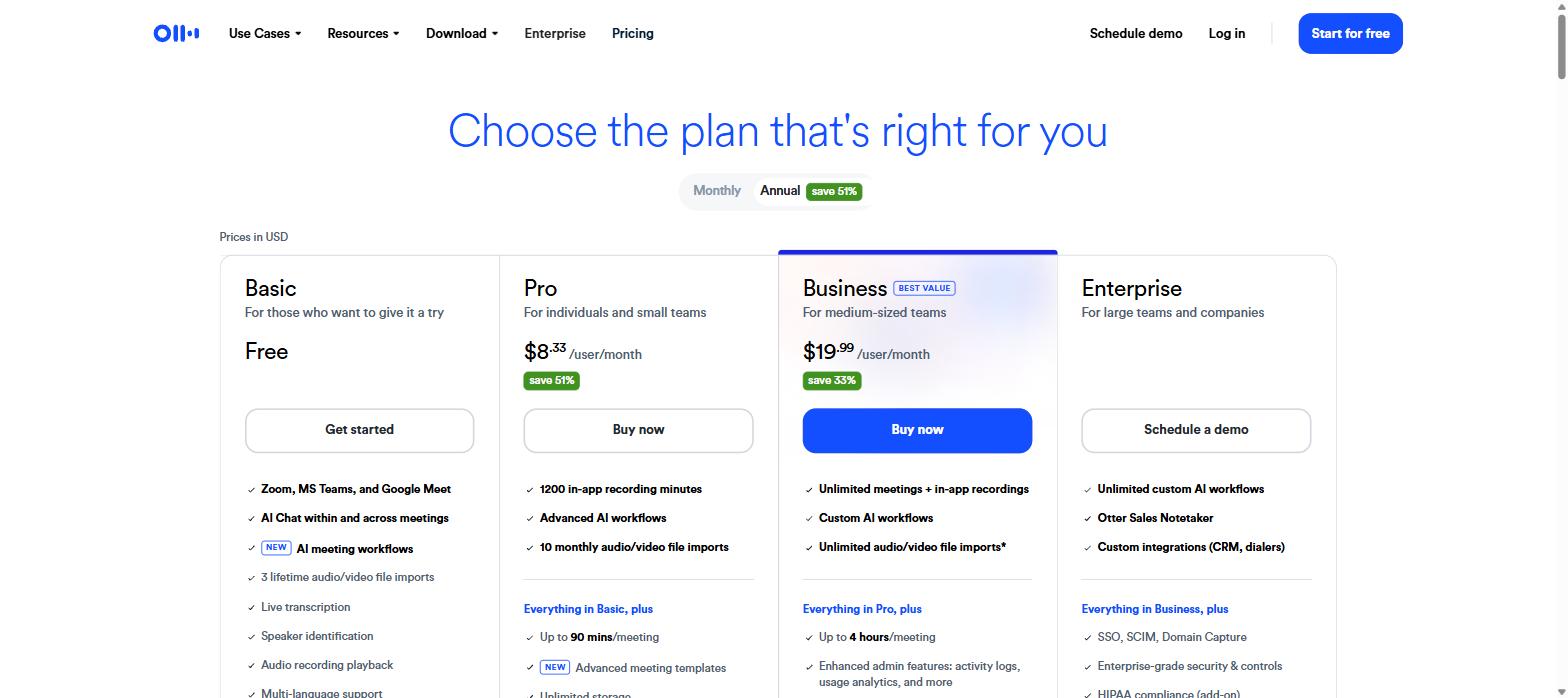
This Otter.ai review starts where most buyers do: on the pricing page. Open Otter.ai’s pricing page and the number that jumps out is $8.33. It sits right under the Pro plan in large type, next to a green “save 51%” badge. It looks like the price of a coffee, and for a tool that sits in your meetings and writes your notes for you, that feels like a bargain.
It is also not what most people pay.
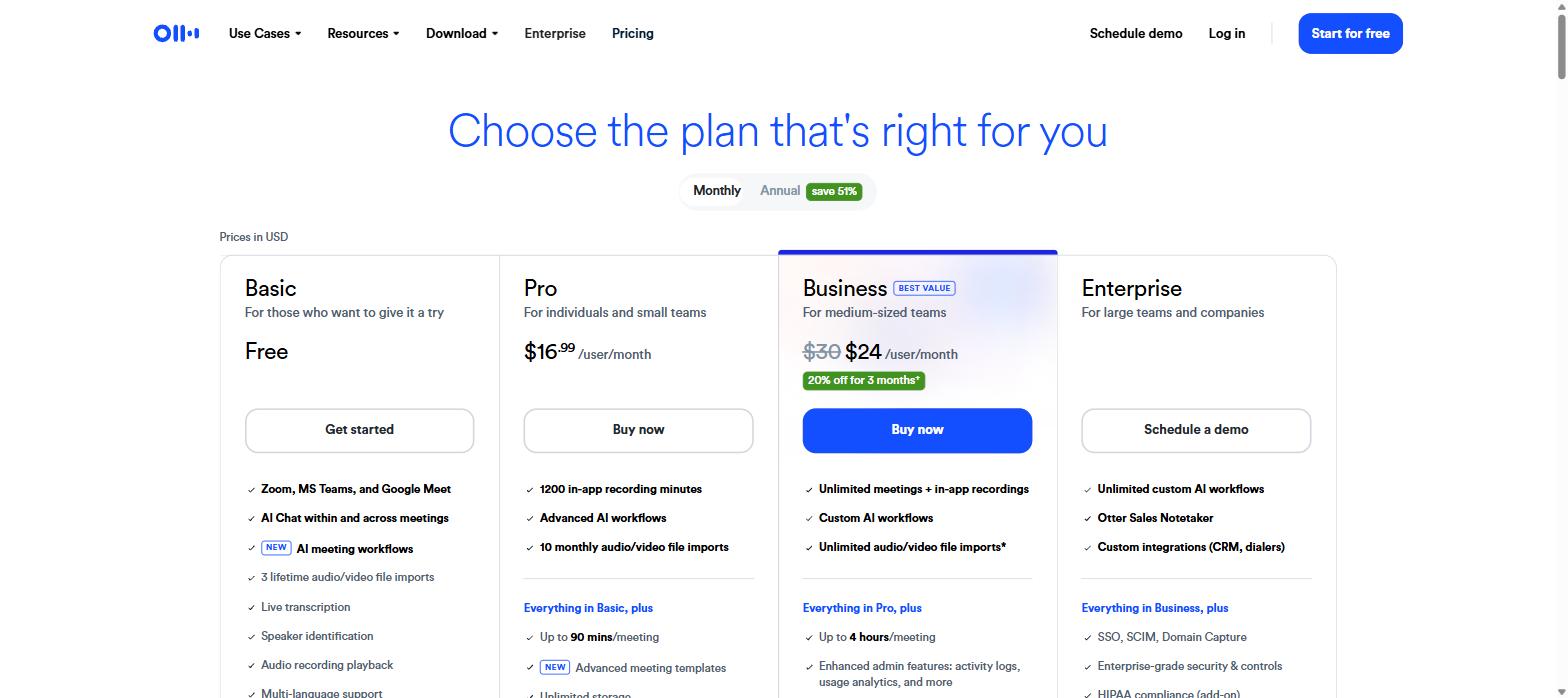
That $8.33 is the annual rate — it only exists if you hand over twelve months up front. Flip the billing toggle to monthly and the same Pro plan costs $16.99 per user per month. Business goes from $19.99 to $30. That is roughly double, and it is the single most important thing to understand before you pick a tier.
This Otter.ai review is not another walkthrough of how well Otter transcribes a standup. It is a breakdown of what the plans actually cost, what limits sit behind the word “unlimited,” and which caps will bite you first.
The annual vs monthly gap is the whole story
Otter’s pricing page loads with annual billing pre-selected. That is a normal SaaS pattern, but the gap here is wider than most.
Annual billing is what loads by default — Pro shows as $8.33/user/month.
Switch the toggle and the picture changes.
Monthly billing: Pro is $16.99 and Business is $30, discounted to $24 for the first three months.
Here is the same thing as numbers you can compare directly.
Plan
Annual (per user/mo)
Monthly (per user/mo)
Year one, one user
Basic
Free
Free
$0
Pro
$8.33
$16.99
$99.96 vs $203.88
Business
$19.99
$30 (→ $24 for 3 months)
$239.88 vs $342
Enterprise
Quote only — you book a demo
On Pro, committing to a year saves you about $104 for a single seat. On a five-person team that is $520. That is real money, and it is why the annual price is the one on the poster.
The Business monthly price has a wrinkle worth noticing: it displays as $30 struck through, dropping to $24 with a “20% off for 3 months” tag. After month four it goes back to $30. If you are budgeting from the checkout screen, you are budgeting from a promotional number.
None of this is dishonest — the toggle is right there. But if you are the kind of buyer who plans to “try it for a month and see,” your actual cost is double the headline, and the trial month for Business is discounted in a way that flatters it.
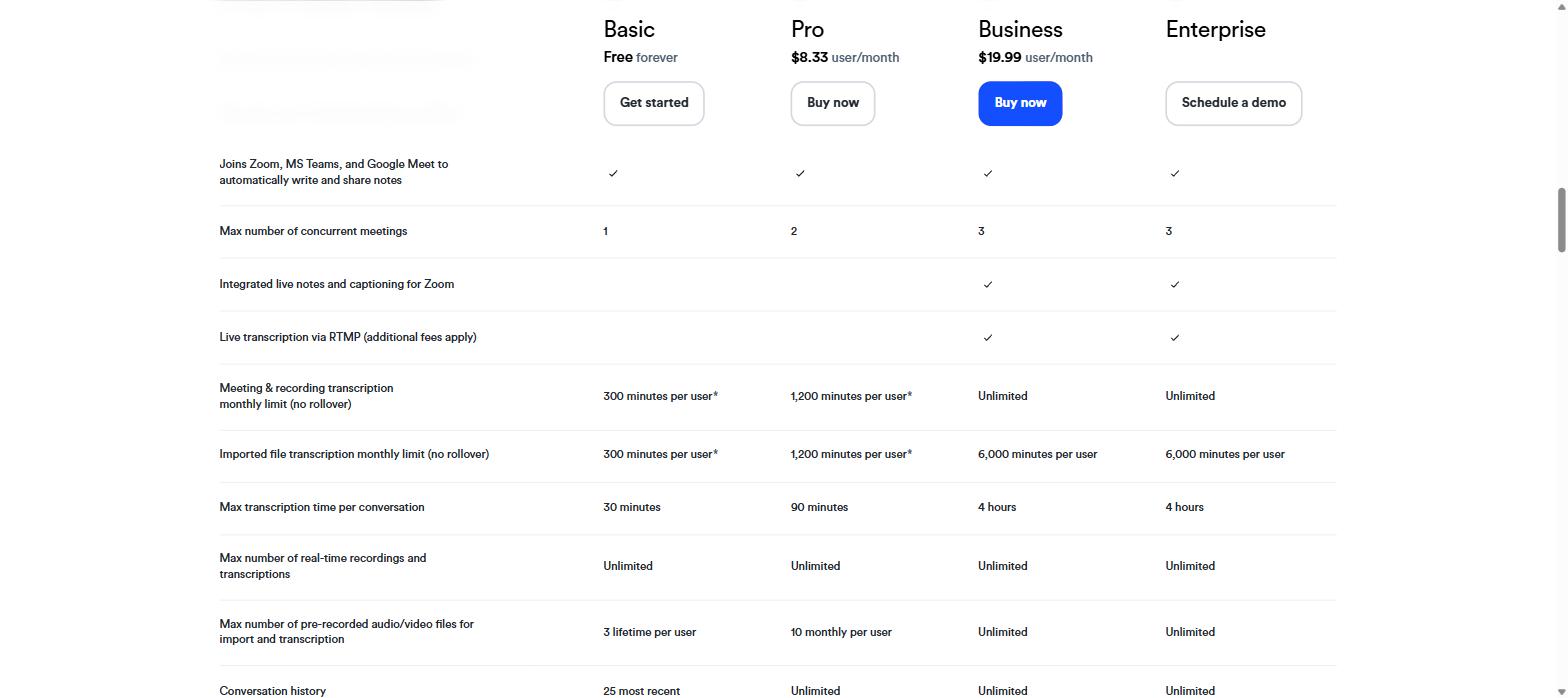
Every Otter.ai review comes back to minutes, because minutes are the core currency here, and the allowances are not subtle about who each plan is for.
Basic
Pro
Business
Enterprise
Minutes per user / month
300
1,200
Unlimited*
Unlimited*
Max length per conversation
30 min
90 min
4 hours
4 hours
File imports
3 lifetime
10 / month
Unlimited
Unlimited
Concurrent meetings
1
2
3
3
Conversation history
25 most recent
Unlimited
Unlimited
Unlimited
Max workspace members
5
5 billed users
25 billed users
Unlimited
*Unlimited applies to meeting minutes. Transcription of imported files is capped at 6,000 minutes per user.
300 minutes a month sounds workable until you divide it. That is five hours — roughly one meeting a day if your meetings are short. For someone evaluating the tool, it is enough. For anyone who lives in calls, it runs out in the second week.
The four caps nobody puts on the poster
The limits table is where the plans really separate.
1. The per-conversation ceiling. On Basic, Otter stops at 30 minutes per conversation. Not 30 minutes of your allowance — 30 minutes of that one meeting. Your hour-long client call gets cut in half, and the half that matters is usually the second one. Pro raises this to 90 minutes, which covers most meetings but not workshops or all-hands. Business gets four hours.
2. Minutes do not roll over. A quiet month does not bank credit for a busy one. If you use 80 of your 300 in August, September still starts at 300. For seasonal work — quarterly planning, hiring sprints, conference season — this is the difference between one plan and the next tier up.
3. One shared pool. Live meetings, uploaded recordings, and any other transcription all draw from the same allowance. There is no separate budget for “files I dragged in.” Upload a two-hour recording on Pro and you have spent 120 of your 1,200 minutes in a single action.
4. Imports are the harshest free limit. Basic gives you three file imports for the lifetime of the account — not three per month. If your plan was to test Otter by uploading old recordings, you get three attempts before that door closes permanently. Pro moves to ten per month, which is generous enough for normal use but still a number you can hit.
Add the 25-conversation history cap on Basic and the free tier reveals its actual purpose: it is a demo with a long runway, not a workable free tool. That is a fair design choice, but it is worth knowing before you build a habit on it.
Team limits are tighter than you would expect
This is where Otter’s pricing gets genuinely awkward for growing teams.
Pro caps you at five billed users. Business caps you at 25. Those are not soft guidelines — they are the ceiling on the plan. A seven-person team cannot stay on Pro no matter how little they use it; they move to Business and the per-seat cost goes from $8.33 to $19.99 annually, or $16.99 to $30 monthly. The jump from five to six people roughly triples your bill.
Concurrent meetings follow the same shape: one on Basic, two on Pro, three on Business and Enterprise. Note that Enterprise does not raise it beyond three. If you have four meetings running at 10am and want all of them captured, no paid tier on the public page solves that on its own.
Then there is the admin layer. SSO and SCIM provisioning require a minimum 100-user license. If your IT policy mandates single sign-on — and for a tool that records meetings, plenty do — you are not looking at Business. You are looking at a hundred-seat Enterprise contract regardless of how many people actually need the product. HIPAA compliance is a separate Enterprise add-on on top of that.
For a 30-person company with an SSO requirement, this is often where the evaluation quietly ends.
AI Chat and vocabulary quotas
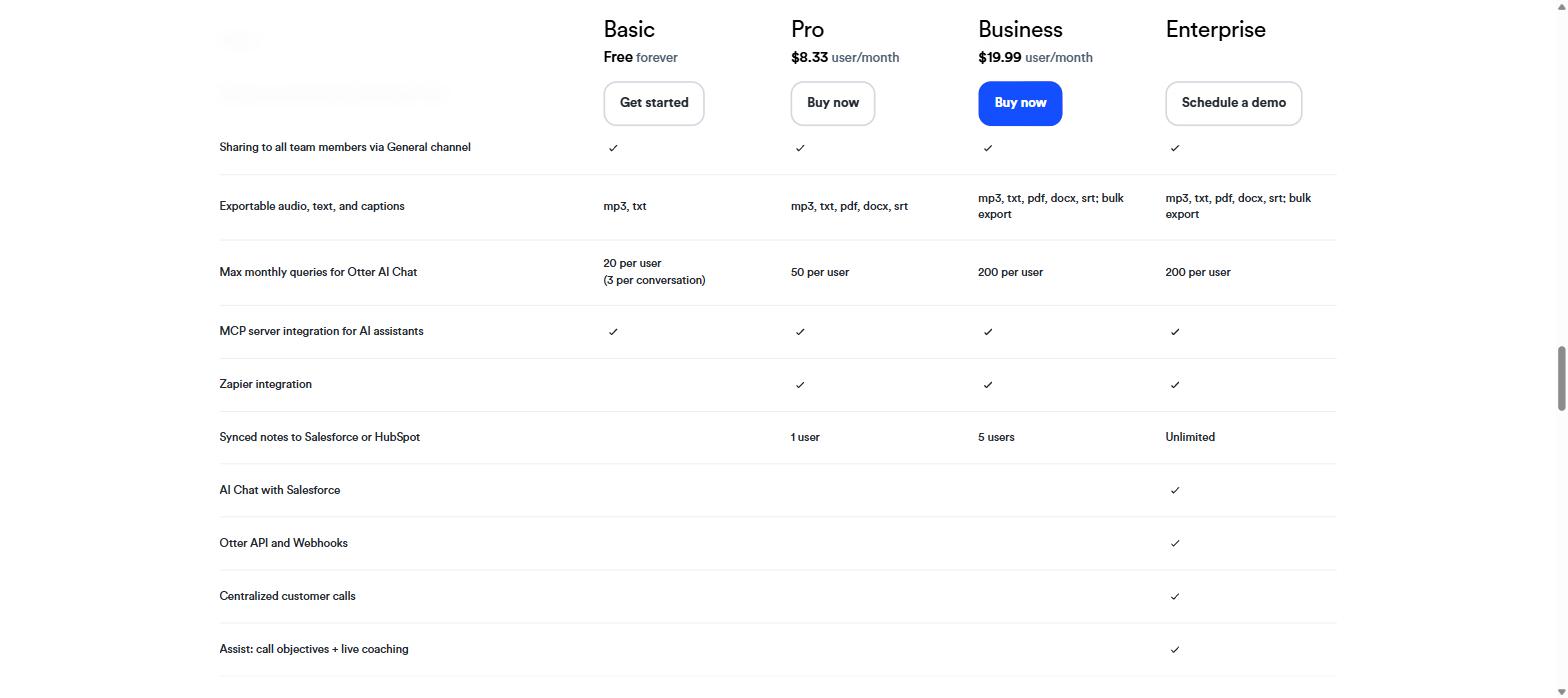
AI Chat queries are capped monthly, and Enterprise gets the same 200 as Business.
Otter’s AI Chat — asking questions across your transcripts — is metered too, and the numbers are modest.
Plan
AI Chat queries / month
Custom vocabulary
Basic
20 (max 3 per conversation)
5 terms
Pro
50
100 team + 100 user
Business
200
800 team + 800 user
Enterprise
200
800 team + 800 user
Fifty queries a month on Pro works out to about two a day. If AI Chat is the feature you are buying Otter for, that budget disappears faster than the minutes do — and Enterprise gives you the same 200 as Business, so there is no way to buy your way past it.
The custom vocabulary allowance matters more than it sounds. Product names, internal acronyms, and unusual surnames are exactly what transcription gets wrong, and five terms on Basic will not cover a single team’s jargon. Pro’s 100+100 is the first tier where this stops being a problem.
One genuinely good note: the Otter MCP server is available even on Basic, so connecting Otter to other AI tools does not require a paid plan. Zapier and Salesforce integrations sit on the higher tiers.
Languages and export
Otter supports six languages: English, Spanish, French, German, Japanese, and Chinese. That is a short list for 2026 — if your meetings run in Portuguese, Korean, Hindi, or any Nordic language, this is a hard no rather than a limitation to work around. Check this before anything else on the pricing page.
Export options scale with the plan. Basic gives you mp3 and txt. Pro adds pdf, docx, and srt — the last one matters if you are producing subtitles. Business and Enterprise add bulk export, which is what you want if you ever need to leave.
Payment is by card, or through the Apple App Store and Google Play. There is no PayPal option, which occasionally matters for freelancers and non-US buyers.
Who this is actually for
Boiled down, here is what this Otter.ai review concludes for each kind of buyer.
You are
Verdict
A solo user in 2–3 meetings a day, English-speaking
Pro annual at $8.33 is strong value
Testing before committing
Use Basic, but spend your 3 lifetime imports carefully
A team of 6–25
Business — budget $19.99/user annually, not $8.33
A team of 26+ or needing SSO
Enterprise, 100-seat minimum. Get a quote early
Running month-to-month by preference
Double every number you saw on the page
Working in a language outside the six supported
Look elsewhere
Handling health data
HIPAA is an Enterprise add-on — factor it in
The student and teacher discount
If you have a .edu address, Otter takes 20% off Pro. That brings annual down to $6.67 per month, billed as $79.99 per year, and monthly down to $13.59. It applies to Pro only, not Business.
For a graduate student transcribing interviews or a teacher capturing lectures, $79.99 a year with a 1,200-minute monthly allowance and 90-minute conversation ceiling is a solid deal — particularly since 90 minutes covers a standard class period with room to spare. Verify eligibility on the pricing page before you pay full price.
Verdict: 4.0 / 5
Nothing in this Otter.ai review argues against the product itself. Otter.ai does the core job well, and at $8.33 annually the Pro plan is priced competitively against everything else in this category. The product is not the problem.
The problem is that the pricing page is optimised for a single reading — annual, Pro, one user — and every step away from that reading costs more than the page suggests. Monthly doubles it. Six team members triple the per-seat rate. An SSO requirement jumps you to a hundred-seat minimum. And “unlimited” on Business still means 6,000 imported minutes and a four-hour conversation ceiling.
Points off for the size of the annual/monthly gap, the five-user cap on Pro, the 100-license floor on SSO, the lifetime-limited free imports, and the six-language list. Points earned for genuinely useful free-tier access to the MCP server, a real student discount, and transparent limit documentation once you scroll to it.
If you take one thing from this Otter.ai review, take this: decide on your billing period first, count your seats second, and check your language third. If all three line up, Otter.ai is worth the annual commitment. If any one of them does not, the price you saw is not the price you will pay.
The iPhone 18 no ports theory is suddenly everywhere. A video making the rounds on TikTok and social media appears to show something startling: an iPhone — labeled as the “iPhone 18” — charging through a small magnetic connector instead…
Hottest fashion trends 2026 reviewed honestly — which trending styles are actually wearable, which are overhyped, and what’s worth buying right now in the US market. Quick Verdict: 2026’s biggest fashion trends fall into two camps: genuinely wearable evolutions of…
PS5 Pro review 2026 — I tested it for 30 days. Here’s the honest verdict on performance, graphics, and whether upgrading from a standard PS5 is actually worth the money. Quick Verdict: The PS5 Pro is the most capable PlayStation…