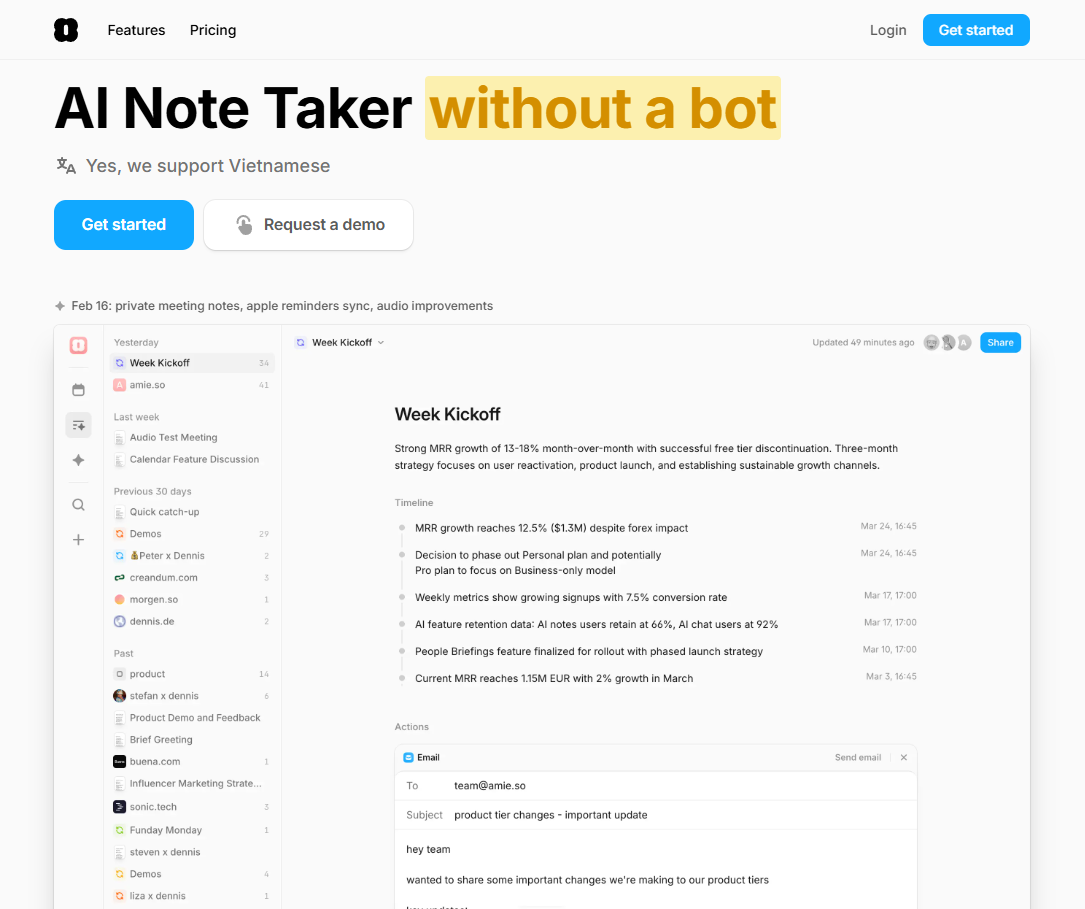
Overall Rating: 9.0 / 10 ⭐⭐⭐⭐☆
Meetings Don’t End When Everyone Leaves the Call
Ask any knowledge worker what takes the most time in a typical workday, and most won’t say meetings.
They’ll say everything that happens after the meeting.
The follow-up email.
Updating the CRM.
Writing meeting notes.
Creating action items.
Scheduling the next discussion.
Sharing summaries with teammates.
A one-hour meeting often creates another hour of administrative work.
That’s the real productivity problem.
And it’s exactly the problem Amie is trying to solve.
Unlike traditional calendar apps that simply tell you when your meetings happen, Amie wants to manage everything that surrounds them—from recording conversations to generating summaries, assigning tasks, drafting follow-up emails, and even reorganizing your calendar automatically.
But can one AI assistant really replace several productivity tools?
Let’s find out.
Brand Background
Amie started as a beautifully designed calendar application focused on combining calendars and tasks into a single interface.
Over the past two years, however, the product has evolved dramatically.
Today, Amie positions itself as an AI-powered productivity workspace that combines:
- AI Meeting Notes
- AI Calendar
- AI Scheduling
- AI Chat Assistant
- Task Management
- Email Drafting
- Workflow Automation
Instead of competing only with Google Calendar or Apple Calendar, Amie is now competing against an entire stack of productivity software including Motion, Otter, Fireflies, Notion Calendar, and dedicated AI meeting assistants.
Product Deep Dive
The Biggest Feature Isn’t AI—It’s Context
The Problem
Most AI tools work in isolation.
One summarizes meetings.
Another manages tasks.
Another drafts emails.
Another schedules events.
Every time you switch between them, you lose context.
How Amie Solves It
Amie connects your meetings, calendar, email, and tasks into one workspace.
After a meeting ends, it already knows:
- who attended
- what was discussed
- what tasks were created
- when everyone is available again
- which email needs to be written
Because all of those systems live together.
Why It Matters
Context is becoming more valuable than intelligence.
Even the smartest AI becomes less useful if it doesn’t know what happened yesterday.
Amie’s biggest strength isn’t that it’s smarter.
It’s that it remembers.
AI Meeting Notes Are Becoming a Commodity
The Problem
Two years ago, automatic meeting summaries felt revolutionary.
Today almost every productivity platform offers them.
Otter.
Fireflies.
Fathom.
Microsoft.
Google.
Everyone summarizes meetings.
What Makes Amie Different
Instead of stopping at a transcript, Amie treats the meeting as the beginning of a workflow.
From one conversation it can:
- create action items
- prepare follow-up emails
- update external tools
- schedule future meetings
- organize your calendar
The summary becomes the starting point—not the final product.
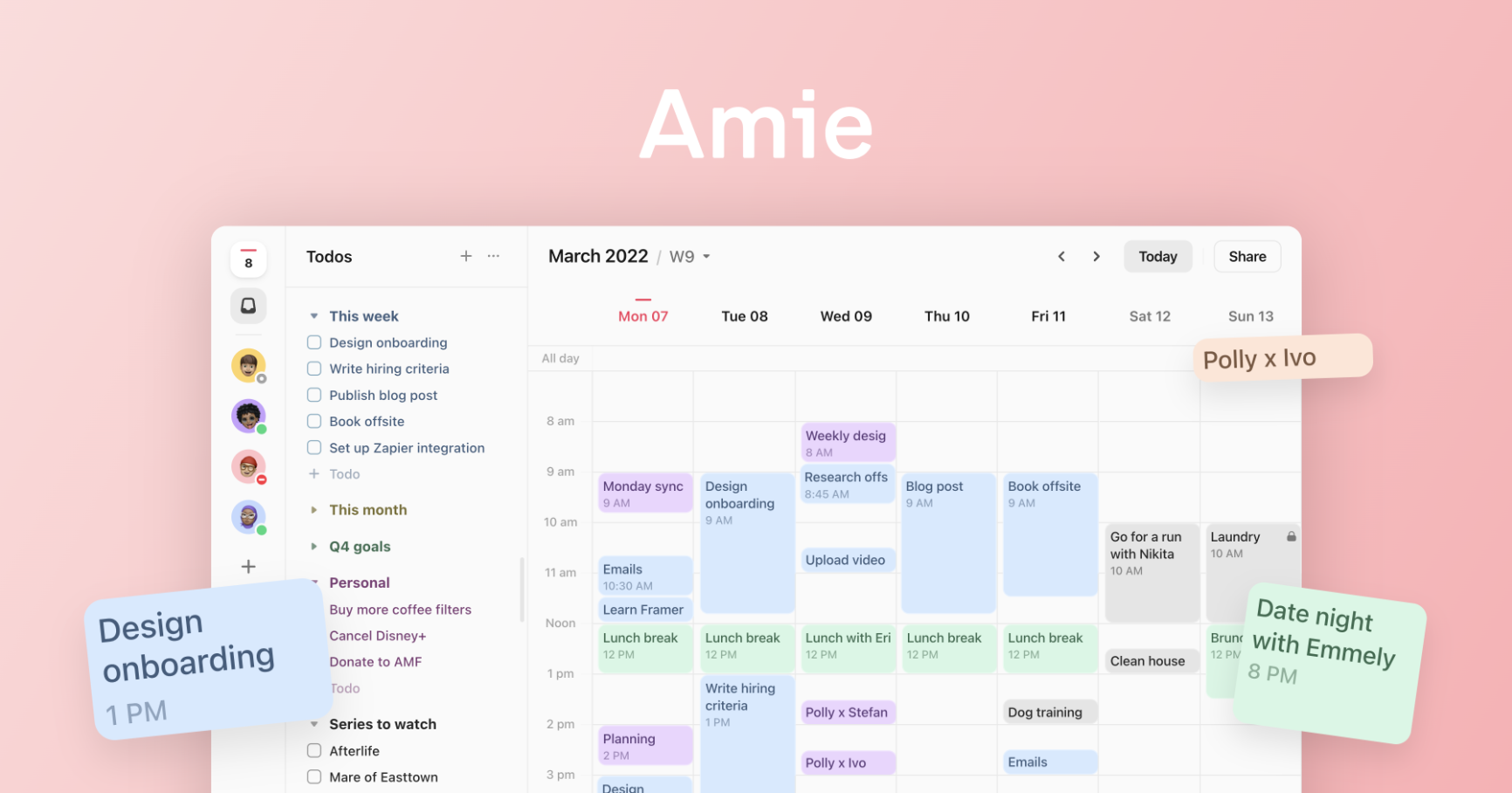
Calendar Management Should Require Less Clicking
Traditional calendar software expects users to manually organize everything.
Move meetings.
Reschedule tasks.
Find empty time slots.
Adjust priorities.
Amie approaches scheduling differently.
Using natural language, users can ask questions like:
“Move everything to Thursday.”
or
“Prepare today’s agenda.”
The AI then updates schedules accordingly.
For professionals managing dozens of meetings each week, eliminating repetitive calendar management can save meaningful time.
AI Works Best When It Removes Decisions
Most productivity apps save clicks.
The better ones save decisions.
Imagine finishing a client meeting.
Instead of asking:
- Where should I save the notes?
- Which CRM should I update?
- Who needs a follow-up?
- What tasks should I create?
Amie can automate much of that workflow through integrations with tools like Notion, Slack, HubSpot, Linear, and Pipedrive.
That’s a much bigger productivity improvement than simply summarizing conversations.
Real-World Performance
One consistent theme among early users is that Amie feels less like another calendar app and more like a daily operating system.
Users frequently praise:
- elegant interface
- strong meeting summaries
- automatic scheduling
- integrated workflows
Many also highlight that the product continues to evolve quickly with frequent feature updates.
That said, AI productivity remains an emerging category.
Community discussions often point out that no single AI assistant perfectly replaces every workflow, and many professionals still combine specialized tools depending on their needs.
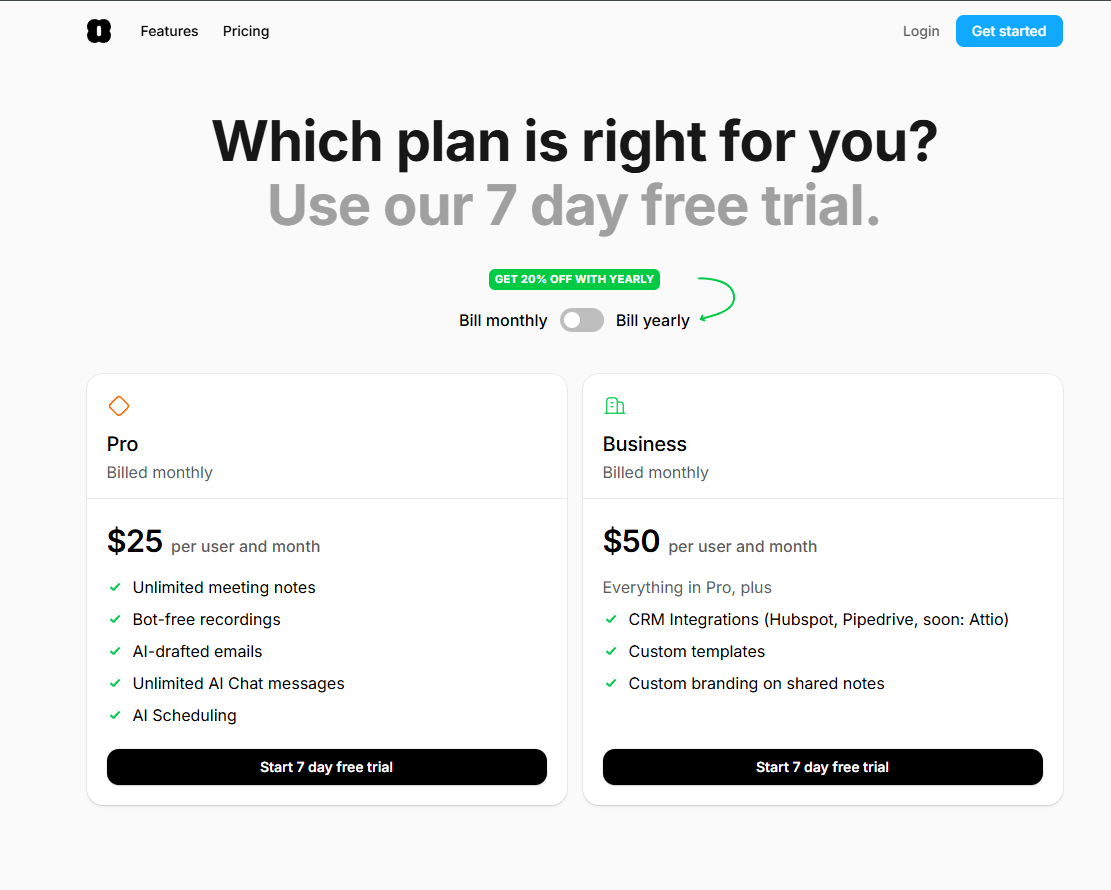
Pricing Analysis
Amie is not competing on price.
It’s competing on software consolidation.
Consider the tools many professionals already pay for:
- calendar software
- meeting recorder
- AI note taker
- scheduling assistant
- task manager
- email assistant
If Amie successfully replaces several of those subscriptions, the overall value becomes easier to justify.
The question isn’t:
“Is Amie cheaper?”
The better question is:
“How many separate tools can it replace?”
Honest Limitations
1. The More Meetings You Have, the More Valuable It Becomes
Someone attending two meetings a week may never unlock its full potential.
Heavy calendar users benefit the most.
2. AI Still Needs Supervision
Generated summaries and drafted emails should always be reviewed before sending.
Automation reduces effort.
It doesn’t eliminate responsibility.
3. Best Experience Requires Integrations
Without connecting calendars, email, and workspace tools, much of Amie’s automation disappears.
4. It Isn’t A Complete Project Management Platform
Amie excels at personal productivity.
Teams managing large engineering roadmaps or enterprise projects may still require dedicated project management software.
Competitive Comparison
Amie vs Motion
Motion focuses heavily on AI scheduling.
Amie extends beyond scheduling into meetings, email drafting, knowledge management, and workflow automation.
Amie vs Fireflies
Fireflies specializes in meeting transcription.
Amie treats transcription as just one step in a larger productivity workflow.
Amie vs Notion Calendar
Notion Calendar organizes schedules effectively.
Amie adds AI-powered meeting intelligence and workflow automation on top of scheduling.
The Bigger Picture
Most productivity software asks you to manage your work.
Amie increasingly tries to manage the busywork surrounding your work.
That difference may define the next generation of AI assistants.
Who Should Buy?
Ideal For
- Founders
- Sales professionals
- Consultants
- Agency owners
- Product managers
- Remote teams
- People spending 15+ hours each week in meetings
Probably Not For
- Students with simple schedules
- Users who dislike cloud integrations
- People attending very few meetings
- Teams already deeply invested in another productivity ecosystem
Final Verdict
Amie is no longer just another AI calendar.
It is gradually becoming an operating layer for modern knowledge work.
Its greatest strength isn’t recording meetings.
It’s reducing everything that happens after those meetings.
For professionals whose days are filled with conversations, follow-ups, scheduling, and constant context switching, that shift can reclaim hours every week.
The future of productivity isn’t creating better meeting notes.
It’s making sure those notes automatically become meaningful work.
Detailed Scorecard
| Category |
Score |
Honest Assessment |
| AI Meeting Notes |
9.4/10 |
Excellent summaries with actionable follow-ups |
| Calendar Intelligence |
9.2/10 |
Smart scheduling and natural language control |
| Workflow Automation |
9.3/10 |
One of Amie’s biggest competitive advantages |
| Ease of Use |
9.1/10 |
Clean, polished interface with intuitive workflows |
| Integrations |
9.0/10 |
Strong support for modern productivity tools |
| Time Savings |
9.5/10 |
Significantly reduces post-meeting administrative work |
| Value for Money |
8.8/10 |
Best for professionals managing frequent meetings |
| Overall Rating |
⭐ 9.0 / 10 |
A productivity platform that transforms meetings from isolated events into automated workflows rather than simply generating transcripts. |
Disclaimer
This review is based on publicly available product information, documented platform capabilities, and general productivity workflows. Individual experiences may vary depending on your existing tools, integrations, and work habits. AI-generated summaries, schedules, and email drafts should always be reviewed before use in professional settings.