Fliki.ai review: The Ultimate AI Video Creation Powerhouse for 2026
In this comprehensive Fliki.ai review, we delve into one of the leading AI-powered platforms transforming digital content creation. Artificial intelligence has revolutionized how creators produce video, making sophisticated tools accessible to everyone. Fliki.ai positions itself as an all-in-one solution for converting text into polished videos and voiceovers. This review will explore Fliki’s capabilities, pricing, strengths, and limitations to help you decide if it’s the right tool for your content strategy.
What is Fliki.ai? A Powerful AI Video Generator

Fliki is an advanced AI video generator that integrates text-to-video and text-to-speech functionalities into a single, streamlined suite. Launched in January 2022 by the creators of Rytr AI (Sabir Ahmed and Atul Yadav), Fliki has rapidly gained popularity. It serves content creators, marketers, educators, and businesses seeking efficient video production without the need for extensive technical skills or costly equipment.
At its core, Fliki transforms written content into visually engaging videos, complemented by professional-grade AI voiceovers. The platform supports over 75 languages and 100 dialects, offering access to more than 2,500 ultra-realistic AI voices. What distinguishes Fliki from basic video editors is its capacity to automate the entire video creation process. This includes everything from script generation to visual selection, voiceover creation, and final export, all within a user-friendly interface that requires no prior video editing experience.
Key Features and Capabilities in Our Fliki.ai Review
Multiple Content Creation Workflows
Fliki offers diverse workflows tailored to various content creation needs, ensuring flexibility for users.
- Idea/Prompt to Video: This innovative feature allows users to simply input a concept or topic. Fliki’s AI then generates a complete video from scratch. For example, a prompt like ‘motivating video on the benefits of healthy eating’ will trigger the AI to create a script, select visuals, add narration, and produce a finished video. Users can specify the desired duration and even upload supporting documents like PDFs to guide the AI.
- Script to Video: For those who prefer full control over their message, this feature converts pre-written scripts into complete videos. Users paste their scripts, and the platform automatically divides content into scenes, matches visuals from its extensive stock library, and generates voiceovers.
- Blog Article to Video: A significant advantage for bloggers and marketers, this tool repurposes written content. Simply paste a blog URL, and Fliki extracts the text, breaks it into scenes, adds relevant stock footage or images, and creates a video version of the article.
- PowerPoint to Video: Transform static presentations into dynamic video content. Fliki converts PowerPoint slides into engaging videos, maintaining visual elements, branding, and fonts. It adds subtle animations, transitions, and AI-generated narration.
- Product Page to Video: E-commerce businesses can efficiently convert product descriptions into promotional videos, simplifying content creation for various platforms.
Advanced AI Voiceover Tool
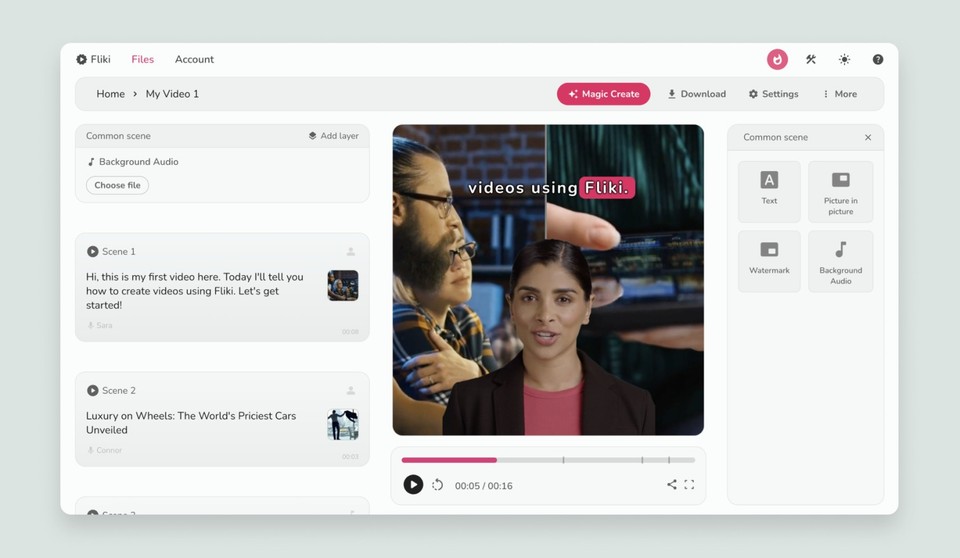
Fliki’s voice library is a standout feature in this Fliki.ai review. It boasts over 2,500 ultra-realistic AI voices across 80+ languages and 100+ dialects. These voices utilize advanced AI algorithms to mimic human speech patterns, tonalities, and emotional nuances, resulting in remarkably natural and professional-sounding voiceovers.
Beyond the extensive default library, Fliki supports voice cloning capabilities (available on premium plans). This allows users to replicate their own voice or create unique character voices, saving significant recording time while adding authenticity. Users can also fine-tune delivery by controlling emphasis, pauses, speed, and pitch.
Media Library and Visual Assets
Fliki provides access to over 10 million stock videos, images, and AI-generated visual assets, eliminating the need for separate subscriptions. The platform’s AI automatically matches relevant visuals to text content, drastically speeding up video creation. Users can also upload their own media or generate custom images using AI prompts, offering flexibility for brand-specific content.
AI Avatars
The platform includes AI avatar functionality, enabling users to create videos with virtual presenters. While this adds a human-like element, current user feedback suggests that avatar quality, particularly eye blinking and lip-syncing, is less refined compared to specialized platforms like HeyGen or Synthesia.
Advanced Editing Capabilities
Fliki’s editor features a scene-based workflow that simplifies video customization without overwhelming users. Key editing options include:
- Adjusting scene duration and transitions.
- Swapping automatically selected visuals with alternatives from the library.
- Adding background music from Fliki’s royalty-free library.
- Inserting text overlays and captions.
- Applying different aspect ratios for various platforms (e.g., 16:9 for YouTube).
Fliki Pricing: Is it Worth the Investment?
Understanding Fliki pricing is crucial for potential users. Fliki offers a tiered subscription model designed to accommodate different needs and budgets, including a free plan to get started.
-
- Free Plan: Ideal for beginners, offering limited minutes and basic features to test the platform.
- Standard Plan: Suited for individual creators, providing more minutes, access to premium voices, and extended features.
- Premium Plan: Designed for professionals and teams, offering the most extensive features, including voice cloning, higher video resolution, and priority support.
The value of Fliki’s pricing largely depends on your usage volume and specific feature requirements. For a detailed breakdown, it’s best to check their official website for the most current information.
Fliki Alternatives: Exploring Other Text to Video AI Tools
While Fliki is a powerful AI video generator, several Fliki alternatives exist for those exploring other options. Popular choices include:
-
- Synthesia: Known for its highly realistic AI avatars and robust enterprise solutions.
- HeyGen: Offers advanced avatar capabilities and a user-friendly interface for various video types.
- Pictory.ai: Specializes in converting long-form content into short, shareable video snippets, similar to Fliki’s blog-to-video feature.
- Descript: A versatile tool for audio and video editing, offering transcription-based editing.
Each of these Fliki alternatives has its unique strengths, so choosing the best one depends on your specific project needs and budget.
Verdict: Our Fliki.ai Review Conclusion
This Fliki.ai review concludes that Fliki is an exceptionally powerful and versatile AI video generator, particularly for users focused on text-to-video AI conversions and high-quality AI voiceovers. Its comprehensive suite of features, including diverse content workflows, an extensive voice library, and a vast media collection, makes it a strong contender in the AI content creation space. While its AI avatar quality could improve, the platform excels in automating video production for various purposes.
For individuals and businesses seeking to efficiently transform written content into engaging video, Fliki.ai offers significant value. Its user-friendly interface and robust capabilities make it an excellent choice for creators looking to scale their video output without extensive technical demands.