Quick Verdict
“AI search optimization platform” is a vague label until you actually see how the pieces fit together. This piece walks through the mechanics of AirOps step by step: how Quill (the platform’s AI agent) actually drafts and manages content, what a Playbook is versus a Workflow, how the platform tracks share-of-voice across AI answer engines, and where a human still has to step in. If you’ve read a features list and still aren’t sure what a day using AirOps looks like, this is the piece that answers that.
Best for: teams who want to understand the actual workflow before signing up, not just the pitch.
Should you buy? If the process below matches how your content team already operates — or the gaps you’re trying to close — AirOps is worth trialing directly. Start a free AirOps trial here.
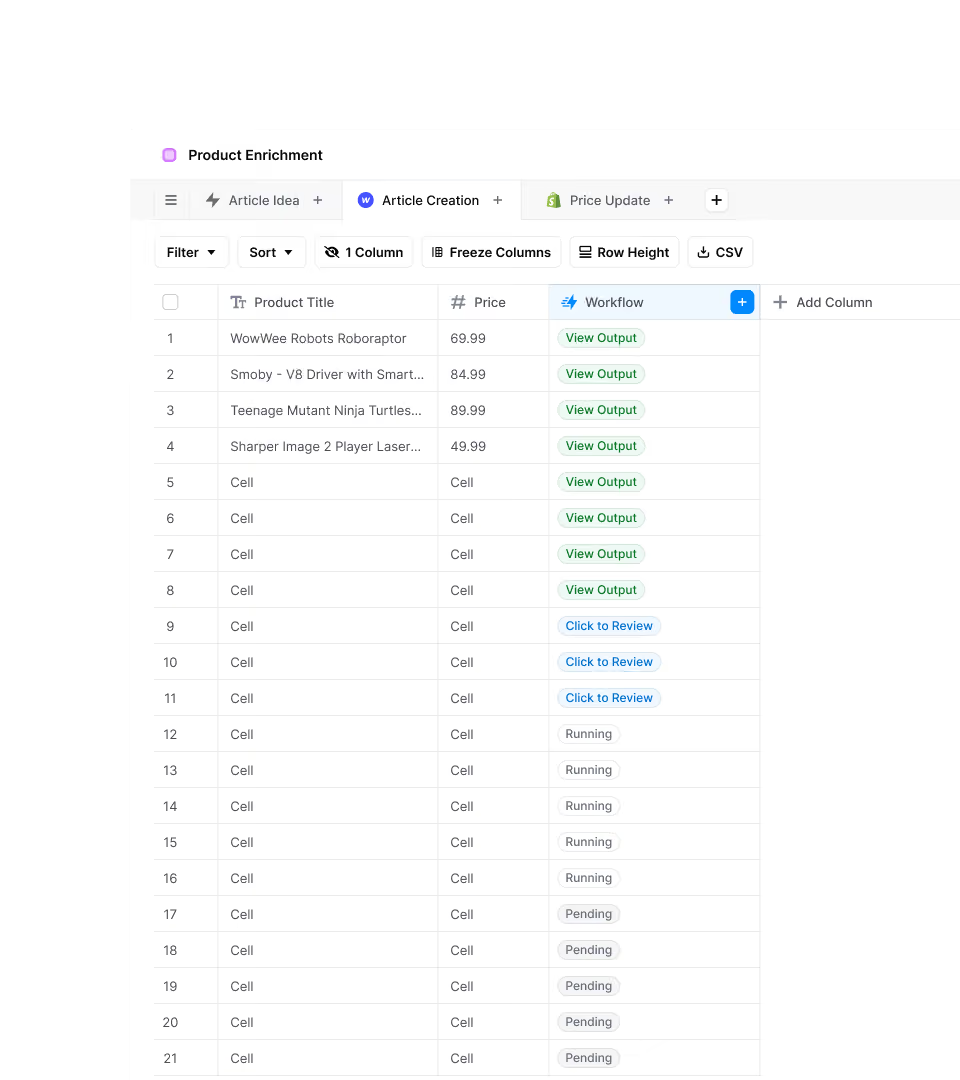
THE THREE BUILDING BLOCKS: WORKFLOWS, POWER AGENTS, AND PLAYBOOKS
AirOps organizes its execution layer around three related but distinct concepts. A Workflow is a fixed chain of steps that runs the same way every time — think of it as a repeatable pipeline: pull data, draft a section, check it against a style guide, output a file. A Power Agent is a more autonomous unit that can reason inside guardrails you set, meaning it can vary its approach step-to-step rather than following a rigid script, while still staying inside boundaries you’ve defined. A Playbook is where these come together into a plain-English strategy brief — you write out your intent and brand context, and AirOps translates that into an executable process, with approval checkpoints where your team reviews before anything ships.
The practical distinction matters when you’re deciding what to automate. A predictable, repetitive task (reformatting product descriptions at scale) is a Workflow. A task that needs judgment calls within limits (writing a blog post that has to sound like your brand but covers a new topic each time) is closer to a Power Agent or Playbook.
HOW QUILL ACTUALLY OPERATES
Quill is AirOps’ AI agent, and it’s the part of the platform most of the marketing centers on. In practice, Quill’s job is to turn a Playbook’s plain-English brief into drafted, refreshed, and monitored content, while your team stays looped in at approval checkpoints rather than doing the manual writing and editing themselves. Quill doesn’t operate as a single black-box generator — it drafts, and then the human review step is where a real editor either approves, edits, or sends it back.
This matters because it changes what your team’s job actually becomes: less first-draft writing, more reviewing, correcting brand voice, and approving what goes live. Teams that dislike this trade-off — who want full manual control over every sentence — are a worse fit than teams who are comfortable delegating first drafts and focusing their time on strategy and review.
THE FOUR AREAS OF AI SEARCH WORK AIROPS COVERS
Content Refresh
Content older than three months is, per AirOps’ own data, roughly three times less likely to be cited by AI answer engines than newer content. The Content Refresh function is built to systematically identify and update aging pages rather than leaving that work to manual audits, which most teams don’t have time to run consistently. In practice this runs as its own Grid: a list of existing articles sits in one column, a “Refresh Content” workflow sits in another, and each row moves through statuses — Run workflow, Review content, View output — as Quill drafts the update and a human checks it before it goes live. The screenshot below shows that exact view, including a live draft open on the right where an editor can read and adjust the refreshed copy line by line before approving it.
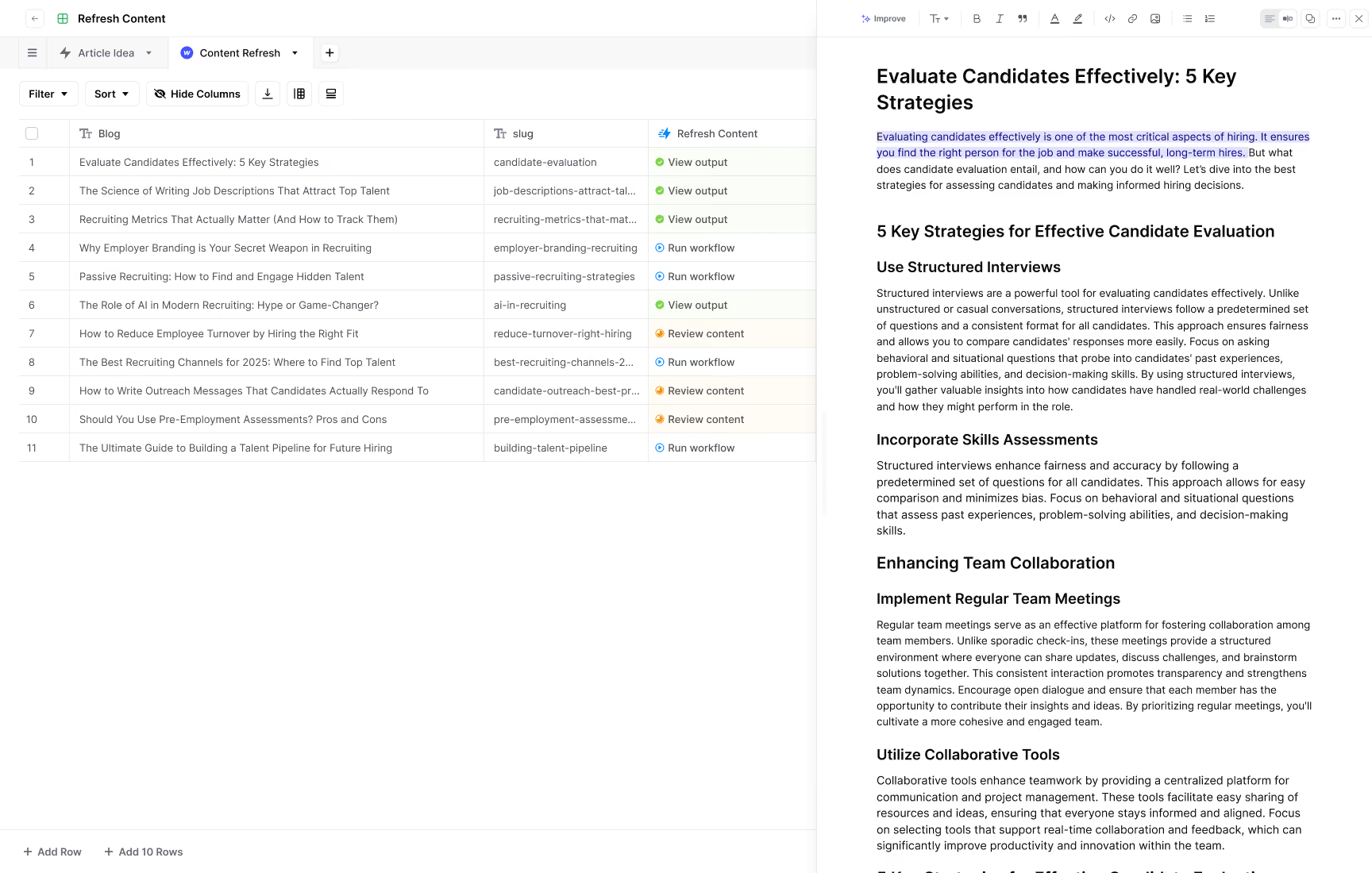
Content Creation
This is the drafting layer — surfacing content gaps before competitors fill them, and producing new pages or sections through the Workflow/Playbook system described above. It runs on the same underlying Grid mechanic as Content Refresh, just pointed at new topics instead of aging pages, which is part of why the learning curve flattens once a team has set up one workflow: the second, third, and fourth ones reuse the same pattern.
Offsite Tracking
AirOps reports that up to 85% of AI visibility is driven by content a brand doesn’t own directly — third-party sites, forums, reviews, and mentions. The Offsite function tracks these external mentions and land-and-expand opportunities on sites that already control your category’s narrative, which is a different job than simply publishing on your own domain. This is the piece most teams skip entirely when they think about AI search, since it doesn’t map to anything in a traditional SEO workflow — there’s no page on your own site to optimize, only a mention on someone else’s that either helps or doesn’t.
Brand Governance
A single governed source of brand truth is meant to keep every piece of AI-agent-written content consistent, so tone and factual claims don’t drift as more content gets produced at higher volume. This matters more as a team scales up how much content Quill is drafting: the more Workflows and Playbooks running in parallel, the easier it is for terminology, product names, or claims to drift between pieces unless one governed reference is feeding all of them.
HOW THE TRACKING SIDE WORKS
Separate from content execution, AirOps runs an insights layer that tracks prompts and pages across answer engines on a regular cadence, monitors what competitors are showing up for, and calculates share-of-voice — essentially, how often your brand appears in AI-generated answers relative to competitors for a given topic. This tracking is what feeds back into deciding what to refresh, what gaps to fill, and where offsite mentions need attention. Without this loop, content production would be flying blind on whether any of it is actually improving AI visibility.
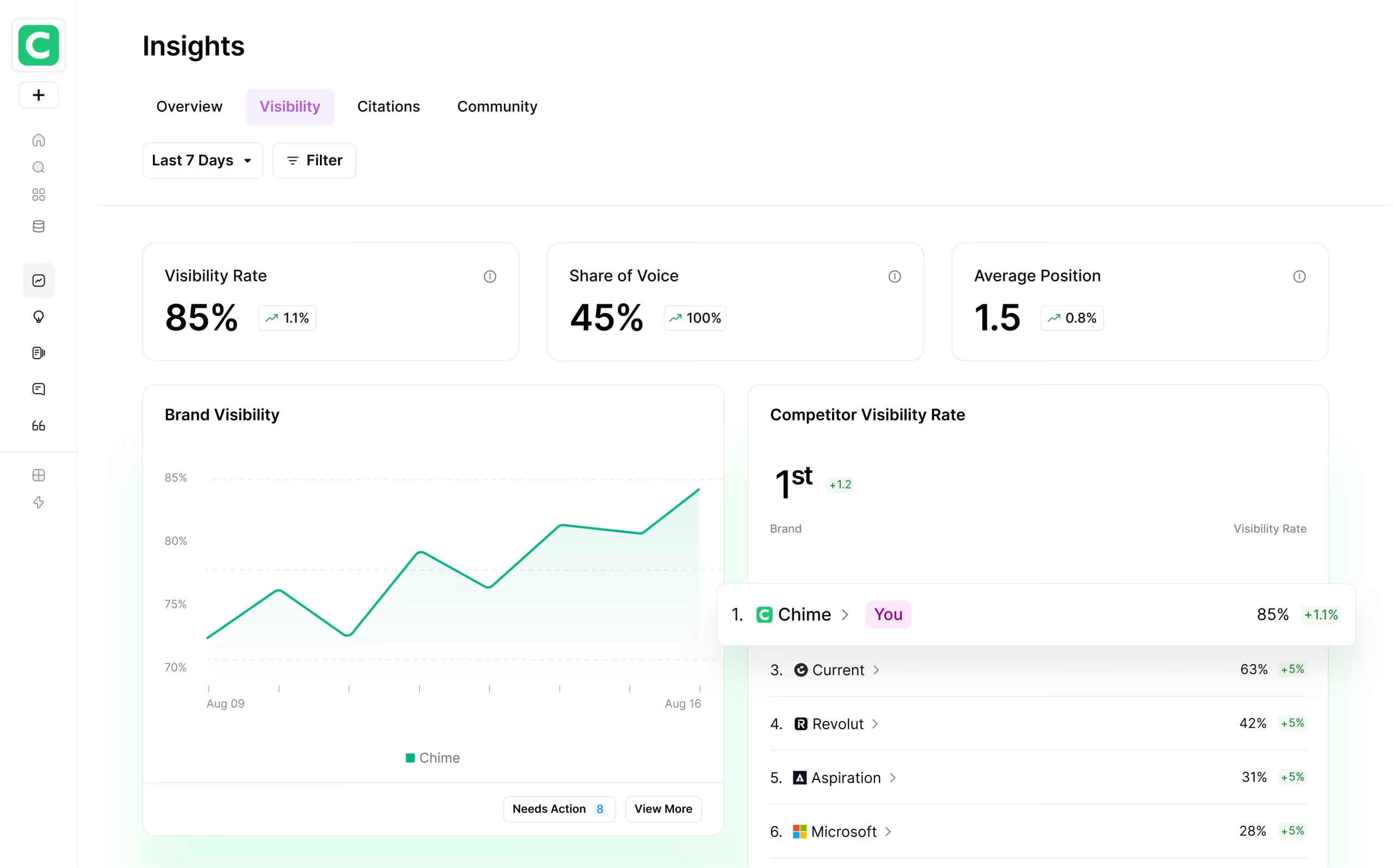
The dashboard above is what that tracking actually looks like day to day: a Visibility Rate percentage, a Share of Voice number against named competitors, an Average Position score, and a ranked list showing exactly where your brand sits relative to the companies it’s competing with for the same AI-generated answers. A “Needs Action” counter sits next to the visibility chart, which is the mechanism that turns a tracking number into an actual task — flagging pages or prompts that need a refresh, a new piece of content, or an offsite push rather than leaving the data to sit in a report nobody re-opens.
WHERE A HUMAN HAS TO STEP IN
| Step |
Who/what handles it |
| Setting the Playbook’s brand context and intent |
Your team, once, per Playbook |
| Drafting and refreshing content |
Quill, inside the Workflow/Power Agent rules you set |
| Approval checkpoints before publishing |
Your team, on every run |
| Resolving integration or authentication issues |
Your team or AirOps support (one G2 review cites a Notion auth issue needing a support ticket) |
| Interpreting share-of-voice and offsite data to set strategy |
Your team |
This is not a fully hands-off system. The value proposition is shifting where your team’s time goes — from manual drafting and manual tracking to review, strategy, and approval — not eliminating human involvement entirely.
PROS AND CONS OF HOW THE WORKFLOW IS STRUCTURED
Pros
- Clear separation of repeatable vs. judgment-based tasks — Workflows and Power Agents map cleanly onto different kinds of work instead of forcing everything through one generic “AI writer.”
- Built-in approval checkpoints — nothing ships without a human review step, which limits the risk of off-brand or inaccurate content going live unsupervised.
- Tracking and execution are connected — the insights layer directly informs what Quill drafts or refreshes next, rather than running as two disconnected tools.
- MCP integration for technical teams — teams already working in Claude or Cursor can connect AirOps directly into that existing workflow instead of adopting a fully separate interface.
- Offsite tracking covers a blind spot — most teams only monitor their own domain; tracking the 85% of AI visibility driven by third-party content is a genuinely different capability.
Cons
- Real learning curve — understanding how Workflows, Power Agents, and Playbooks fit together takes time before a team is producing output efficiently.
- Setup can require technical hand-holding — the documented Notion authentication issue shows integrations don’t always work cleanly out of the box.
- Occasional performance issues — some verified reviews mention lag and playbooks that stall and need a manual refresh.
- Depth aimed at teams, not solo creators — the three-tier system (Workflow/Power Agent/Playbook) is more structure than a single-person operation typically needs.
- Approval checkpoints add process overhead — the safety of human review also means content doesn’t ship instantly, which is a deliberate trade-off but a real one.
PRICING TIED TO HOW MUCH OF THE WORKFLOW YOU USE
Because tracking and execution are usage-based (tied to tracked prompts and answer-engine coverage), pricing scales with how much of the system you actually run. The free Solo plan covers 100 tracked prompts per page on ChatGPT insights only — enough to test one Playbook end-to-end. Starter and Pro tiers add more tracked prompts and multi-engine insight tracking (Perplexity, Copilot, Grok, DeepSeek, Claude, Google AI Overviews). Enterprise moves to custom or unlimited tracked prompts across all nine engines, which is the tier that supports running Workflows, Power Agents, and Playbooks at real production volume across a full content team. All paid tiers bill yearly with roughly two months free versus paying monthly.
FINAL VERDICT
Once you see the actual mechanics — Workflows for repeatable tasks, Power Agents and Playbooks for judgment-based work, Quill drafting inside human approval checkpoints, and a tracking layer that closes the loop — AirOps reads less like a magic AI writer and more like a structured production system with automation built into each stage. Our advice: if your team already thinks in terms of repeatable processes and wants to keep a human checkpoint before anything publishes, this structure will likely fit. If you’re looking for a fully autonomous, zero-review content machine, this isn’t built to be that, and you should look elsewhere. See how AirOps’ workflow system works with a free trial.
FREQUENTLY ASKED QUESTIONS
What’s the difference between a Workflow and a Playbook in AirOps?
A Workflow is a fixed, repeatable sequence of steps that runs the same way every time. A Playbook is a plain-English strategy brief that AirOps turns into an executable process, typically involving more judgment-based work through Power Agents, with approval checkpoints built in.
Does Quill publish content without human review?
No. Quill drafts, refreshes, and monitors content, but your team is looped in at approval checkpoints before anything ships, rather than the platform publishing autonomously.
What does the “offsite tracking” feature actually track?
It monitors content and mentions on third-party sites — forums, reviews, other publications — since AirOps’ data indicates up to 85% of AI visibility comes from content a brand doesn’t directly control.
Can AirOps integrate with tools like Claude or Cursor?
Yes, through AirOps MCPs (Model Context Protocol integrations), which let technical teams connect AirOps’ workflows directly into tools they’re already using rather than switching entirely to AirOps’ own interface.