Clueso pricing starts at zero, and the free tier is not a trial
Clueso turns screen recordings into videos and step-by-step articles (screenshot from clueso.io).
Most software that turns a screen recording into a polished video gives you fourteen days and then a paywall. Clueso does something different: the bottom tier costs nothing and has no end date. The company spells it out in its own FAQ – sign up for the Free plan and use it “for as long as you like”, with ten minutes of video exports and ten article exports a month.
That changes the question Clueso pricing has to answer for a buyer. It is not “can I afford to try this” but “at what point does the free tier stop being enough, and what exactly does the next one add?” This review reads the published plans and the four-column comparison table as a spreadsheet to answer that.
How this review was done
This is a desk review. No paid Clueso pricing plan was bought and no account was created. Every number below is read from pages Clueso publishes: the pricing page and its full comparison table, the FAQ, the feature pages for help articles and auto-translate, the agents page and the MCP page. Where the company makes a claim about itself – “Rated 4.8 on G2”, “From 5 hours to 30 minutes per video” – it is written below as a claim by the company, not as an independent measurement.
Prices are the US dollar figures shown on the public pricing page, with the yearly toggle on by default. Anything that depends on a sales conversation – the Enterprise tier – is described as “custom”, because that is all the site states.
The four Clueso pricing tiers at a glance
Clueso pricing comes in four plans. Three carry a number, and the fourth does not.
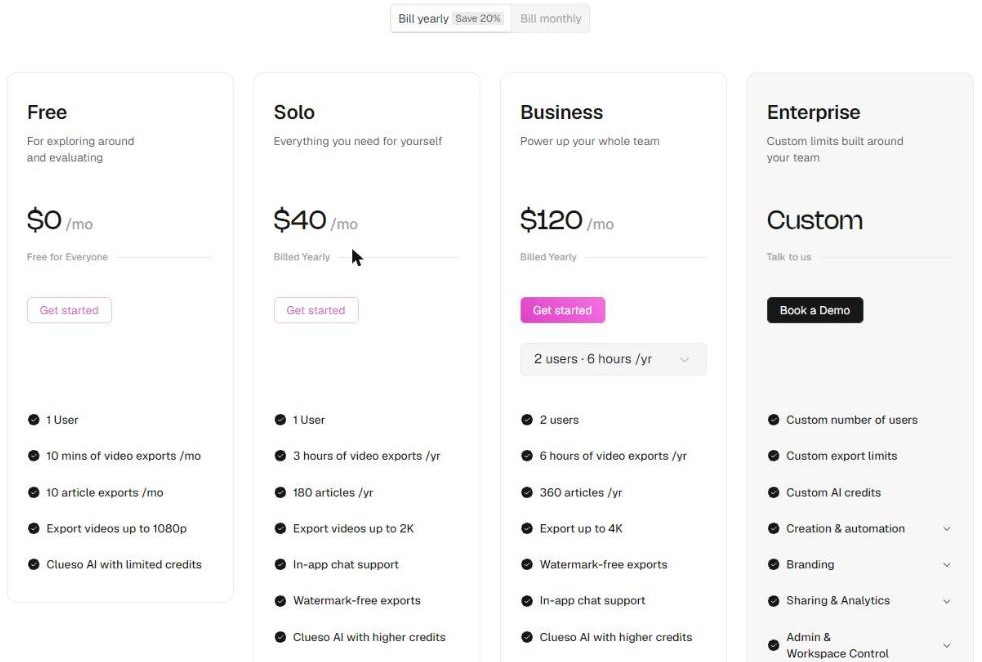
The published plan cards, with the yearly billing toggle on (screenshot from clueso.io).
Plan
Price (USD)
Seats
Video exports
Article exports
Max resolution
Free
0
1 user
10 mins / month
10 articles / month
1080p
Solo
40 / month, billed yearly
1 user
3 hours / year
180 / year
2K
Business
120 / month, billed yearly
2 users
6 hours / year
360 / year
4K
Enterprise
Custom
Custom
Custom
Custom
4K
Read the Clueso pricing cards and the comparison table side by side and you notice something immediately: they do not use the same clock.
Monthly on the table, yearly on the cards
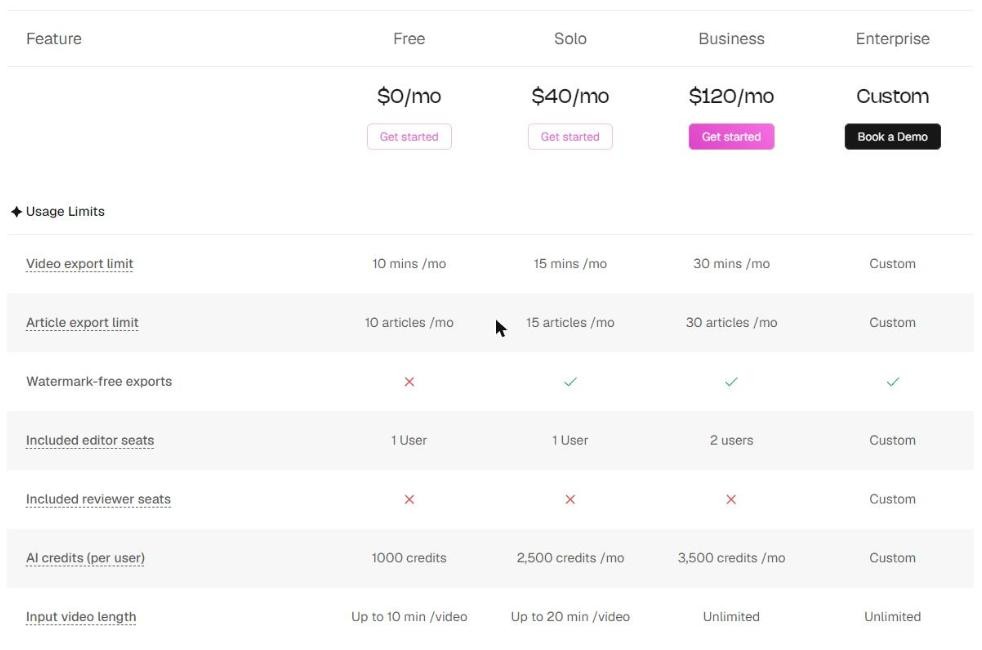
The Clueso pricing cards quote Solo and Business per year – “3 hours of video exports /yr”, “180 articles /yr”. The comparison table a little further down the same page quotes the same limits per month.
The Usage Limits block states the same allowances per month (screenshot from clueso.io).
The two sets of Clueso pricing figures agree once you convert: 15 minutes a month is 3 hours a year, 30 minutes a month is 6 hours a year. Nothing is wrong. But the switch of unit flatters the paid Clueso pricing tiers, because “3 hours” sounds like a lot more than “15 minutes” – and the Free tier is only ever quoted in months.
Plan
Video export, per month
Video export, per year
Articles, per year
Yearly cost (USD)
Free
10 mins
2 hours
120
0
Solo
15 mins
3 hours
180
480
Business
30 mins
6 hours
360
1,440
Put every tier on the same clock and the shape of the ladder is clear: Solo buys five more minutes of video and five more articles a month than the free plan. That is the volume story. The value story is somewhere else entirely.
What the Solo tier of Clueso pricing actually adds
If you climb the Clueso pricing ladder from Free to Solo expecting a flood of extra capacity, the ladder will disappoint. Upgrade for the other four things and it makes sense:
Watermark-free exports. The table marks this as the single clearest line between free and paid – every Free export carries a Clueso watermark.
2K instead of 1080p. Resolution rises again to 4K on Business.
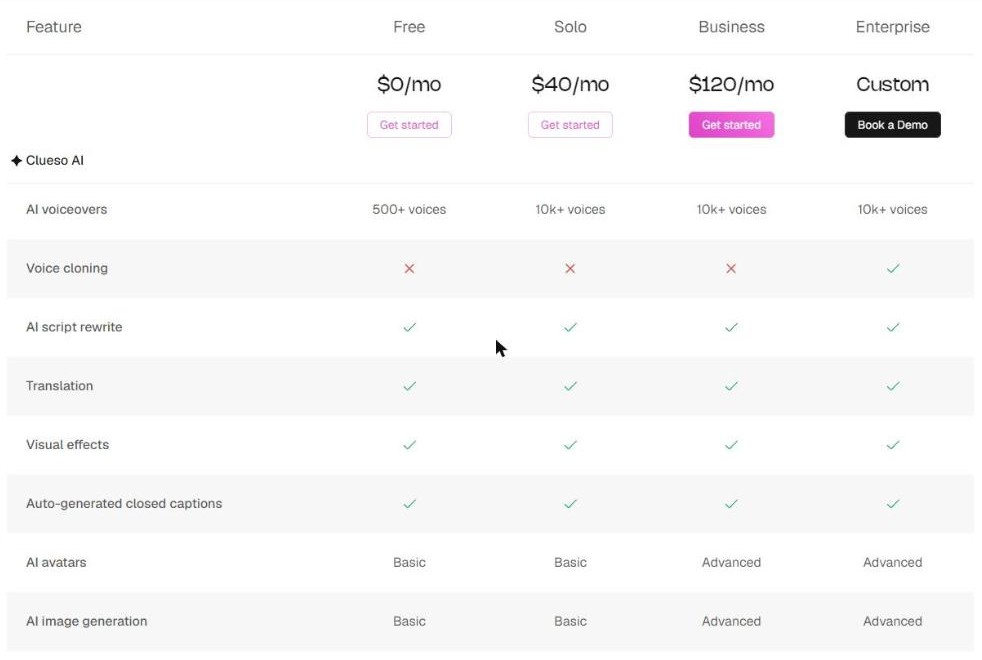
10k+ AI voices instead of 500+. A twentyfold jump in the voice library, stated plainly in the Clueso AI block.
2,500 AI credits a month instead of 1,000, plus the ability to buy more – “Additional AI credits” is marked not included on Free and included from Solo up.
Longer source recordings. Input video length rises from up to 10 minutes per video on Free to up to 20 minutes on Solo, and to unlimited on Business.
Human support. Free gets AI chat; Solo gets regular support; Business and Enterprise get priority.
That is a coherent package at this point on the Clueso pricing ladder. It is just not a capacity package, and the plan card – which leads with “3 hours of video exports /yr” – rather implies it is.
Clueso pricing at Business: double the volume, three times the price
The step from Solo to Business is the part of Clueso pricing worth doing arithmetic on. Solo is 480 dollars a year for one seat and 180 minutes of export. Business is 1,440 dollars a year for two seats and 360 minutes.
Measure
Solo
Business
Yearly cost (USD)
480
1,440
Seats
1
2
Cost per seat per month (USD)
40
60
Video export minutes per year
180
360
Cost per exported minute (USD)
2.67
4.00
So volume doubles, seats double, and the Clueso pricing triples. Per exported minute, Business is the more expensive plan, not the cheaper one. That is not a trap – it is simply that Business is sold on capability rather than capacity, and the capability list is substantial: 4K export, viewership analytics, customisable embed players, live team collaboration, roles and permissions, centralised billing, clip templates, components and custom fonts, plus the option to buy additional editor seats, which Free and Solo cannot do at all.
The practical reading: move to Business when you need a second person and the analytics, not when you need more minutes. If minutes are the constraint, two Solo seats cost less than one Business plan – and the plan comparison lays out every row so you can check that against your own usage.
Yearly versus monthly Clueso pricing
Every headline figure in Clueso pricing assumes annual billing. The site states that yearly billing saves 20 per cent, which puts the monthly-billed equivalents at roughly 50 dollars for Solo and 150 dollars for Business.
Over a year that gap in Clueso pricing is a 120 dollar difference on Solo and a 360 dollar difference on Business – enough that it belongs in the decision, especially for a tool you may be trialling on one project before committing a team to it.
AI credits in Clueso pricing, and the one row without a time unit
Clueso pricing meters AI work in credits on top of the export limits, and the comparison table lists them per user.
The Clueso AI block: voices, cloning, avatars and image generation by tier (screenshot from clueso.io).
Plan
AI credits (per user)
AI voices
AI avatars and image generation
Free
1,000 credits
500+ voices
Basic
Solo
2,500 credits / month
10k+ voices
Basic
Business
3,500 credits / month
10k+ voices
Advanced
Enterprise
Custom
10k+ voices
Advanced
One detail in the Clueso pricing table is worth noticing before you plan around it. The three paid rows say credits per month. The Free row says only “1000 credits”, with no period attached – so the page does not make clear whether that is a monthly allowance or a one-time grant. If you intend to run on the free tier for a while, that is the first question to ask support.
Voices, avatars and the features that stay behind the Enterprise line
A handful of capabilities never appear on any priced Clueso pricing plan. They are marked as Enterprise-only in the table, which is useful to know early because no amount of upgrading from Free to Business will reach them:
Voice cloning – the 10k+ library is available from Solo, but cloning your own voice is Enterprise.
SAML/SSO and a security review – the two things an IT department usually asks for first.
Multiple workspaces and comments for collaboration.
Included reviewer seats – marked not included on Free, Solo and Business, so a review workflow with non-editing stakeholders is an Enterprise feature.
The auto update agent, which the table lists as a paid add-on on Enterprise rather than an included feature.
SLAs, a dedicated customer success manager, white-glove onboarding and early access to new features.
Everything else in the creation block of Clueso pricing – recording with the browser extension, uploading existing or mobile video, turning slide decks and PDFs into video, generating step-by-step guides, AI script rewrite, translation, visual effects and auto-generated captions – is marked as included on all four tiers, free included.
Captions, SRT files and who actually needs them
Auto-generated closed captions sit on every Clueso pricing tier, and every tier can export captions as VTT and SRT files alongside MP4 and GIF. That is a quietly important pair of boxes for anyone publishing training or support video inside an organisation.
Captions are not only a convenience. In the United States, federal agencies and the organisations that sell to them work to accessibility requirements that treat captions and audio description as part of the deliverable, not an extra; the government’s own guidance on video and other synchronized media sets out what has to be captioned and why. Similar duties exist under the European Accessibility Act and many national rules. If your videos are customer training or employee onboarding, exportable SRT files are the difference between meeting that bar and rebuilding the library later.
“150+ languages” and the counter on the same page
Translation is included on every Clueso pricing tier, and the auto-translate feature page is enthusiastic about reach: it promises closed captions in 150+ languages, one-click translation of docs and videos into 150+ languages, and content creation in 150+ languages.
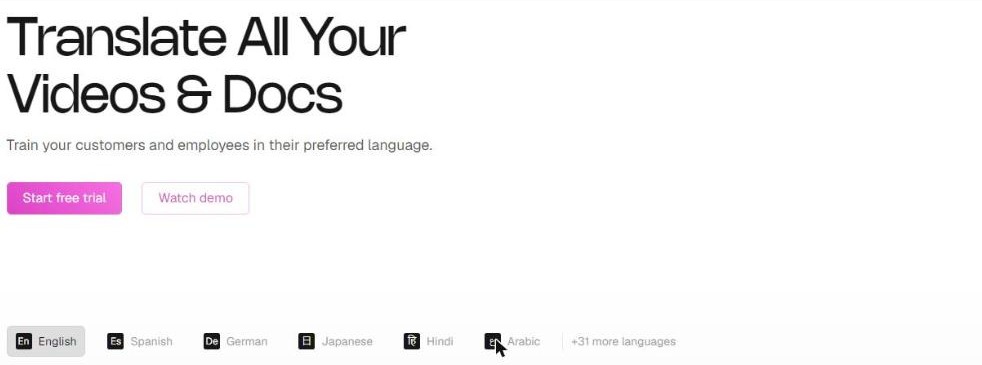
The language row on the same page shows six languages and a “+31 more languages” counter (screenshot from clueso.io).
The interactive language row on that same page shows six languages – English, Spanish, German, Japanese, Hindi and Arabic – followed by the label “+31 more languages”, which comes to 37. Both numbers are published by Clueso, a few hundred pixels apart. The likeliest reading is that the demo switcher carries a subset while the engine supports far more, but the page does not say so, and if a specific language matters to your rollout it is worth confirming before you buy.
The page also describes two features that matter more to a brand than raw language count for a brand: translation rules for tone, grammar and style, and a translation glossary that pins exact translations for product terms so they stay consistent everywhere.
Security included on every Clueso pricing tier, even the free one
This is the most unusual column in the whole Clueso pricing table, and it runs in the buyer’s favour.
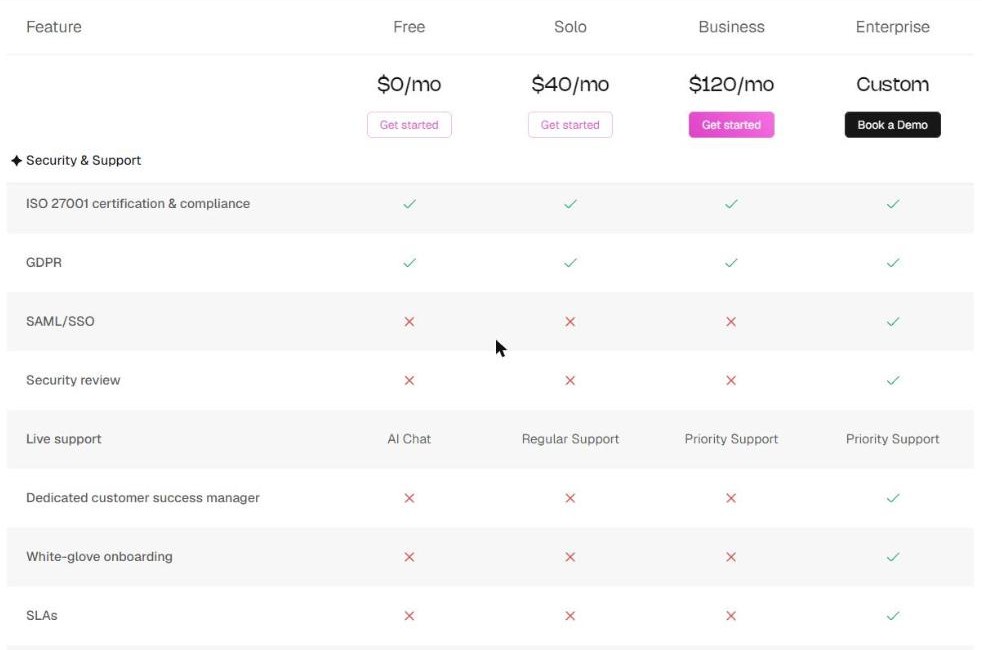
SOC 2 Type II, ISO 27001 and GDPR are marked included on all four tiers (screenshot from clueso.io).
SOC 2 Type II, ISO 27001 certification and compliance, and GDPR are all marked included on Free, Solo, Business and Enterprise alike. Plenty of SaaS products park their compliance posture behind the enterprise tier; Clueso applies it to the account you open for nothing. The FAQ repeats the same two certifications and adds that the company undergoes regular security audits.
Where your data physically sits is published alongside Clueso pricing too. Clueso states that it stores data in AWS across three regions – Mumbai, Frankfurt and California – and that the region used depends on your location or where the project is created. It also states that you can permanently delete your content and the associated data at any time from workspace settings, and that only you and your authorised team members can access your content.
What is not on the lower tiers is the enforcement layer: SAML/SSO and a formal security review are Enterprise-only. So the certifications are there from day one; the controls an IT team would want to impose on top of them are not.
The agent that logs into your product
The newest layer above Clueso pricing is an agent that does the recording for you, and it is worth reading the company’s own description carefully before deciding which tier you need.
The agents page sets out four steps. You share login access to your product or connect your codebase; the agent studies the product and drafts a script and production plan; a browser agent navigates through your product and captures the screen recording autonomously; then the voiceover, zooms, callouts, motion graphics and brand styling are applied automatically.
That is a genuinely different proposition from a recorder, and the part of Clueso pricing most likely to change the maths, and for a team shipping features weekly it is the part most likely to justify the spend. It also means credentials to a live product leave your hands – which is exactly why the certification rows above, and the Enterprise-only security review, belong in the same decision. Clueso publishes the certifications; what it cannot publish is your own policy on handing over product access, and that is the conversation to have internally first.
There is a lighter-touch route to the same engine, at no extra line in Clueso pricing. Clueso publishes an MCP server with install prompts for Claude, ChatGPT, Gemini and Cursor, so a video can be requested from the assistant you already use, with every output still editable afterwards. No separate line for MCP appears anywhere in the pricing table.
What you get before Clueso pricing matters at all
Because the free tier of Clueso pricing is permanent, it is worth being precise about what it can do, since for a lot of small teams it is the whole answer.
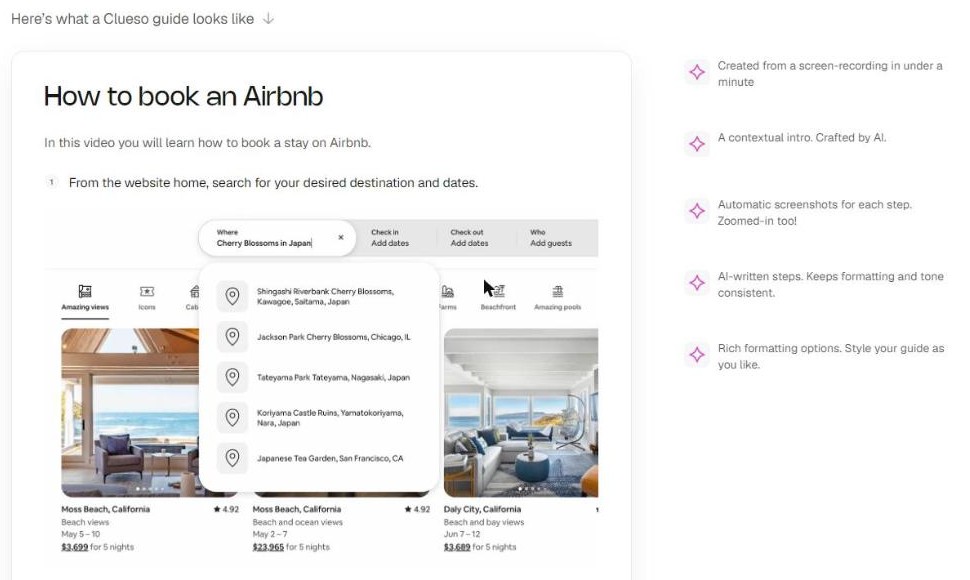
The published example of a generated guide: numbered steps with an automatic screenshot for each (screenshot from clueso.io).
At the zero-dollar end of Clueso pricing you get one seat, ten minutes of video export and ten articles a month at 1080p with a watermark, 500+ AI voices, AI script rewrite, translation, visual effects, auto-generated captions, VTT and SRT export, article export in five formats, embeddable links, view-only sharing, a 5K+ media library, and the full creation set – browser-extension recording, mobile and existing uploads, PPT-to-video, PDF-to-video and automatic step-by-step guides.
Ten articles a month is a real documentation output. If what you need is written help content with automatic screenshots rather than polished video, the free tier may never run out, and the Clueso plan page is simply somewhere to check back when it does.
Who each tier fits, and the short version
The bottom rung of Clueso pricing, Free, fits a solo maker or a small support team writing help articles, who can live with a watermark and 1080p. Solo fits one person publishing externally, where the watermark and the 500-voice library are the blockers rather than the minutes. Business fits a two-person team that needs 4K, analytics on who watched, shared roles and the ability to buy more seats. Enterprise is the only route to SSO, voice cloning, reviewer seats, multiple workspaces and an SLA.
Clueso pricing is less of a fit if you need a reviewer workflow or SSO on a small budget, since both sit behind a sales call, or if you are buying minutes rather than features – the per-minute cost goes up, not down, as you climb.
What the published Clueso pricing tables do well is leave almost nothing to guess at: the limits, the resolutions, the credit allowances and the certifications are all on one page, and the certifications reach the free tier. What they leave slightly blurred is the free plan’s credit period, the gap between a “150+ languages” promise and a “+31 more” counter, and plan cards that quote years where the table quotes months.
Overall: 4.7 / 5.
Desk review based on the pricing, FAQ, feature, agents and MCP pages published at clueso.io, read in US dollars in October 2026. No account was created and no plan was purchased. Prices and plan contents change; check the current pricing page before buying. This article contains affiliate links.
The iPhone 18 no ports theory is suddenly everywhere. A video making the rounds on TikTok and social media appears to show something startling: an iPhone — labeled as the “iPhone 18” — charging through a small magnetic connector instead…
Hottest fashion trends 2026 reviewed honestly — which trending styles are actually wearable, which are overhyped, and what’s worth buying right now in the US market. Quick Verdict: 2026’s biggest fashion trends fall into two camps: genuinely wearable evolutions of…
PS5 Pro review 2026 — I tested it for 30 days. Here’s the honest verdict on performance, graphics, and whether upgrading from a standard PS5 is actually worth the money. Quick Verdict: The PS5 Pro is the most capable PlayStation…