DesignFiles is an all-in-one business platform for interior designers, and DesignFiles procurement is the half of it that runs after a client says yes: quotes, invoices, retainers, purchase orders, requests for quotes, spec sheets, order tracking and a push into QuickBooks Online. Moodboards and renderings get the attention on the marketing pages, but DesignFiles procurement is where the platform draws its only real line between its two paid plans.
The DesignFiles wordmark, taken from the company site.
That line is unusually clean, and it is the reason this review exists. Read row by row, the split in the published feature comparison is not scattered across the product at all: every feature the cheaper plan loses belongs to DesignFiles procurement or to the billing beside it, and the design tools are identical on both tiers. This article reads that table, puts the arithmetic next to it, and sets the marketing pages beside the terms of service.
How this review was done
This is a desk review. No account was created, no card was entered, no trial was started and no purchase order was issued inside the software. Everything below comes from material DesignFiles publishes itself: the plans page and its feature table, the DesignFiles procurement, specification, invoicing and QuickBooks feature pages, the security overview and the terms of service, all read on 29 October 2026. Screenshots are of those public pages.
Where the company makes a claim it is reported as a claim, and where two DesignFiles pages disagree both versions are printed and neither is treated as the winner. Nothing here is an assessment of how DesignFiles procurement feels in daily use, because that would need a funded account and a live project, and this review had neither.
Two plans, and the twenty dollars that separates them
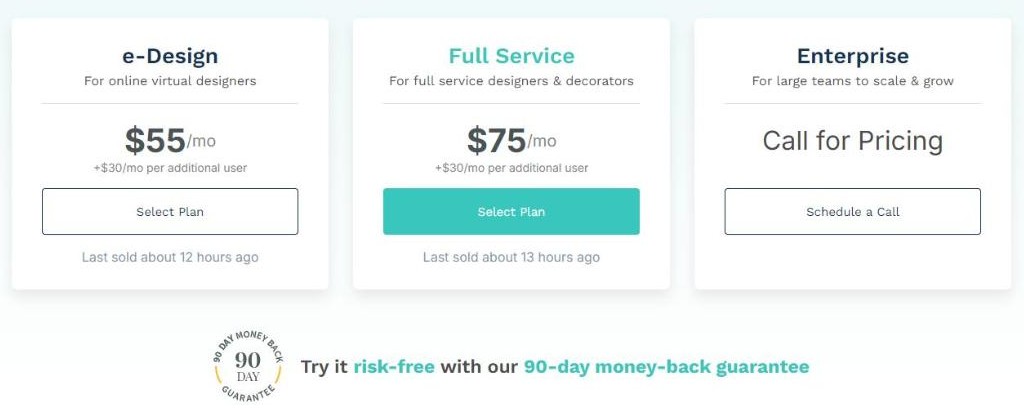
Three columns sit on the plans page, two of them carrying a number. e-Design is $55 a month, for online virtual designers. Full Service is $75 a month, for full service designers and decorators. Enterprise says Call for Pricing and offers a scheduled call rather than a signup button. Both paid plans add seats at the same rate: $30 a month per additional user.
The plans page: $55, $75, Call for Pricing, and a 90-day money-back badge underneath.
Plan
Monthly
Per day, as the page puts it
Extra seat
Twelve months
e-Design
$55
Just $1.83/day
+$30/mo
$660
Full Service
$75
Just $2.50/day
+$30/mo
$900
Enterprise
Call for Pricing
not published
not published
not published
Figures as printed on the DesignFiles plans page; the annual column is simple multiplication.
The per-day figures assume a thirty-day month: $55 divided by 30 is $1.83, $75 divided by 30 is exactly $2.50, and in a thirty-one day month the same subscriptions work out at $1.77 and $2.42. The gap that matters is between the columns: $20 a month, $240 a year, and that gap buys DesignFiles procurement and nothing else.
Eleven rows of difference, and all eleven are DesignFiles procurement
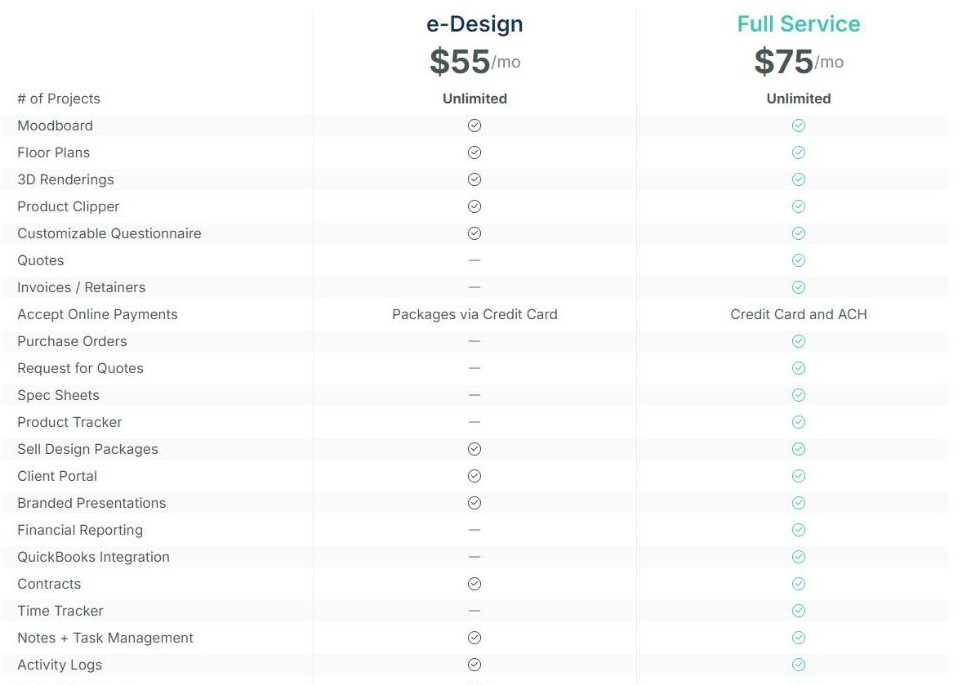
The comparison table runs to thirty-six feature rows, including a block at the bottom labelled New Features. Twenty-four carry the same mark in both columns, one differs in detail rather than availability, and the remaining eleven are available on Full Service and unavailable on e-Design. Every one of those eleven is part of DesignFiles procurement, billing or financial reporting.
The plans page comparison table. The dashes in the e-Design column cluster entirely around money.
Row that differs
e-Design $55
Full Service $75
Quotes
not included
included
Invoices / Retainers
not included
included
Purchase Orders
not included
included
Request for Quotes
not included
included
Spec Sheets
not included
included
Product Tracker
not included
included
Financial Reporting
not included
included
QuickBooks Integration
not included
included
Time Tracker
not included
included
Timed Services
not included
included
Flat Rate Services
not included
included
Accept Online Payments
Packages via Credit Card
Credit Card and ACH
The eleven availability differences plus the one row where both plans have the feature but not the same version of it.
Set against that, here is what does not change when you move up to the DesignFiles procurement tier: unlimited projects, moodboards, floor plans, 3D renderings, the product clipper, the questionnaire, selling design packages, the client portal, branded presentations, contracts, tasks, activity logs, the project calendar, board templates, the contact book, shoppable product lists, mobile access, video training and support by email, chat and phone. The New Features block adds background removal, the visual elements and design asset libraries, Kanban tasks and the SideDoor integration to both tiers.
A designer reading that table quickly can draw one conclusion and be right: the cheaper plan is the whole design product with DesignFiles procurement removed. The upgrade decision is not about how much design work you do. It is about whether you issue purchase orders.
Quotes, invoices and retainers: where DesignFiles procurement begins
The home page describes the chain in a single sentence: add a product once and it automatically flows into quotes, invoices, purchase orders, FFE schedules and order tracking. That is the clearest statement of what DesignFiles procurement is supposed to do, and it explains why the eleven missing rows travel together: remove quotes and invoices and the rest of the chain has nothing to start from.
Document
What the company says it does
Plan that has it
Quote
priced selection sent to the client for approval
Full Service only
Invoice / Retainer
the billable document and the deposit against it
Full Service only
Request for Quote
pricing request sent out to a vendor
Full Service only
Purchase Order
generated from an approved quote or invoice
Full Service only
Spec Sheet
the product record contractors and clients read
Full Service only
Order tracker entry
status of the item from order to delivery
Full Service only
The document chain described across the DesignFiles feature pages, mapped onto the plan table.
One row in the DesignFiles procurement chain deserves a second look. Both plans sell design packages and accept online payments, so an e-Design subscriber is not locked out of taking money; what they cannot do is raise a quote or an invoice, and the payment row itself is narrower, with e-Design marked Packages via Credit Card against Full Service on Credit Card and ACH. For a studio moving five-figure furniture orders, the difference between card-only and bank transfer is not a detail. The DesignFiles plans and full feature table are published openly and need no account.
Purchase orders built from an approved quote in DesignFiles procurement
The DesignFiles procurement feature page is headed All Your Product Orders, Fully Organized and opens on the problem it means to solve: orders tracked across spreadsheets and emails. The core DesignFiles procurement claim is specific and testable by anyone with an account. DesignFiles procurement turns approved quotes and invoices into ready-to-send purchase orders, auto-filling the product details, pricing and quantities already saved to the item, and linking every purchase order back to the quote and invoice it came from.
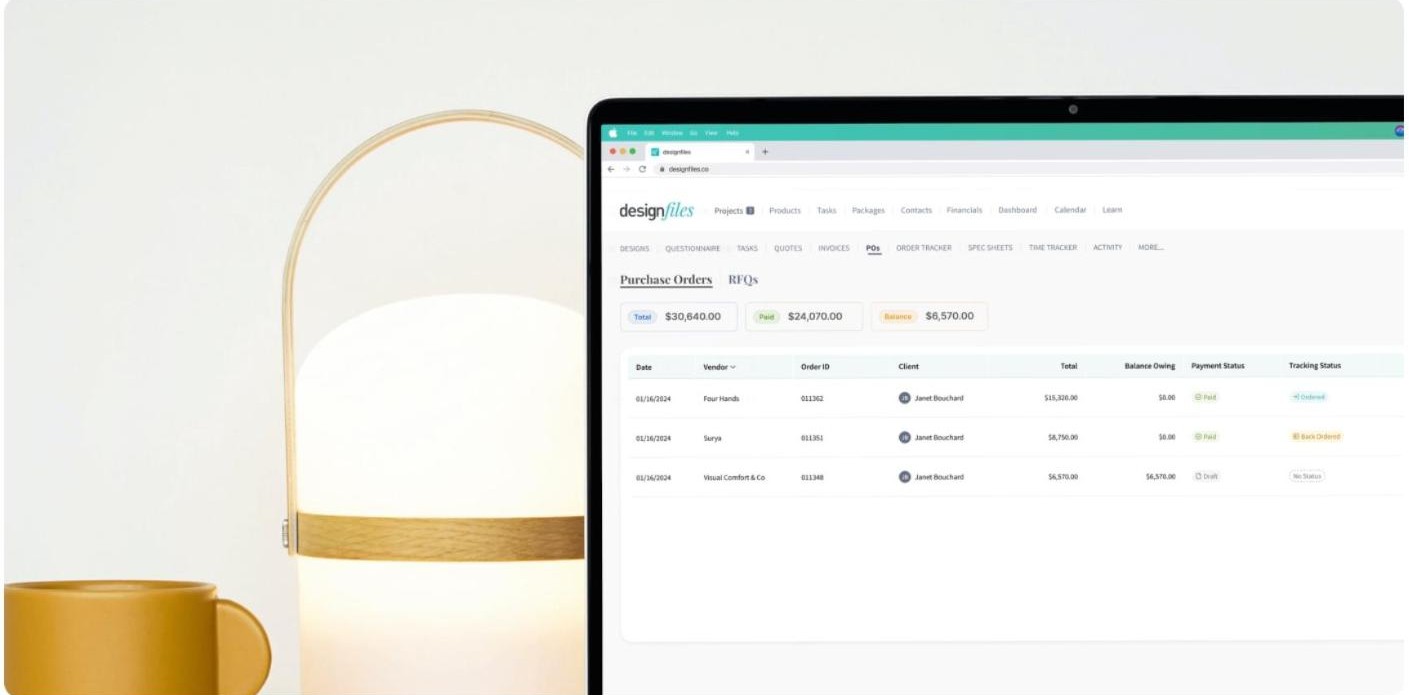
The purchase order screen as DesignFiles presents it, with Total, Paid and Balance summed across orders.
The DesignFiles procurement mock-up is worth reading for its navigation rather than its numbers. The row of module tabs runs DESIGNS, QUESTIONNAIRE, TASKS, QUOTES, INVOICES, POs, ORDER TRACKER, SPEC SHEETS, TIME TRACKER, ACTIVITY and then MORE. Six of those visible tabs are Full Service rows, which means the screenshot the company uses to sell DesignFiles procurement is one an e-Design subscriber would not see in that form.
Purchase orders generated from an approved quote or invoice rather than retyped
Each order carrying the vendor, order ID, client, total and balance owing
Payment status and tracking status held as separate fields, so Paid and Back Ordered can be true at once
The tutorial library attached to the page gives a sense of how much there is to learn: Creating Purchase Orders runs 7:16, Tracking Projects and Products 5:14, and Using the Client Facing Order Tracker 4:44. Seventeen minutes of video for the DesignFiles procurement module is a reasonable signal that DesignFiles procurement is a real subsystem rather than a checkbox.
Next to the purchase order tab in the same screen is RFQs. The feature page describes requesting quotes from vendors without leaving the project, which puts the outbound half of DesignFiles procurement in the same record as the inbound half. No published limit applies to requests, vendors or purchase orders on either paid plan, and no per-document fee appears on the plans page; what is published is the availability line, and on it Request for Quotes is a Full Service row.
Spec sheets and FFE schedules in DesignFiles procurement
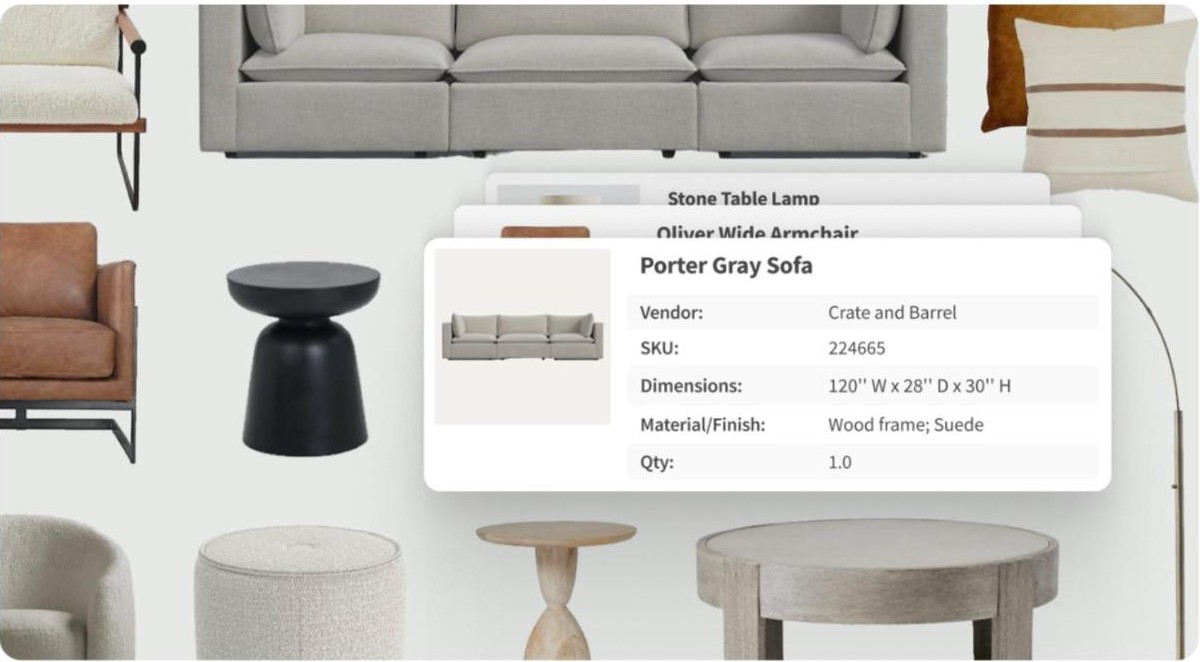
The DesignFiles procurement specification page makes a narrower promise than the procurement page, and a more checkable one. Spec sheets are auto-generated from product selections already in the project, so the name, image, dimensions and finish are carried across rather than copied by hand, and they can be organised by room, by category or by install phase.
A product record as the specification page shows it: vendor, SKU, dimensions, material and quantity.
The second claim on that page is about version control rather than content: one always-current version per project, shared with clients or contractors as a live link instead of an emailed file. For anyone who has watched a contractor build from version four of a schedule while the client approved version six, that link is the part of DesignFiles procurement worth the most. It is also, again, a Full Service row: an e-Design subscriber can build the moodboard, place every product and present the scheme, then has to produce the specification somewhere else.
The order tracker clients can watch
The DesignFiles procurement order tracker is described as working as FF&E procurement software for the whole studio, following each item from order to delivery. Two fields do the work in the company mock-up and they are kept deliberately separate: payment status reads Paid, Submitted or Draft, tracking status reads Ordered, Back Ordered or No Status. An item can be fully paid and back ordered at once, which is the situation that generates the most client emails.
One of the three DesignFiles procurement tutorials is called Using the Client Facing Order Tracker, so the tracker is meant to be shown to clients. That is a reasonable thing to want and a risky thing to enable: a client watching a back-ordered sofa in real time sees the delay before you have decided how to explain it. DesignFiles publishes no per-field visibility matrix for the client view, so how much a client sees is worth confirming in a demo.
QuickBooks Online and the DesignFiles procurement paper trail
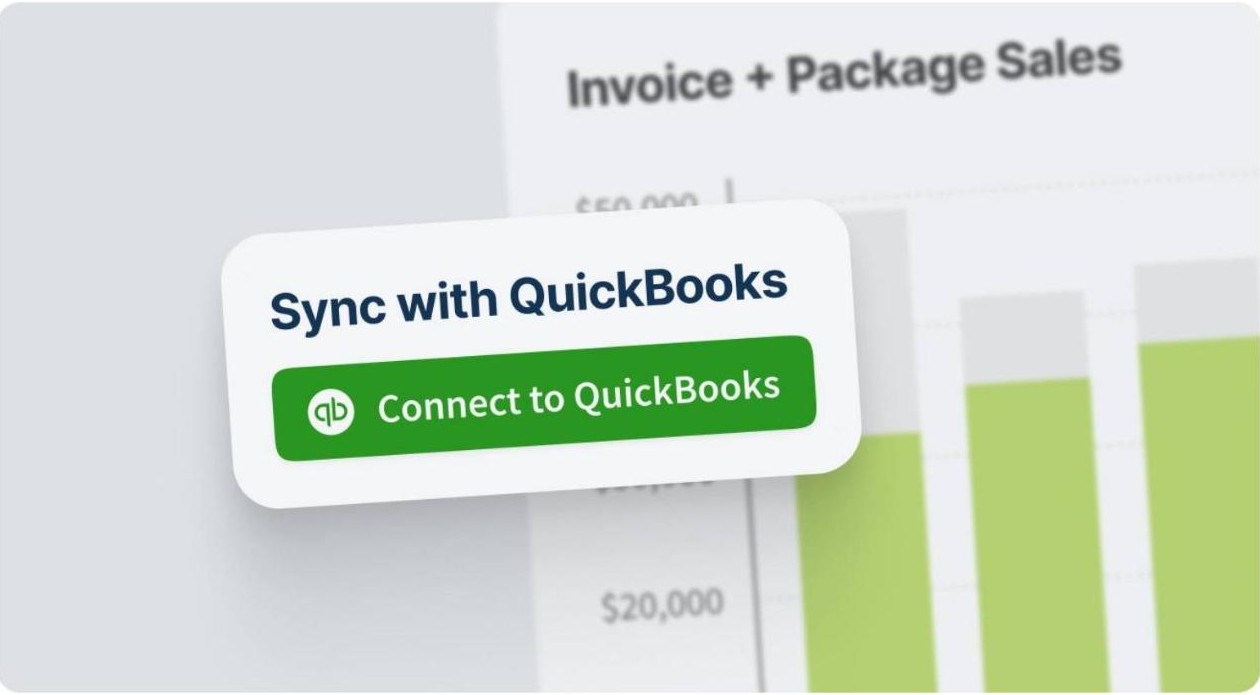
The accounting page is specific about direction and scope. Retainers, invoices, purchase orders and payment records are pushed from DesignFiles to QuickBooks Online, the designer chooses which document types sync, auto-sync can be switched on or off, and preferences can be changed later without redoing past work. The page names QuickBooks Online only: not the desktop edition, and no other ledger.
The QuickBooks Online connection as the accounting feature page presents it.
This is the row where the DesignFiles procurement split has consequences outside the software. Three of the four DesignFiles procurement document types that sync are Full Service rows, so on the $55 plan there is nothing for the integration to carry. Keeping clean books is not optional for a design business, and the IRS guidance on recordkeeping for small businesses is blunt about supporting documents needing to show what was bought, from whom and for how much. A tool that issues the purchase order and the invoice is already producing those records.
Time Tracker, timed services and flat rate services
Three more Full Service rows sit slightly apart from the DesignFiles procurement document chain. Time Tracker is the module; Timed Services and Flat Rate Services are the billing models on top of it, both listed in the New Features block. Together they cover the part of a design business sold by the hour rather than by the item. That completes the shape of the split: DesignFiles procurement handles what the studio buys for the client, the time tools handle what the studio sells of itself, and both sit on the same side of the $20 line.
Adding a second seat changes the DesignFiles procurement math
Seats cost $30 a month on either plan, and that flat rate produces a result worth putting in a table before anyone signs up. A two-person e-Design studio pays more each month than a solo designer on Full Service, and still has no quotes, no invoices and no purchase orders.
Team size
e-Design total
Full Service total
Gap
1 user
$55
$75
$20
2 users
$85
$105
$20
3 users
$115
$135
$20
4 users
$145
$165
$20
Built from the two published prices and the $30 per additional user line on the plans page.
Two things fall out of that. The premium for DesignFiles procurement never grows with the team: $20 a month at one seat, $20 a month at four, $240 a year however large the studio gets. And there is a crossover. At two seats e-Design costs $85 against $75 for a solo Full Service account, so a pair of designers on the cheaper plan pay ten dollars a month more than one designer who has the entire DesignFiles procurement and billing stack. An easy trap to fall into by adding a colleague without revisiting the tier.
The free trial, the guarantee and the terms
This is the one place where two DesignFiles pages do not line up, so both are printed and neither is treated as correct. The plans page carries a badge reading 90 DAY MONEY BACK GUARANTEE and the line Try it risk-free with our 90-day money-back guarantee. The FAQ repeats it: no annual contract, you pay for the months you use, and the guarantee gives a full three months to test the platform risk-free.
The terms of service say something different. The words 90 and guarantee do not appear in it at all. What it contains instead is a fair refund policy with worked examples: full refunds for being charged after meaning to cancel, for forgetting to cancel while not using the service, and for trying it a couple of months and not being happy; partial refunds for an account with activity on it, where the company says it will review the usage and work out a figure.
Question
What the plans page says
What the terms of service say
Refund window
90-day money-back guarantee, three months risk-free
no 90-day term stated; a fair refund policy with examples
Refund mechanism
a guarantee
full or partial at the company’s assessment of usage
Projects on the free trial
table shows unlimited projects on both paid plans
the free trial includes one client project
Contract length
no annual contract, pay for the months you use
upgrades and downgrades take effect at the next billing cycle
Marketing page and terms of service, read on the same day and quoted side by side.
The project row is the cleaner gap: unlimited describes the paid plans while the terms describe a free trial limited to one client project, so both can be true. The refund row is harder to reconcile, because a guarantee and a discretionary policy are not the same promise, and anyone who cares about the ninety days should get it in writing before the first charge. Two other terms matter to anyone relying on DesignFiles procurement: downgrading may cost features or capacity and the company accepts no liability for that loss, and all fees are exclusive of taxes. The DesignFiles terms and plan pages are public and take ten minutes to read.
Security and record keeping, in the company’s own words
DesignFiles publishes a security overview, and the useful thing about it is that it is specific rather than reassuring. Data is written to multiple disks instantly, backed up daily and stored in multiple locations; traffic runs over HTTPS with 256-bit SSL; uploaded files are encrypted at rest; major systems are described as fully redundant.
The same page then says, in its own words, that the application databases are generally not encrypted at rest, on the reasoning that the information is active in them and subject to the same protection and monitoring as the rest of the systems. That is the company stating its own design choice, printed here as a statement rather than a verdict. The page is dated Last Updated at: July 10, 2021 – the most checkable fact in this section, and the one most worth asking about, since a studio running DesignFiles procurement stores client addresses and order totals in it.
What the ratings on the plans page actually say
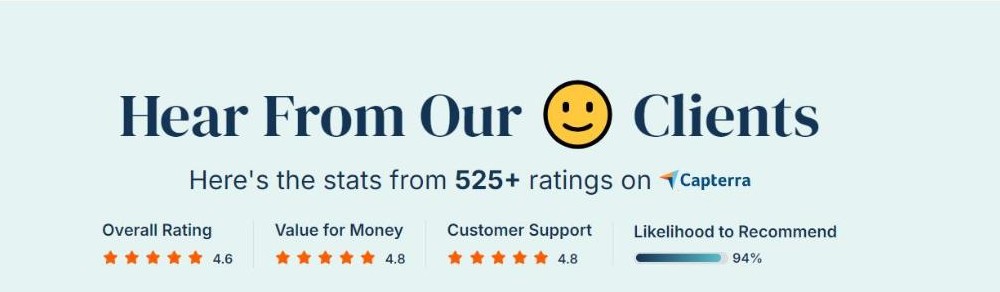
The plans page carries a rating band, and it names its source, which is more than many software pages do. The figures are attributed to Capterra and drawn from 525 or more ratings: an overall rating of 4.6, value for money at 4.8, customer support at 4.8 and likelihood to recommend at 94 per cent.
The rating band on the plans page, with Capterra named as the source.
Directly above that band, in larger type, is a separate headline: 95 per cent of members say DesignFiles is worth every penny. The two numbers sit close together and look like one claim, but one is a Capterra metric with a stated sample size and the other is an unsourced in-house figure. Treat the 4.6 as the number a buyer can go and verify.
Two operational figures from the FAQ are easy to check against your own experience: setup is said to take five to ten minutes, and the average gap between signing up and sharing a first design is given as 3.2 days. Branding can be swapped for your own logo and colours, which matters for anything in DesignFiles procurement a client or vendor will see.
Who each plan fits
The feature table makes this unusually easy to answer, because there is only one DesignFiles procurement question to resolve and it has nothing to do with how much design work you do.
Situation
Plan the table points to
Why
E-design packages sold as fixed products, client buys their own furniture
e-Design $55
you never issue a purchase order, so none of the eleven DesignFiles procurement rows apply
Full service work, you place the orders and bill the client
Full Service $75
quotes, invoices, purchase orders, spec sheets and the tracker are all up here
Taking payment by bank transfer rather than card
Full Service $75
ACH appears only in the Full Service payment row
Books kept in QuickBooks Online
Full Service $75
the integration and financial reporting are both Full Service rows
Billing time as well as product
Full Service $75
Time Tracker, Timed Services and Flat Rate Services sit on that side
Large team, custom terms
Enterprise
pricing is not published; the page offers a call
Read straight off the published comparison table rather than inferred.
The honest summary: if your business model never touches a purchase order, the $55 plan is the whole design product and you lose nothing. The moment you buy on behalf of a client, every DesignFiles procurement tool you need is on the other side of a $20 line, with no partial route across it.
The short version on DesignFiles procurement
DesignFiles publishes more of its own detail than most platforms in this category, and it holds up when read closely: the comparison table is honest about the split, the feature pages describe mechanisms rather than outcomes, the security overview names a limitation most pages would leave out, and the rating band names its source. The gap between the 90-day guarantee and the discretionary refund policy in the terms is the one thing to settle in writing before paying.
Clearest strength: the whole design toolkit is on both plans, so the upgrade question is only about DesignFiles procurement
Best-documented feature: purchase orders generated from an approved quote, still linked to that quote and invoice
Most practical detail: one always-current spec sheet per project, shared as a live link
Check before paying: whether the 90-day guarantee is written into your agreement
Ask in the demo: how much of the DesignFiles procurement order tracker a client actually sees
Overall: 4.3 / 5. A focused, well-documented platform with a pricing page easier to read than most, marked down slightly because the refund promise on the marketing page is not the refund promise in the terms, and because a security overview last updated in 2021 carries a lot of weight for a product holding vendor and client financial records. If you run full service projects, DesignFiles and its procurement tools are worth an hour and a demo call.
Disclosure: this article contains affiliate links. If you subscribe through them, Review King may earn a commission at no extra cost to you. Visit DesignFiles
The iPhone 18 no ports theory is suddenly everywhere. A video making the rounds on TikTok and social media appears to show something startling: an iPhone — labeled as the “iPhone 18” — charging through a small magnetic connector instead…
Hottest fashion trends 2026 reviewed honestly — which trending styles are actually wearable, which are overhyped, and what’s worth buying right now in the US market. Quick Verdict: 2026’s biggest fashion trends fall into two camps: genuinely wearable evolutions of…
PS5 Pro review 2026 — I tested it for 30 days. Here’s the honest verdict on performance, graphics, and whether upgrading from a standard PS5 is actually worth the money. Quick Verdict: The PS5 Pro is the most capable PlayStation…