Planify Pro advertises plans “from $8.33/month”. That number is real, and it is also the one plan on the price list that is not allowed to sell anything. If you are here because you want to build an Etsy or Amazon KDP planner shop, the figure that matters to you is $179.40 a year — and possibly $349. This review works through what each tier actually buys, what the commercial licence covers, and the two questions the company’s own documentation does not answer.
Planify Pro Review 2026: the Short Verdict
What it is: a browser-based planner design tool — 7,000+ templates across 50+ collections, drag-and-drop widgets, PDF export for print or for GoodNotes.
Who it is for: Etsy and KDP sellers building a planner catalogue, and hobbyists who want a planner built exactly their way.
The two features that justify it: one-click dated planner generation and automatic hyperlinking on export.
Real entry price to sell: $179.40 a year, not $99.99 and not $8.33 a month.
Track record: trading since 2020, “2,000+ creators” by its own count.
Biggest gap: no published refund policy, and no answer anywhere to what happens to your right to sell if you cancel.
Our rating: 3.5 out of 5.
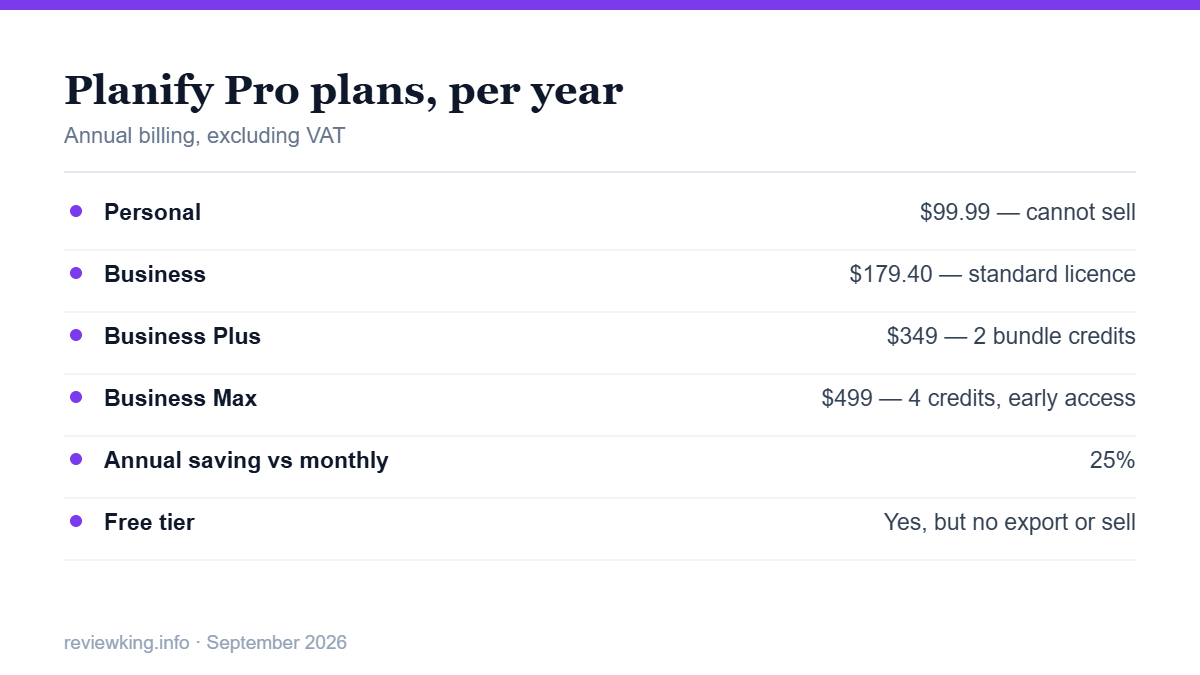
All four tiers, annual price and what changes between them.
The Four Plans, and Which One You Actually Need
Planify Pro sells four tiers. Annual billing saves 25% against monthly, and the prices below exclude VAT:
Personal — $99.99/year ($8.33/month). Full editor, clickable PDFs, 200 pages per planner, 5 GB storage, 10 translations a month. Licence is personal use only. You cannot sell.
Business — $179.40/year ($14.95/month). Adds the standard commercial licence, the free bi-weekly bundle drop, 450 pages, 10 GB, 20 translations.
Business Plus — $349/year ($29.08/month). Adds 2 Bundle Credits a month, 700 pages, 50 GB, one-click re-theming and monthly market trend reports.
Business Max — $499/year ($41.58/month). Adds 4 Bundle Credits, early bundle access, 1,000 pages, 100 GB, 100 translations.
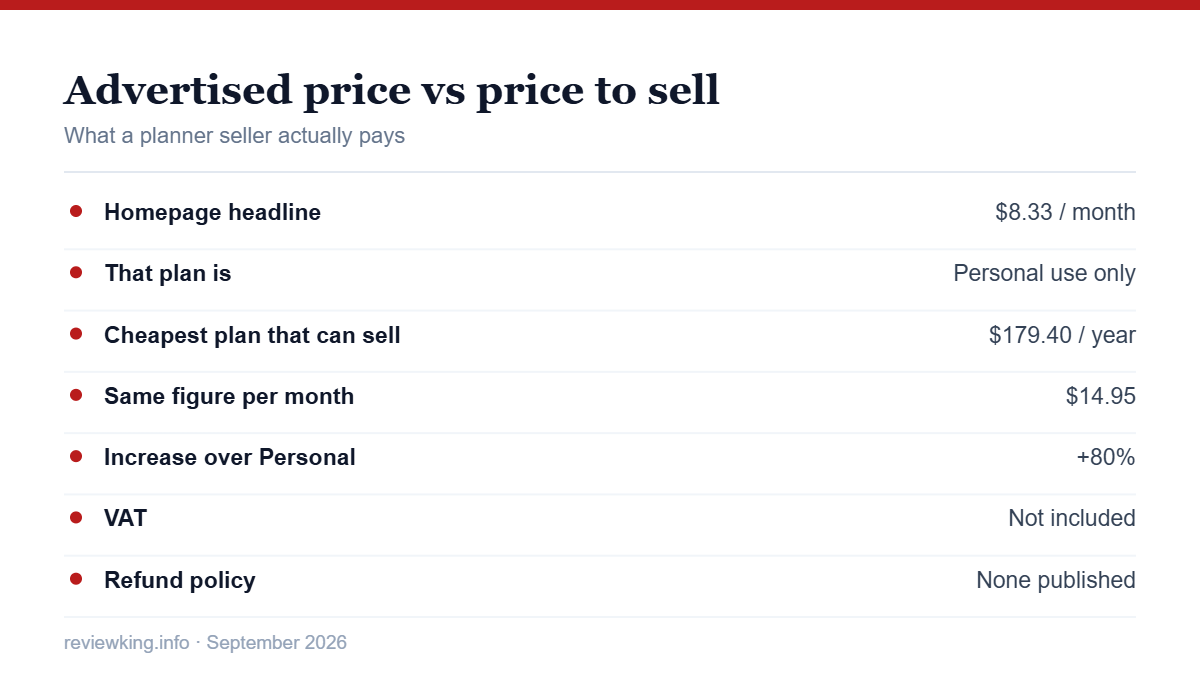
The jump that matters in Planify Pro pricing is Personal to Business: $79.41 a year, an 80% increase, and it is the difference between a hobby and a shop. Planify Pro is not hiding this — the pricing page states plainly that the Personal licence is “Personal only” — but the homepage headline is the $8.33 figure, and a reader skimming it will not realise the plan attached to it cannot be used commercially. That is the single most important thing to know before you sign up, and you can check the current tier prices yourself before committing.
Planify Pro also runs a free tier with no time limit. You can explore the editor and design with it, but saving, exporting and selling all require a paid plan — so treat it as a look around rather than a trial you can finish a product in.
The advertised price versus the price to actually sell.
The Two Features That Earn the Money
Most of what Planify Pro does — templates, drag-and-drop, colour and font control — you could approximate elsewhere. Two things you could not, and they are the reason the product exists.
One-click dated planner generation. Pick a start month and an end date, press one button, and the whole dated planner is stamped out — every month, week and day with the correct dates. Anyone who has built a 12-month planner in Canva by typing dates into hundreds of text boxes will understand immediately what this is worth. It is the difference between an afternoon and a few seconds.
Automatic hyperlinking on export. A digital planner that does not link is a stack of images. Planify Pro hyperlinks every tab, section and page automatically so the file behaves like an app inside GoodNotes or Notability. On a 50-page planner that is a couple of hundred links you would otherwise place by hand — and every one of them is a chance to ship a broken product to a paying customer.
Around those two features Planify Pro stacks 7,000+ templates in 50+ collections, with two to four new collections a month, plus a widget library of stickers, trackers and tabs that is colour-coordinated with each collection. Export is print-ready PDF in A4, US Letter, half-letter and custom ring-bound sizes.
What the Commercial Licence Actually Covers
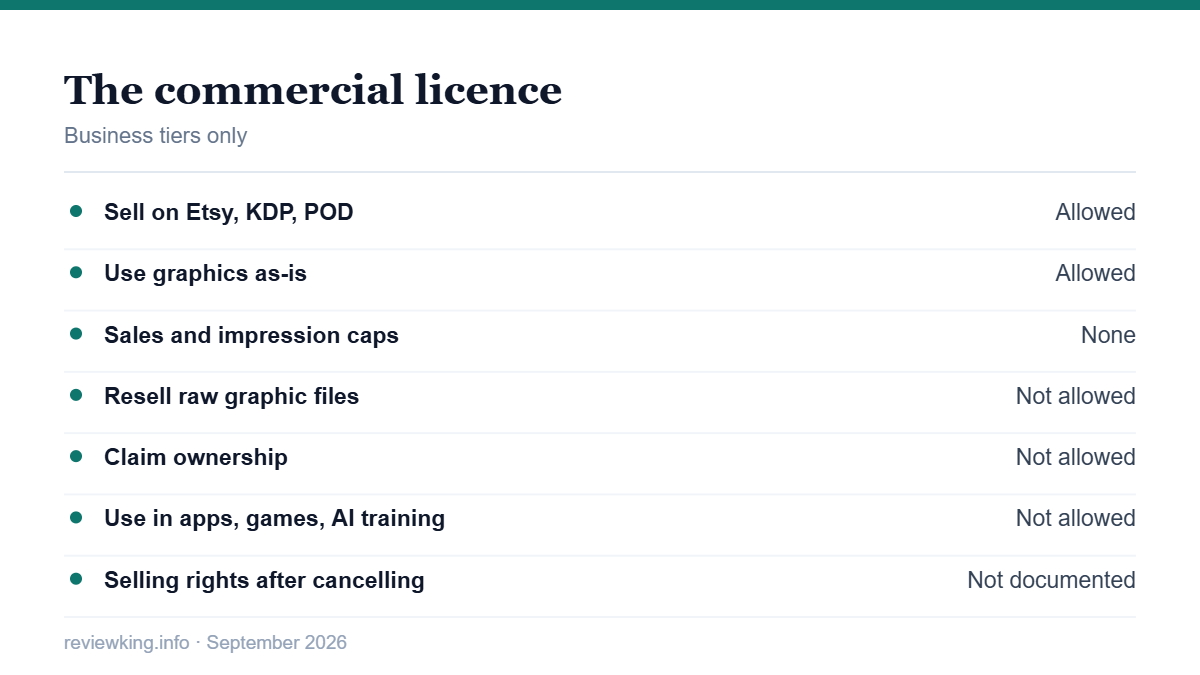
This is where Planify Pro is genuinely more generous than most graphic marketplaces, so it deserves saying clearly. On a Business plan you may:
Sell unlimited physical and digital products — sticker sheets, dashboards, wall art, KDP books, eBooks, and print-on-demand items such as mugs, shirts and tote bags.
Use graphics as-is, with no requirement to modify them first — unusual, and a real time saver.
Advertise and promote with the graphics with no impression caps and no sales caps.
Sell on Etsy, Amazon KDP, Redbubble, Zazzle, Printful or your own store.
The Planify Pro restrictions are reasonable and clearly stated: you may not resell the raw graphic files or bundle them as a standalone digital product, you do not acquire ownership (Planify Pro keeps the copyright and grants usage rights), and the graphics may not be used in apps, games, or as AI training data.
The licence in one card: allowed on the left, not allowed on the right.
The Questions the Documentation Does Not Answer
We read the pricing page, the commercial licence guide, the cancellation help article, the account dispute policy and the full terms of service. Three things are missing, and for a subscription a business depends on they matter.
What happens to your right to sell if you cancel. This is the most important question an Etsy seller can ask, and the licence FAQ does not address it. If your subscription lapses next year, can you keep selling the twenty listings already in your shop? Ask support and get the answer in writing before you build a catalogue.
Refunds. There is no refund policy on the pricing page, in the cancellation article, or anywhere in the terms of service. The cancellation guide explains which button to press and nothing else — no refund terms, no notice period, no word on what happens to your saved designs.
What the licence tiers mean. The comparison table labels the licence “Standard” on Business, “Premium” on Business Plus and “Scale” on Business Max, but nowhere explains how the three differ. If you are choosing between $179 and $499, that is precisely the line you need explained.
One more thing worth knowing: the free bi-weekly bundle drops are downloadable only while their window is open. Miss a fortnight and that bundle is gone unless you spend a Bundle Credit, which only Business Plus and above receive. Bundles you unlock with a credit are yours to keep and re-download even after cancelling; the free drops are not.
Two Caveats About the Marketing
The comparison table is against the wrong opponents. Planify Pro compares itself with Canva, PowerPoint and InDesign, and wins comfortably. But those are general design tools that were never built for planners — of course they lose. The table does not compare Planify Pro with any other planner-specific tool, which is the comparison a buyer actually needs.
Independent coverage is thin. There is no Trustpilot profile for planifypro.com, and a search for reviews returns mostly the company’s own blog alongside affiliate posts. This article is affiliate-linked too, so apply the same discount to it. The absence of independent reviews is not evidence of a problem — the product is niche and the user base is small by the company’s own count — but it does mean you are relying on the vendor’s description more than you would with a mainstream tool.
Who Planify Pro Is Right For
A good fit if: you are building a planner catalogue to sell, you have been dating planners by hand or wiring hyperlinks one at a time, and you will list enough products for $179.40 a year to be a rounding error against your revenue. At roughly $15 a month it needs to replace only a few hours of manual work to pay for itself.
A poor fit if: you want one planner for yourself and would rather pay once — $99.99 a year for a personal planner is a lot when the same money buys several finished planners outright. Also a poor fit if you need certainty about post-cancellation selling rights before you commit, since that certainty is not currently published.
Bottom Line
Planify Pro solves two specific, genuinely painful problems for planner sellers, and the commercial licence attached to it is more permissive than most. What lets it down is not the product but the paperwork: a headline price that belongs to a plan you cannot sell with, no published refund policy, unexplained licence tiers, and silence on what happens after you cancel.
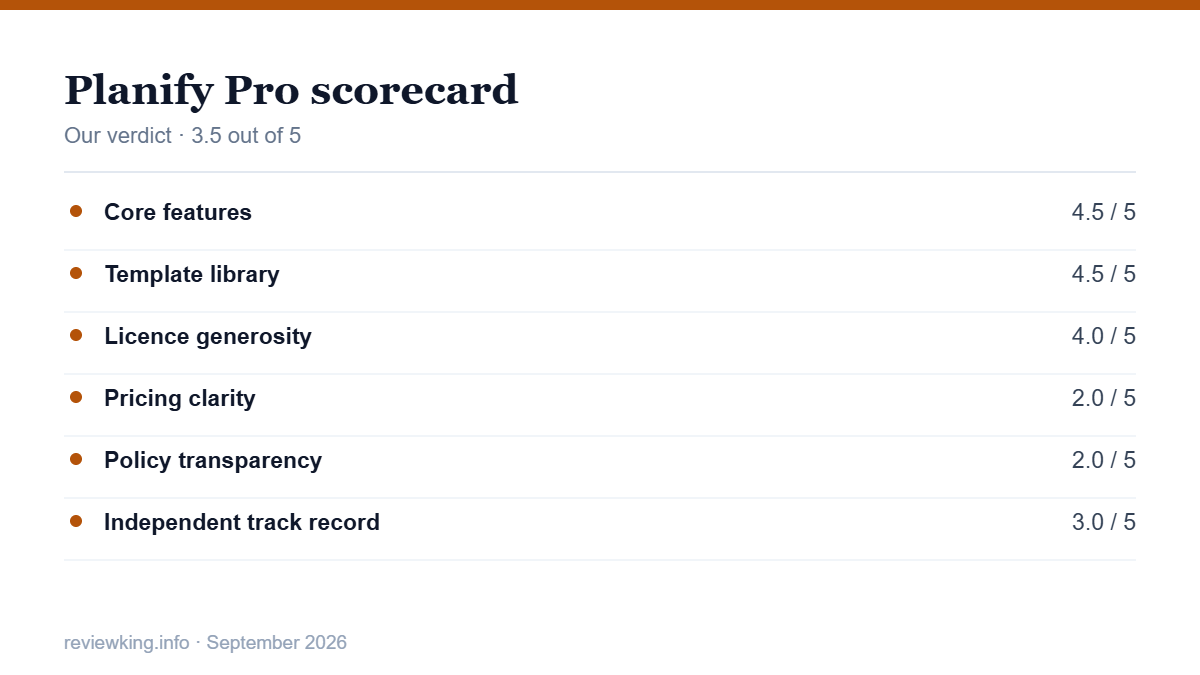
Our rating is 3.5 out of 5. If you are selling, budget $179.40 a year rather than the advertised figure, and email support two questions first: what happens to my selling rights if I cancel, and what is the refund policy. You can try the free tier and the editor before paying anything, compare the four plans side by side, or browse the template collections to see whether the styles suit your shop.
Our scorecard for Planify Pro.
Want the design side rather than the numbers? Our Planify Pro templates guide covers the 7,000-template library, one-click dated planners and automatic GoodNotes hyperlinking.
Planify Pro FAQ
How much does Planify Pro cost?
Four annual tiers, excluding VAT: Personal $99.99, Business $179.40, Business Plus $349 and Business Max $499. Monthly and three-month billing exist, and annual saves 25%.
Can I sell planners made on the cheapest plan?
No. The Personal plan at $99.99 a year is licensed for personal use only. Selling requires a Business tier, which starts at $179.40 a year.
Does Planify Pro have a free plan?
Yes, with no time limit, but it is a look around rather than a working trial: saving, exporting and selling all require a paid plan.
Can I sell Planify Pro planners on Amazon KDP?
Yes. The Business commercial licence covers KDP books, Etsy listings, your own store and print-on-demand platforms including Redbubble, Zazzle and Printful, with no cap on sales.
What can I not do with the graphics?
You cannot resell the raw files or bundle them as a standalone digital product, you do not own the copyright, and the graphics may not be used in apps, games or as AI training data.
Is there a refund if I change my mind?
We could not find a published refund policy in the pricing page, the cancellation guide or the terms of service. Ask support in writing before paying for an annual plan.
The iPhone 18 no ports theory is suddenly everywhere. A video making the rounds on TikTok and social media appears to show something startling: an iPhone — labeled as the “iPhone 18” — charging through a small magnetic connector instead…
Hottest fashion trends 2026 reviewed honestly — which trending styles are actually wearable, which are overhyped, and what’s worth buying right now in the US market. Quick Verdict: 2026’s biggest fashion trends fall into two camps: genuinely wearable evolutions of…
PS5 Pro review 2026 — I tested it for 30 days. Here’s the honest verdict on performance, graphics, and whether upgrading from a standard PS5 is actually worth the money. Quick Verdict: The PS5 Pro is the most capable PlayStation…