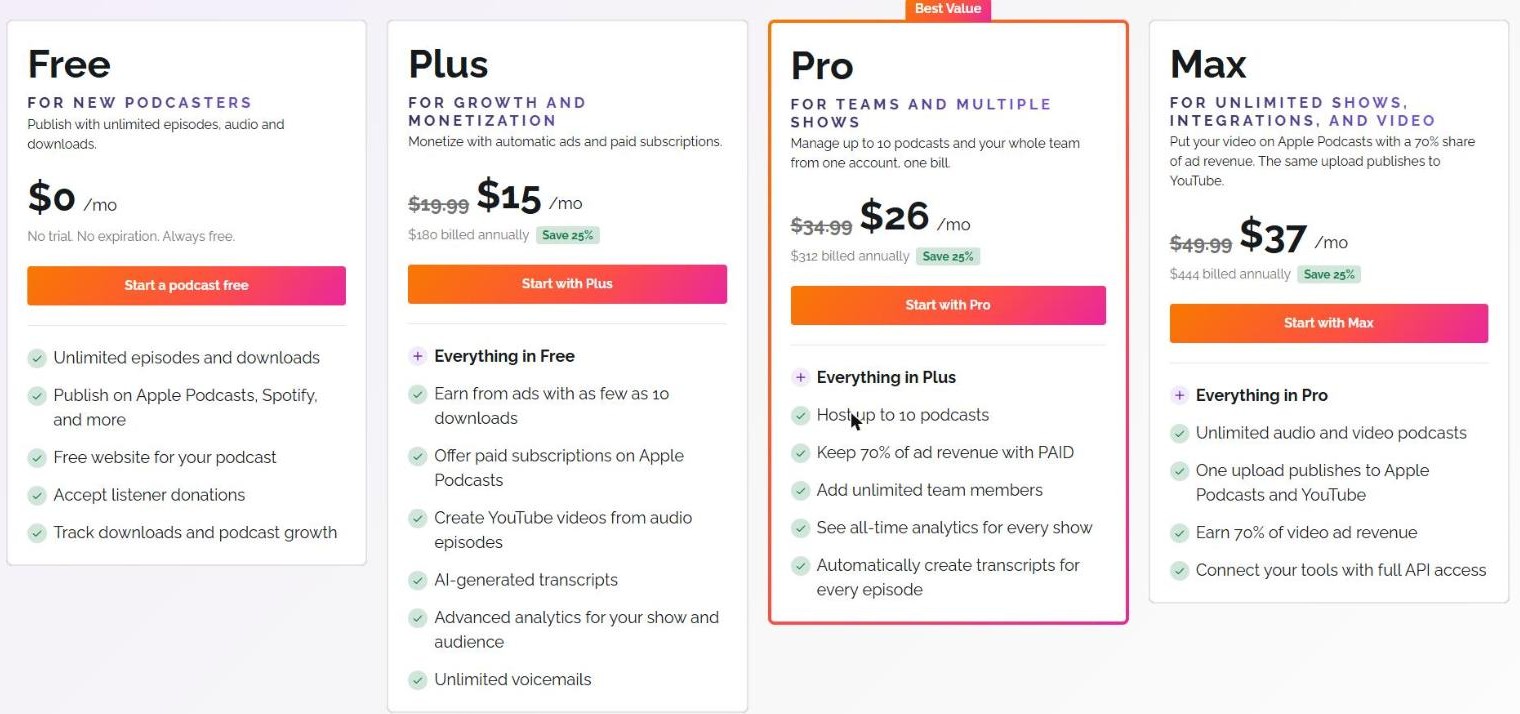
RSS.com is a podcast host built around unlimited episodes and downloads on every plan, including the free one (screenshot from rss.com).
Disclosure: Some links in this article are affiliate links. If you sign up or buy through them, Review King may earn a commission at no extra cost to you. This does not change how we review or score a product.
Most podcast hosts sell you storage and bandwidth. RSS.com sells something else: every plan on the page, the free one included, carries unlimited episodes, unlimited audio and unlimited downloads. Once storage stops being the meter, the tiers must be separated by something else, and what separates them is the question here.
This is a look at RSS.com pricing specifically, not a general tour of the platform. We read the plan cards, the comparison grid, the PAID monetization page, the migration page and the Terms of Service, then did the arithmetic those pages leave to the reader.
RSS.com pricing at a glance: four plans, two billing cycles
RSS.com pricing runs to four tiers, each quoted two ways. The page opens on the annual view with a toggle top right to flip to monthly. Flipping it is the fastest way to see what you are actually charged, because the big number on every card is a monthly-equivalent figure even when the plan is billed once a year.
The four plan cards at annual rates. The struck-through figures are the monthly prices (screenshot from rss.com).
Plan
Monthly
Annual rate
Billed annually
Headline audience
Free
$0
$0
Nothing
For new podcasters
Plus
$19.99/mo
$15/mo
$180
For growth and monetization
Pro
$34.99/mo
$26/mo
$312
For teams and multiple shows
Max
$49.99/mo
$37/mo
$444
For unlimited shows, integrations, and video
All RSS.com pricing is quoted in US dollars and Pro carries a “Best Value” ribbon. Above the cards sits a one-line summary of the commercial terms: “Cancel anytime. 30-day money-back guarantee on paid plans.” That sentence returns later, because it is the one claim here we could not find anywhere in the Terms of Service.
What the annual “Save 25%” badge in RSS.com pricing really works out to
Each paid card in RSS.com pricing wears an identical green “Save 25%” badge. Run the numbers from the company own figures and the badge turns out to be a floor on two tiers and, by a hair, a ceiling on the third.
Plan
Monthly price
Annual rate
Actual discount
12 months monthly
Annual total
You keep
Plus
$19.99
$15.00
24.96%
$239.88
$180.00
$59.88
Pro
$34.99
$26.00
25.69%
$419.88
$312.00
$107.88
Max
$49.99
$37.00
25.98%
$599.88
$444.00
$155.88
Twenty-five per cent off $19.99 is $14.9925. Rounded to a clean $15, the Plus subscriber gets 24.96%, a difference of nine cents across a year. The money is irrelevant; the direction is the point. The cheapest tier is the only one in RSS.com pricing that lands under the advertised figure, while Max clears it at 25.98%. Nothing is wrong here, it is simply rounder on the page than in the arithmetic, and the annual commitment is worth about two and a half months of service on every tier.
The free tier: what $0 buys in RSS.com pricing, and what pays for it
The Free card is the most generous rung in RSS.com pricing on paper: unlimited episodes and downloads, publishing to Apple Podcasts and Spotify, a free website, listener donations, download tracking. It closes with “No trial. No expiration. Always free.”
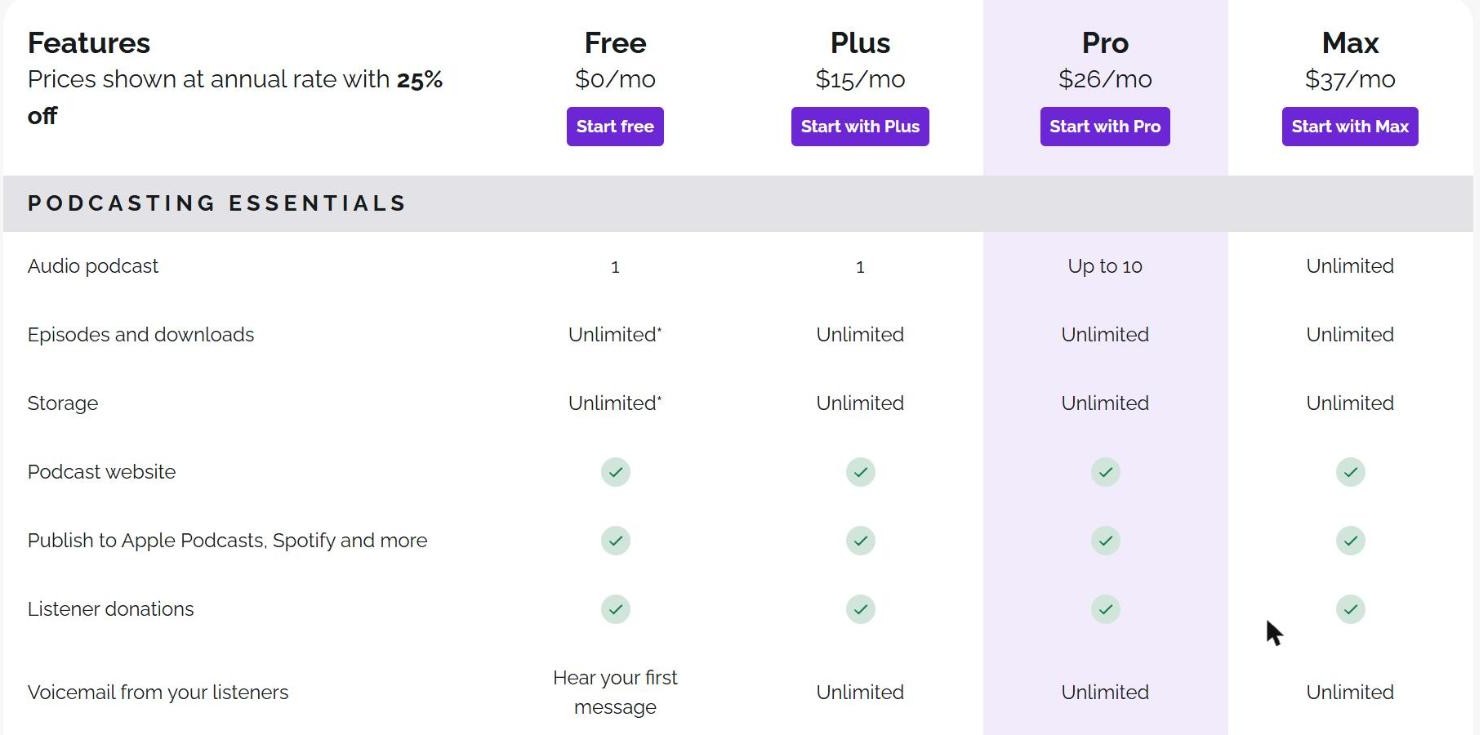
The podcasting essentials block of the comparison grid. Note the asterisks beside the free tier entries (screenshot from rss.com).
The Terms of Service explain the economics behind that. In the Consideration section the company states that hosting and distribution for non-paying accounts “at no charge is supported, in whole or in part, by advertising, and that the advertising rights granted to RSS America under this Agreement form part of the consideration for such hosting and distribution.”
The Advertising section is specific. On a non-paying account the company and its partners may insert ads into audio and video content, RSS feeds, episode files, players and podcast websites, and may add promotional text, links or images to show descriptions and episode notes, which is what third-party apps display. Placement, format and frequency sit at the company discretion, and it reserves the right to change any of it “without notice to you and without amending this Agreement.”
Ads on Non-Paying Accounts cannot be disabled or removed by you… You may stop the insertion of Ads under this paragraph (b) by subscribing to a Paid Plan or by deleting the applicable Content or your Account.
One more line matters: the PAID revenue share “does not apply to any Ads served on a Non-Paying Account.” So the entry rung of RSS.com pricing is ad-supported hosting where the ads run on your show and the revenue stays with the host. That is an ordinary business model, written down plainly, which is more than many hosts manage. It is simply not what the Free card communicates on its own, and it should be read as a trade rather than a gift.
The credit-card asterisk hiding under the RSS.com pricing grid
Look closely at the free column and two entries carry a small asterisk: “Episodes and downloads: Unlimited*” and “Storage: Unlimited*”. The footnote sits in grey type at the bottom of the RSS.com pricing comparison grid, below the final row.
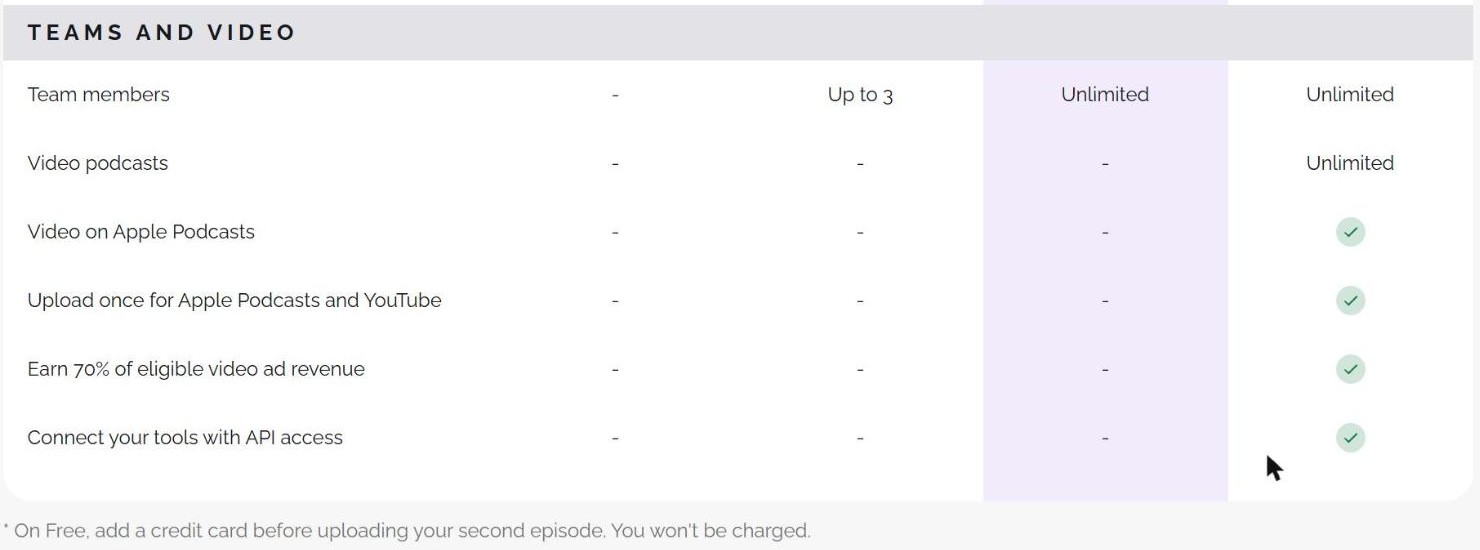
The teams and video rows, with the free-plan footnote set below the grid (screenshot from rss.com).
On Free, add a credit card before uploading your second episode. You will not be charged.
The FAQ confirms it: asked whether you can start without a credit card, the answer is yes for the first episode, and “you will need to add one before uploading your second episode, but you will only be charged if you choose to upgrade. Free stays $0.” Episode one needs no card; episode two does. That is a real distinction from hosts demanding payment details at signup, and equally a real distinction from “no card required” as most people hear it.
Plus at $15 a month: where monetization starts in RSS.com pricing
Plus is the first paid rung in RSS.com pricing and the first where money flows the other way. On top of everything in Free it adds programmatic ads qualifying at “as few as 10 downloads”, paid subscriptions through Apple Podcasts, YouTube videos generated from audio, AI-generated transcripts, advanced analytics and unlimited listener voicemails.
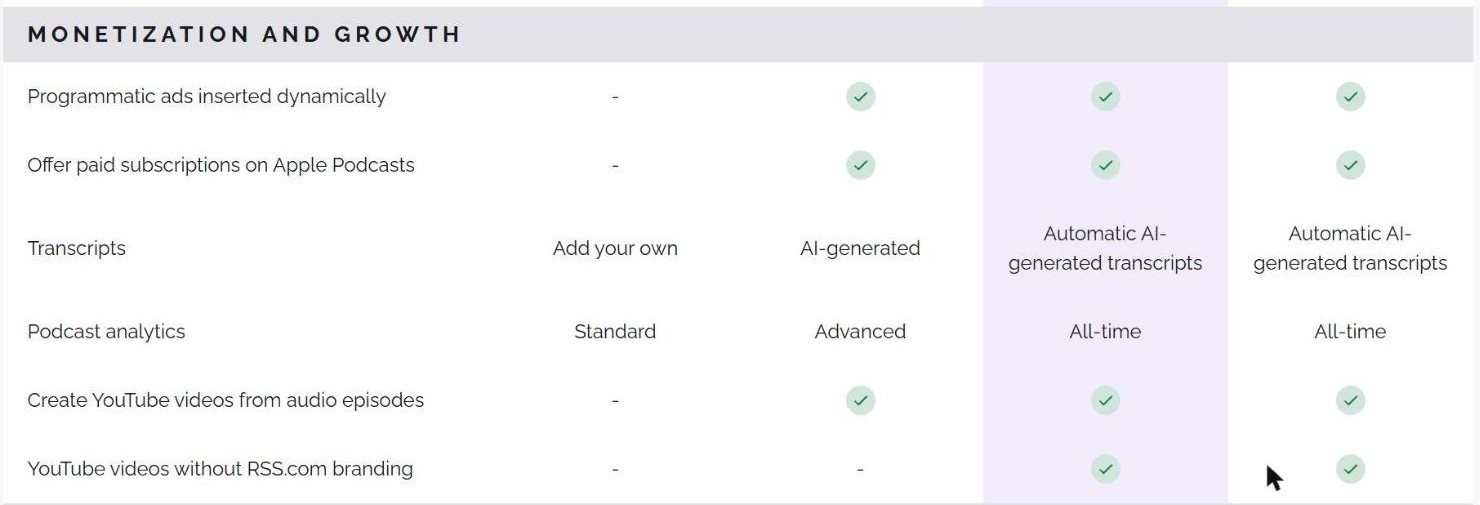
The comparison grid fills in what the card compresses. Transcripts move from “add your own” to AI-generated, analytics from “Standard” to “Advanced”, voicemail from one message to unlimited, and team members appear capped at three. One row flips that the card never mentions: creating YouTube videos from audio is a Plus feature, but “YouTube videos without RSS.com branding” stays a dash until Pro.
Monetization and growth rows. Programmatic ads turn on at Plus; unbranded YouTube video waits for Pro (screenshot from rss.com).
For a solo podcaster with one show, Plus at $180 a year is RSS.com pricing in miniature: you are not paying for capacity, you are paying for the tools that turn an audience into revenue, plus the right to stop being the product.
Pro at $26 a month: ten shows, one bill, unlimited seats
Pro is the point in RSS.com pricing pitched at teams and networks. The audio podcast row jumps from one show to “Up to 10” and team members from three to unlimited. Analytics become all-time rather than windowed, transcripts automatic for every episode, and YouTube exports lose the host branding.
This is the largest single jump in the RSS.com pricing ladder. Free and Plus both cap you at one show, so a producer with two podcasts has no middle option: the second show costs $11 a month more and brings eight further slots with it. For a small network, Pro at $312 a year against three or four separate Plus subscriptions is the calculation that makes the tier.
The Pro card also carries the line “Keep 70% of ad revenue with PAID”, which is what sent us to the monetization documentation, because where the RSS.com pricing page puts that promise and where the feature page puts it are not the same place.
Max at $37 a month: video, API access and the 70% video split
Max is the only tier in RSS.com pricing that unlocks video. Video podcasts, video on Apple Podcasts, “Upload once for Apple Podcasts and YouTube”, “Earn 70% of eligible video ad revenue” and API access are dashes on every cheaper tier and ticks here. Audio podcasts go from ten to unlimited at the same time.
The single-upload workflow is the headline: one video file published to both Apple Podcasts and YouTube removes a duplication step that otherwise eats an hour a week. The API is the other draw, and the documentation is direct about its maturity. The feature page states it launched in December 2025, is in beta, and that “a stable version 1.0 will be announced once the beta period wraps up.” The Max card inside RSS.com pricing sells it as “full API access”; the feature page calls the same thing a beta.
The Terms add something the RSS.com pricing page does not. Max is defined there as an “Ad-Supported Plan”: advertising in hosted video content is “a standard, non-optional feature of the plan”, enabled automatically on upload, and it “cannot be disabled or removed by you for so long as you subscribe to an Ad-Supported Plan”. The 70% video split is the compensation. It is a coherent deal and worth understanding before moving a video catalogue across.
Where RSS.com pricing puts the 70% audio split, and where the feature page puts it
This is the most useful discrepancy we found in RSS.com pricing, and the answer is better than the page suggests. On the plan cards, “Earn from ads with as few as 10 downloads” sits under Plus, while the explicit “Keep 70% of ad revenue with PAID” sits one tier up under Pro. In the comparison grid, “Programmatic ads inserted dynamically” is a tick for Plus, Pro and Max alike, but no row anywhere states the audio revenue share. The only split row in the whole RSS.com pricing table is “Earn 70% of eligible video ad revenue”, and that is Max-only.
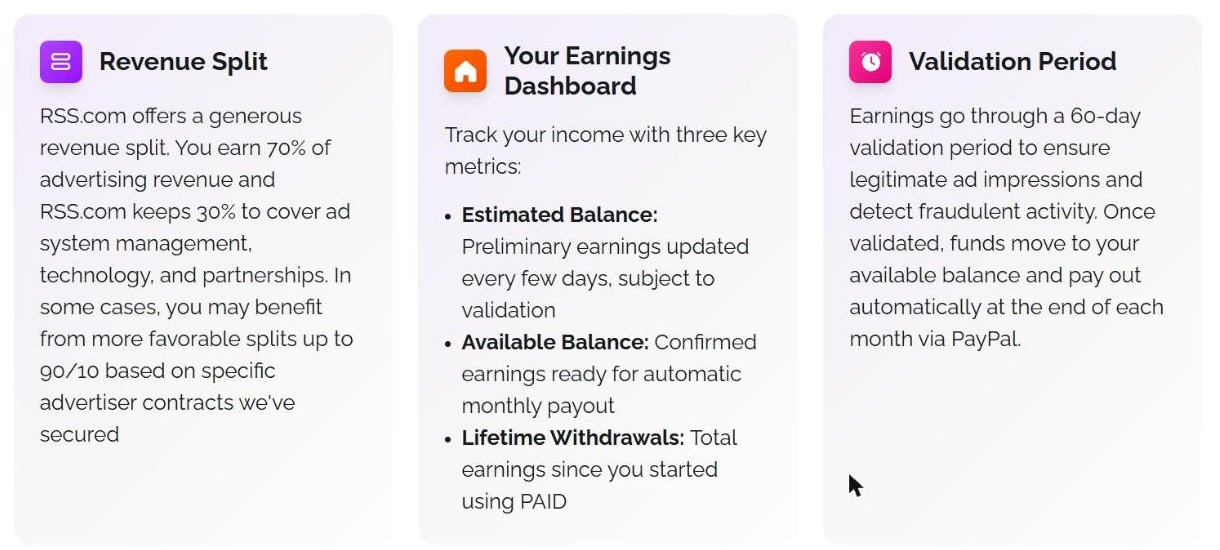
Read the pricing page alone and a reasonable person concludes the 70% audio split begins at Pro. The PAID feature page says otherwise, twice. Its Revenue Split card reads: “You earn 70% of advertising revenue and RSS.com keeps 30% to cover ad system management, technology, and partnerships.” Its FAQ, asked whether PAID covers all plans, answers: “PAID is included in all paid plans for podcasts with at least 10 downloads in the last 30 days.”
The PAID revenue split, earnings dashboard and validation period, as documented on the feature page (screenshot from rss.com).
Both pages are the company own. Neither states a falsehood; RSS.com pricing simply never names the audio split for Plus, and its layout implies a boundary the feature page does not draw. If you are buying Plus for monetization, the feature page is the document that answers your question, and it answers it in your favour. The same card adds that splits can reach 90/10 “based on specific advertiser contracts we have secured”, without naming the conditions.
How PAID works behind the RSS.com pricing line items
PAID, the engine behind several RSS.com pricing line items, stands for Programmatic Ads Inserted Dynamically. Ads are selected per impression through a real-time auction, targeted on listener location, device type, language and content category. The podcaster chooses pre-roll, mid-roll or post-roll, and can exclude categories using IAB classifications, the advertising taxonomy maintained by the IAB Tech Lab and the same framework behind the certified download measurement the analytics pages reference.
The entry requirements are the unusual part: ten downloads in the last 30 days, no minimum episode count, available “worldwide wherever PayPal is supported”. Once activated, ads run across the entire back catalogue rather than new episodes only.
Stage
What the documentation says
Qualify
10 downloads in the last 30 days, no episode minimum
Activate
Enable PAID in the dashboard, accept the PAID Program Terms
Set up payout
Add a PayPal address; a one-cent deposit verifies the account
Estimated balance
Preliminary earnings, refreshed every few days, subject to validation
Validation
60-day window to confirm impressions and screen for fraud
Available balance
Confirmed earnings, paid out automatically at the end of each month
Put the last two rows together and you get a number RSS.com pricing never prints. An impression served on the first of a month does not clear validation until roughly the first of the month two months later, and then waits for that month payout run: up to about 90 days from first ad to first money. For a new podcaster choosing a tier, that lag matters more than the split percentage, because the monetization you are buying on Plus will not offset the subscription until the back half of your first year.
What PAID does not do yet
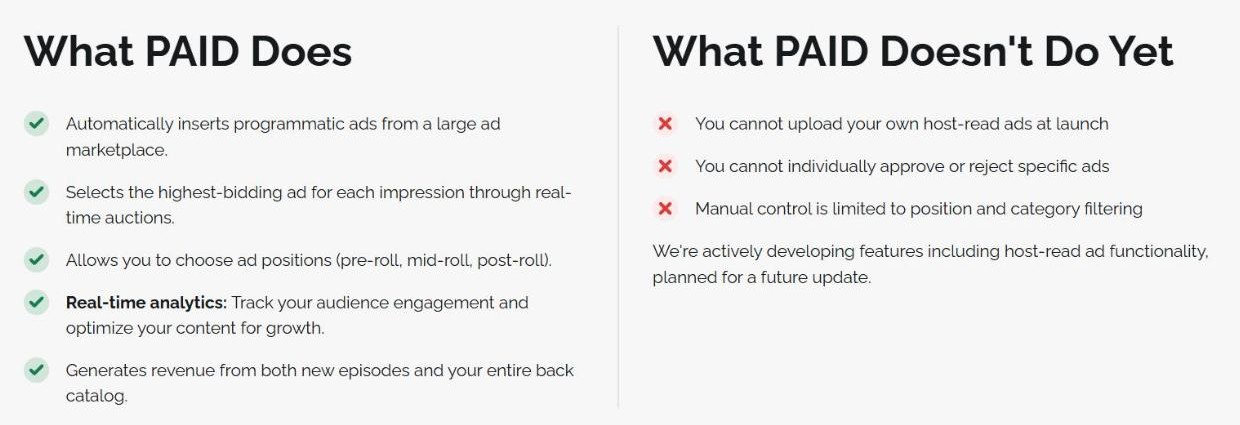
Unusually for anything sold through RSS.com pricing, the feature page carries its own limitations block. Host-read ads cannot be uploaded at launch, individual ads cannot be approved or rejected one by one, and manual control is limited to position and category filtering. Host-read functionality is “planned for a future update.”
The limitations block published alongside the PAID feature set (screenshot from rss.com).
For a show already selling and reading its own sponsorships, that is the gap to plan around: PAID is an extra line rather than a replacement workflow. The documentation says as much, noting it “works alongside sponsorships, donations, premium subscriptions, and other revenue sources.”
What “unlimited” covers in RSS.com pricing, and what it does not
The banner above RSS.com pricing reads “Unlimited episodes and downloads on every plan”, and the FAQ defines it: “RSS.com podcasters enjoy unlimited episodes, audio, and downloads on every plan, including Free. No storage caps, no episode deletion, no monthly upload limits.” That claim holds across the grid, where episodes, storage and downloads read “Unlimited” in all four columns.
The limit that does move is the one the word never covers: the number of shows. One on Free, one on Plus, up to ten on Pro, unlimited on Max. Reading “unlimited” as “as many podcasts as I like” is the single most likely misreading of the whole RSS.com pricing page. A smaller version of the same pattern sits two rows down, where listener voicemail on Free is capped at “Hear your first message” while every paid tier is unlimited.
Migrating in: three months free, priced out
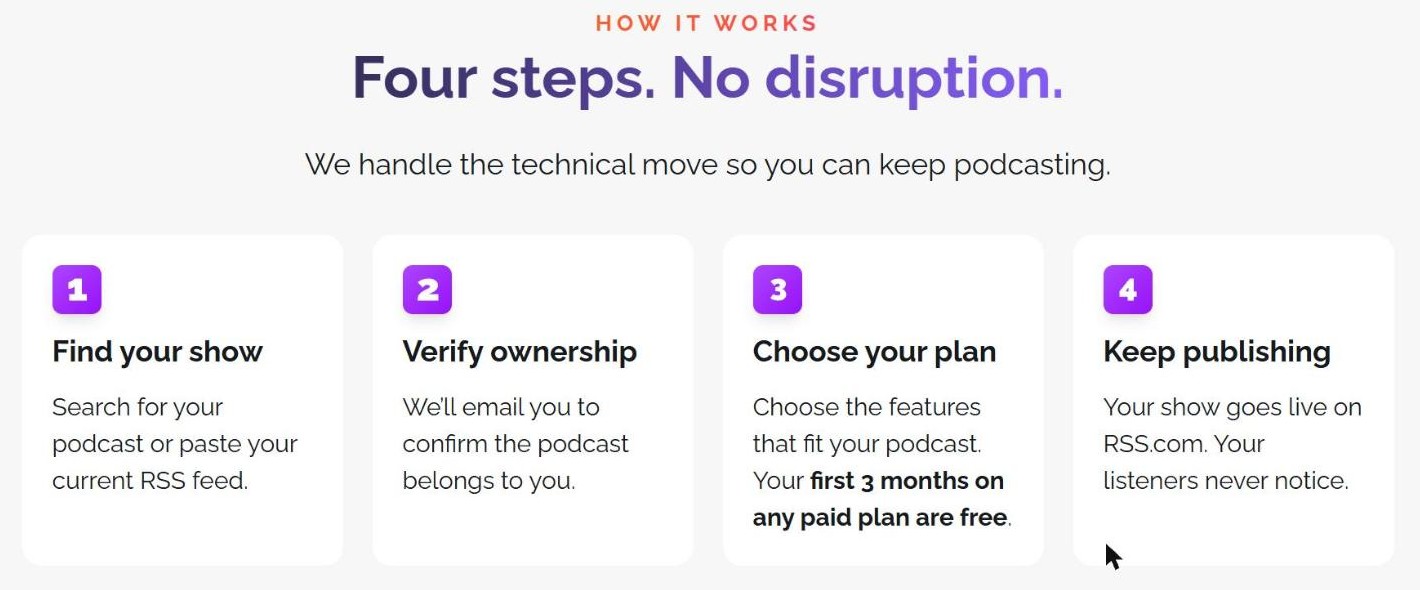
Sitting outside RSS.com pricing itself, the migration page offers three months free on any paid plan for a show moving across, plus a redirect that keeps listeners and apps pointed at the right feed during the transfer. Four steps: find the show or paste the current feed, verify ownership by email, choose a plan, keep publishing.
The four-step migration flow, with the three-free-months offer on step three (screenshot from rss.com).
Plan
3 months at the annual rate
3 months at the monthly rate
Plus
$45.00
$59.97
Pro
$78.00
$104.97
Max
$111.00
$149.97
The offer scales with the tier, so it is worth most to the podcasters most expensive to move. What the page does not specify is how three free months interact with an annual commitment, whether they extend the term or offset the first invoice. That is a question for support before committing a year up front, and it is answered nowhere in the RSS.com pricing documentation we read.
Billing, cancellation and the 30-day guarantee in RSS.com pricing
The headline above the RSS.com pricing cards promises two things: cancel anytime, and a 30-day money-back guarantee on paid plans. The first is documented in the Terms. The second we could not locate there at all.
Cancellation is self-service. Subscriptions renew automatically at the end of each term and you cancel from the Subscription section of the dashboard or by emailing support. The nuance is what cancelling does not do: “While you may cancel your payment subscription prior to the automatic renewal at any time, your subscription shall be discontinued upon the expiration of the then-current subscription term.” You keep the plan until the term runs out.
What happens next connects back to the free tier. The Terms state that if a paid plan “expires, is cancelled, is not renewed, or is downgraded to a Free Plan, your Account will become a Non-Paying Account” at the end of the paid period, and that is the ad-supported status described earlier. Lapsing out of RSS.com pricing is not a pause but a move into a different arrangement, with ads the host sells.
On refunds, a text search of the Terms returns no instance of “30-day”, “money-back” or any refund entitlement for subscriptions. The only refund sentence runs the other way, in the account-deletion clause: “any subscription fees already paid will not be refunded.” We are not suggesting the guarantee goes unhonoured, and support policies often sit outside a contract. The accurate statement is narrower: the guarantee is published in RSS.com pricing, it is not reflected in the binding agreement, and anyone relying on it should get it confirmed in writing before paying for a year. Two smaller points: disputes go to binding arbitration in Delaware administered by JAMS, with a documented opt-out, and the operating company is RSS America, LLC.
Who RSS.com pricing fits
A first-time podcaster testing the idea. Free is the least restrictive entry point in RSS.com pricing, as long as you read it as ad-supported hosting and have a card ready for episode two.
A solo show with a small but real audience. Plus at $180 a year plus PAID at a 10-download threshold is the shortest path from publishing to any revenue at all, if you can wait out the validation window.
A producer running several shows. Pro is the tier RSS.com pricing is really built around: ten shows and unlimited seats for $312 a year is where the per-show cost collapses.
A video-first or tooling-heavy operation. Max is the only route in RSS.com pricing to video, the single Apple-and-YouTube upload and the API, and it accepts non-optional video advertising as part of the bargain.
A show already selling host-read sponsorships. PAID complements that rather than replacing it, since host-read uploads are not supported yet.
Anyone who needs refund terms in writing. Confirm the 30-day guarantee with support before committing to an annual plan, because the Terms do not restate it.
How this review was done
This is a desk review. We did not open an account, upload an episode, enable PAID or request a refund, and nothing above is hands-on testing. Every figure, quotation and feature state came from pages the company publishes: the RSS.com pricing page with its grid and FAQ, the programmatic ads page and its FAQ, the API access page, the migration page and the Terms of Service, all read in late November 2026.
Tables and feature grids were verified visually rather than by scraping, because tick-and-dash states are routinely lost when a page is read as text. The arithmetic in the discount, migration-value and payout tables is ours, derived from the published prices and stated timeframes. Where two company pages describe the same thing differently we quoted both. Plan contents change, so check RSS.com pricing before you buy.
The short version
RSS.com pricing is built around a single idea and carries it the whole way: capacity is not the product, so nothing meters your episodes, your storage or your downloads. What you buy as you climb is monetization, then scale, then video and automation. The ladder is legible and the jumps land in sensible places, with Pro doing the heaviest lifting for anyone past one show.
The documentation is better than average where it usually gets vague: PAID is explained down to the validation window and the payout mechanism, the limitations block exists, and the Terms describe the ad-supported free plan in detail rather than burying it. The places to read twice are where the marketing layer and the contract layer differ in emphasis: the 70% audio split the grid never states, the “full API access” the feature page calls a beta, and the 30-day guarantee the Terms do not mention. None are deal-breakers; all three deserve a confirming email before an annual payment leaves your account.
Overall: 4.6 / 5. RSS.com pricing is transparent where it counts, unusually generous at the entry point, and structured to reward podcasters who grow into it. Compare the current RSS.com plans and start a show if unlimited episodes on every tier is the constraint you have been fighting.
For a solo creator the decision is mostly Free against Plus, and the honest framing is that Free is a trade: ads run on your episodes and the revenue stays with the host. Check what the Plus tier includes if taking that revenue back is the point of paying.
For networks the comparison that matters inside RSS.com pricing is Pro against several Plus subscriptions, and ten shows plus unlimited seats at $312 a year usually wins it on the second show. See how Pro and Max compare on the pricing page before spreading a catalogue across separate accounts.
And if your show already lives elsewhere, the migration offer is worth between $45 and $111 depending on tier, on top of a feed redirect that keeps your audience intact. Start a transfer and claim the three free months if you have been putting the move off.
related products
[rk_latest_products]
// latest news
Stay up to date with the freshest latest industry news from the Review King.
The iPhone 18 no ports theory is suddenly everywhere. A video making the rounds on TikTok and social media appears to show something startling: an iPhone — labeled as the “iPhone 18” — charging through a small magnetic connector instead…
Hottest fashion trends 2026 reviewed honestly — which trending styles are actually wearable, which are overhyped, and what’s worth buying right now in the US market. Quick Verdict: 2026’s biggest fashion trends fall into two camps: genuinely wearable evolutions of…
PS5 Pro review 2026 — I tested it for 30 days. Here’s the honest verdict on performance, graphics, and whether upgrading from a standard PS5 is actually worth the money. Quick Verdict: The PS5 Pro is the most capable PlayStation…