Most WordPress owners meet their backup plugin twice: on the day they install it and on the day something has already gone wrong. WPvivid is built for the second day, and it is unusually generous about the first one, because the parts most people actually need are in the free plugin rather than behind a paywall.
WPvivid Backup and Migration runs on more than 900,000 WordPress sites according to the official plugin directory, which is the same figure the company prints on its own pricing page. This WPvivid review works through what the free plugin covers, what the paid WPvivid tiers add, and what the price list looks like once you do the arithmetic the pricing page does not do for you.
Short version first: the free build already does files and database backups, site-to-site migration, scheduled jobs, six cloud destinations and a staging site in a subdirectory. The paid WPvivid tiers are mostly about incremental backups, finer control over what goes into a backup, rollback, and six more places to send the archive.
What WPvivid actually does
The plugin directory describes the product in one sentence, and it is worth reading carefully because it tells you where the free line is drawn:
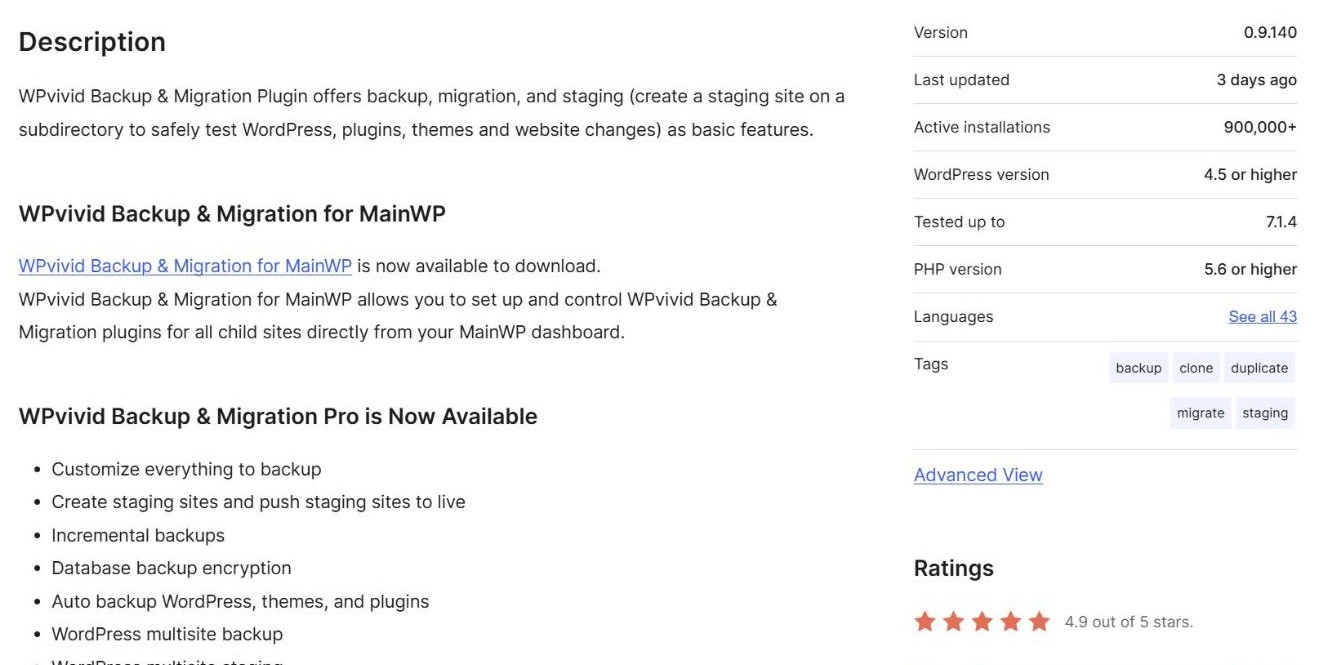
WPvivid Backup and Migration Plugin offers backup, migration, and staging (create a staging site on a subdirectory to safely test WordPress, plugins, themes and website changes) as basic features.
Three WPvivid jobs, then, and all three are listed as basic features rather than upsells. Backup means a copy of your files and your database, on demand or on a schedule, sent to a cloud destination of your choosing. Migration means moving a whole site to a different host or domain, either by uploading a backup or by pairing two sites directly. Staging means a working clone in a subdirectory where you can break things without visitors noticing.
That combination is why the WPvivid plugin tends to be installed before a redesign or a host change rather than after a crash. It is also why the plugin is tagged on the directory with backup, clone, duplicate, migrate and staging rather than with a single word.
What the free WPvivid plugin already covers
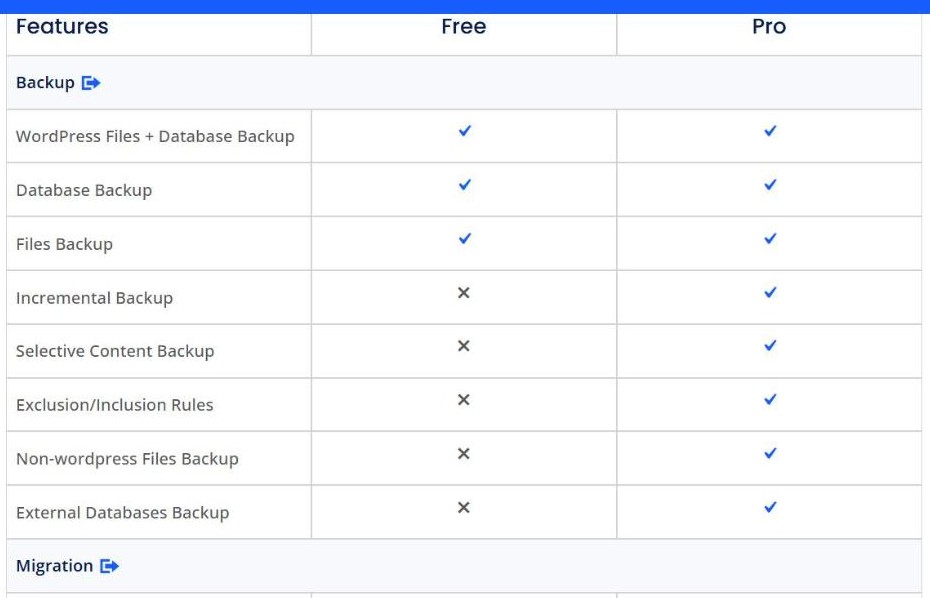
WPvivid publishes a full feature grid comparing the free build against Pro, which is more candid than most plugin vendors are willing to be. In the backup block, three rows carry a tick in both columns: WordPress Files plus Database Backup, Database Backup on its own, and Files Backup on its own.
The backup block of the comparison grid (screenshot from wpvivid.com)
In the WPvivid migration block, both Migration Through Upload and Site-to-Site Auto-migration are ticked for free. In the schedule block, Basic Schedule and Basic Backup Retention Rule are ticked for free. One-click restore is there too. For a site owner whose entire requirement is “take a weekly copy of everything and put it somewhere safe”, the free WPvivid plugin finishes the job without a licence key.
That is the part worth saying plainly, because plenty of backup plugins reserve scheduling or off-site storage for paying users. Here the free WPvivid tier covers the schedule and six storage destinations.
What WPvivid Pro adds on top
The paid WPvivid build is not a different product, it is the same plugin with the advanced rows unlocked. In the backup block alone, five rows are Pro-only:
Incremental Backup – only the changes since the last run, rather than a full copy every time
Selective Content Backup – pick which parts of the site go into the archive
Exclusion and Inclusion Rules – rules rather than manual ticking, which matters once a site has a large uploads folder
Non-WordPress Files Backup – files sitting outside the WordPress install
External Databases Backup – databases the WordPress install does not own
Beyond backup, the paid side adds advanced schedule rules, multiple backup schedules, an incremental backup schedule, rollback of core, plugins and themes, multiple staging sites, pushing a staging site to live, subdomain staging, selective restore, multisite support, database backup encryption, role and capability controls, whitelabel, advanced email notifications and 24/7 ticket support.
The shape of that list is consistent: free handles the whole-site copy, Pro handles the part of the job that gets fiddly once you run more than one site or once the site gets big enough that a full nightly archive stops being reasonable.
Cloud storage: six destinations free, twelve with Pro
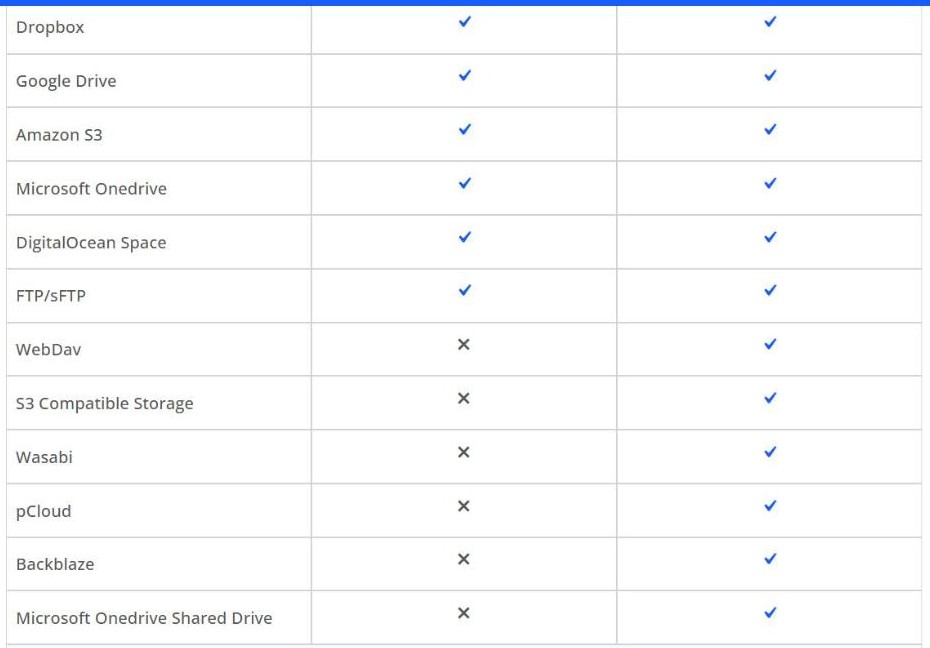
The WPvivid storage block is the clearest illustration of where the line sits, and it happens to split exactly in half.
The cloud storage block of the comparison grid (screenshot from wpvivid.com)
Destination
Free
Pro
Dropbox
Yes
Yes
Google Drive
Yes
Yes
Amazon S3
Yes
Yes
Microsoft OneDrive
Yes
Yes
DigitalOcean Space
Yes
Yes
FTP / sFTP
Yes
Yes
WebDav
No
Yes
S3 Compatible Storage
No
Yes
Wasabi
No
Yes
pCloud
No
Yes
Backblaze
No
Yes
Microsoft OneDrive Shared Drive
No
Yes
Twelve storage rows in the grid, six of them ticked for the free build
Six of the twelve rows are free, and the six free ones are the mainstream services most people already pay for. Note that FTP and sFTP share a single row, so the free side covers two protocols in one tick. The Pro-only six lean towards object storage and cheaper archival tiers, which is what you reach for when the backups get large enough that Dropbox stops being the sensible place to put them.
WPvivid pricing, tier by tier
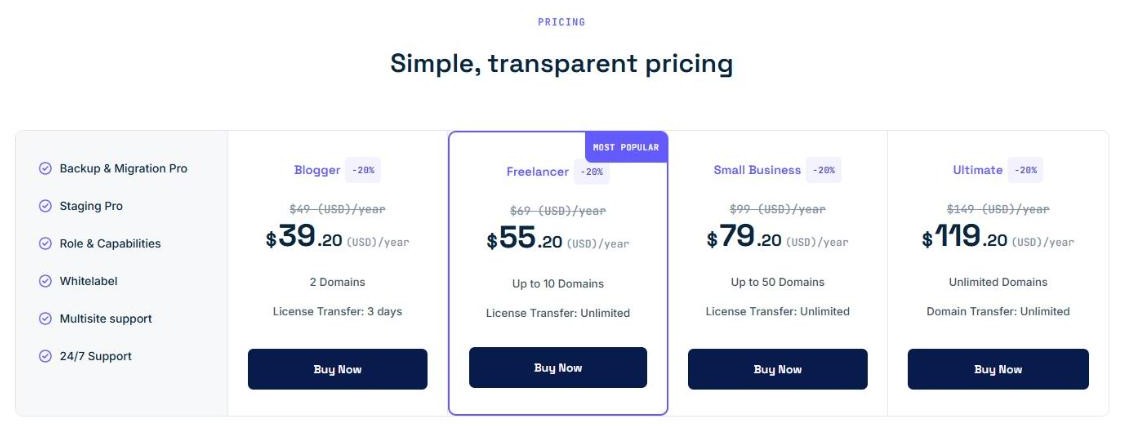
There are four WPvivid tiers and two billing shapes. At the time of writing the published list prices carry a 20 percent discount, shown behind a countdown timer, so both numbers are given below. The tiers differ by how many domains the licence covers, not by which features you get.
The yearly pricing tiers (screenshot from wpvivid.com)
Tier
List price per year
Discounted
Domains
Blogger
$49
$39.20
2
Freelancer
$69
$55.20
Up to 10
Small Business
$99
$79.20
Up to 50
Ultimate
$149
$119.20
Unlimited
Yearly WPvivid pricing as printed on the pricing page
Freelancer is flagged as the most popular WPvivid tier. The WPvivid pricing page lists the same six headline items against all four tiers – Backup and Migration Pro, Staging Pro, Role and Capabilities, Whitelabel, Multisite support, 24/7 Support – so the only thing the money buys as you move up the table is more domains.
The lifetime maths: every WPvivid tier breaks even at two years
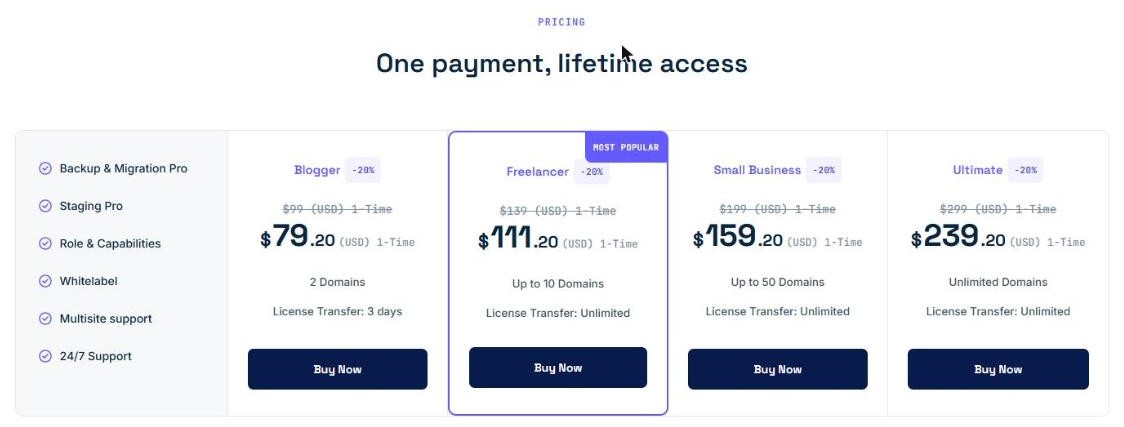
Switch the toggle to Lifetime and the same four WPvivid tiers reappear with one-time prices.
The lifetime pricing tiers, charged once (screenshot from wpvivid.com)
Put the two tables side by side and a pattern appears that the pricing page never states: the lifetime WPvivid price is almost exactly double the yearly price, at every single tier.
Tier
Per year
Lifetime
Break-even
Blogger
$49
$99
2.02 years
Freelancer
$69
$139
2.01 years
Small Business
$99
$199
2.01 years
Ultimate
$149
$299
2.01 years
Lifetime divided by yearly, using the published list prices
The ratios land between 2.007 and 2.021. Because the 20 percent discount is applied uniformly to both columns, the discounted prices give exactly the same ratios: $79.20 against $39.20 is still 2.02, and $239.20 against $119.20 is still 2.01. The sale moves the price but not the decision.
That makes the choice unusually simple to reason about. If the site will still exist in twenty-five months, the lifetime licence is the cheaper line. If you are buying for a client project with a defined end, the yearly one is. The WPvivid lifetime tiers are labelled 1-Time on the page, so there is no renewal to forget about either way.
Cost per domain falls from $24.50 to $1.98
The second piece of arithmetic the page leaves to the reader is what each WPvivid tier costs per site. Dividing the yearly list price by the domain allowance gives this:
Tier
Per year
Domains
Per domain per year
Blogger
$49
2
$24.50
Freelancer
$69
10
$6.90
Small Business
$99
50
$1.98
Ultimate
$149
Unlimited
depends on your portfolio
Yearly list price divided by the number of domains each tier allows
Two steps stand out. Moving from Blogger to Freelancer costs $20 more and multiplies the allowance by five, from two domains to ten. Moving from Freelancer to Small Business costs $30 more and multiplies it by five again, from ten to fifty. The per-domain cost collapses by about 92 percent across those two steps.
On the lifetime column the same division is even starker: Small Business at $199 covers fifty domains once, which is $3.98 per site for the life of the licence, or $3.18 at the discounted $159.20. Anyone maintaining more than three or four sites is very likely paying less per site on a bigger tier than on the entry one.
The one line that separates Blogger from the rest
The four WPvivid tiers share a feature list, but they do not share one small line underneath the domain count. Three of them read License Transfer: Unlimited. Blogger reads License Transfer: 3 days.
That is the entry tier saying you can move the licence between sites only within a three-day window, where the other three let you move it as often as you like. For someone who builds a site, hands it over and builds another, that single line is arguably a bigger practical difference than the jump from two domains to ten – and it is printed in small type under the price rather than in the feature grid.
Two labels for the same row
One small inconsistency is worth recording, since it is visible on the same page within two clicks. On the Yearly tab the Ultimate tier reads Domain Transfer: Unlimited. Switch to the Lifetime tab and the same Ultimate tier reads License Transfer: Unlimited. The three other tiers say License Transfer on both tabs.
Nothing in the rest of the page suggests these are different things, and the most likely reading is simply that one cell was typed differently from the others. It is noted here rather than resolved, because resolving it would mean guessing at an intention the page does not state.
Staging, migration and rollback
Staging is the feature that turns the WPvivid backup plugin into a workflow tool. The free build creates a staging copy in a subdirectory, which is enough to test a plugin update or a theme change against your real content. The paid build adds multiple staging sites, staging on a subdomain rather than a subdirectory, and the step that matters most: pushing the staging site back to live once you are happy with it.
WPvivid migration follows the same free-then-advanced pattern. Uploading a backup to a new host and pairing two sites for an automatic transfer are both free. Crash protection during a migration is a Pro row.
Rollback is WPvivid Pro-only and covers WordPress core, plugins and themes. Paired with the automatic backup before an update, that is the feature aimed squarely at the failure mode most site owners actually hit – an update that breaks the front end at an inconvenient hour.
WPvivid on the record: 900,000 sites and a 0.9 version number
The plugin directory listing is the easiest independent check available, and it is public.
The official plugin directory entry with the meta panel (screenshot from wordpress.org)
The WPvivid meta panel on the official WPvivid plugin directory page reports 900,000 plus active installations, a rating of 4.9 out of 5, a last update three days before this review was written, and 43 translations. The rating breakdown is 1,509 five-star ratings out of 1,571 in total, which is 96.1 percent of everyone who left a score.
Two numbers in that panel are worth a second look. The first is the compatibility range: WordPress 4.5 or higher and PHP 5.6 or higher. Both are far older than anything a current host would ship, which means WPvivid still installs on the elderly sites that most need rescuing – exactly the sites where a backup plugin earns its keep.
The second is the version number. After enough years to reach 900,000 installs, the current release is 0.9.140. The project has simply never declared a 1.0, and the update cadence suggests the version string is a counter rather than a statement about maturity.
The refund policy, as written
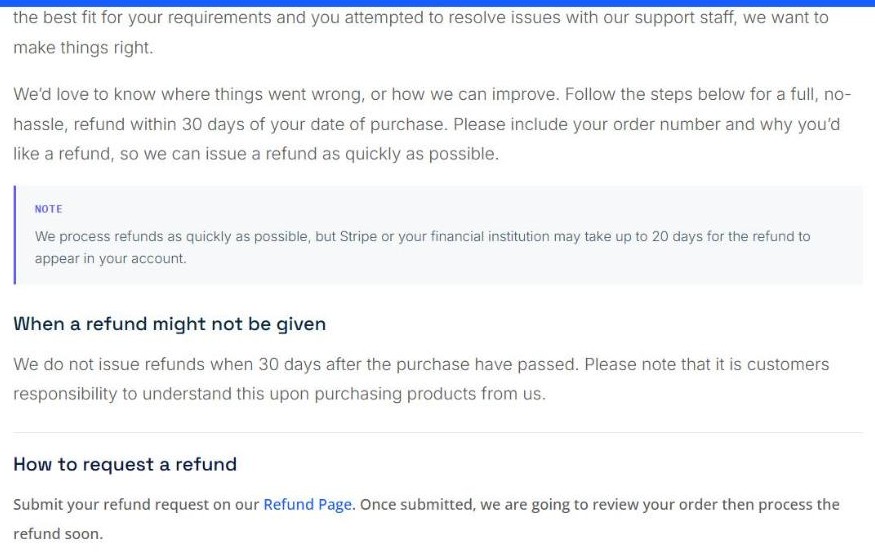
The WPvivid refund page is short, which in this category is a good sign.
The refund policy page (screenshot from wpvivid.com)
The company offers a 30 Day Money Back Guarantee and describes it as a “full, no-hassle, refund within 30 days of your date of purchase”, asking for an order number and a reason. The page also asks that you have “attempted to resolve issues with our support staff” first.
We process refunds as quickly as possible, but Stripe or your financial institution may take up to 20 days for the refund to appear in your account.
Under the heading “When a refund might not be given”, exactly one condition is listed: “We do not issue refunds when 30 days after the purchase have passed.” There is no clause about having already used the software, no restocking fee and no partial-refund schedule. A reader should still weigh the 20-day settlement note, because the practical gap between requesting a refund and seeing the money can run well past the month.
Who WPvivid fits
On the strength of the published material, the WPvivid audience sorts fairly cleanly:
One site, modest size – the free plugin is very likely the whole answer. Scheduled backups to Dropbox or Google Drive, one-click restore, and a subdirectory staging site cost nothing.
A large single site – incremental backups and exclusion rules are the reason to pay, because a full nightly archive of a big uploads folder stops being practical.
Two to ten client sites – Freelancer at $6.90 per domain per year, with unlimited licence transfers, is the tier the pricing table is shaped around.
An agency or a portfolio – Small Business drops the cost to $1.98 per domain per year, and multisite support plus whitelabel start to matter.
Someone who wants it handled once – the lifetime tiers pay for themselves a shade past two years at every level.
The group WPvivid fits least well is the site owner who wants backups they never think about again at a managed-host level, with monitoring and someone to call. WPvivid is a plugin you configure, not a service that watches your site for you.
How this review was done
This is a desk review. Everything above was read from material WPvivid publishes itself – the pricing page, the free-versus-pro feature grid and the refund policy – plus the public plugin directory listing. No licence was purchased and no site was migrated with WPvivid for this article, so no claim is made about how the plugin behaves on a live restore.
WPvivid prices were read in US dollars as printed on the pricing page, with both the list price and the current 20 percent discount recorded. Every arithmetic result in this review – the break-even ratios, the per-domain costs, the rating percentage – can be reproduced from the figures in the tables above in a couple of minutes.
The short version
WPvivid is a backup, migration and staging plugin whose free build genuinely finishes the job for a single ordinary site, and whose paid tiers are priced around how many sites you run rather than which features you are allowed. The feature grid is published in full, the refund terms carry one condition, and the directory listing backs up the install and rating claims.
The WPvivid pricing deserves the two minutes of arithmetic it takes: lifetime is double the yearly figure at every tier, which puts break-even just past two years, and the per-domain cost drops from $24.50 to $1.98 across two upgrade steps. The one thing to read carefully before buying the entry tier is the three-day licence transfer window, which is printed under the price rather than in the grid.
The iPhone 18 no ports theory is suddenly everywhere. A video making the rounds on TikTok and social media appears to show something startling: an iPhone — labeled as the “iPhone 18” — charging through a small magnetic connector instead…
Hottest fashion trends 2026 reviewed honestly — which trending styles are actually wearable, which are overhyped, and what’s worth buying right now in the US market. Quick Verdict: 2026’s biggest fashion trends fall into two camps: genuinely wearable evolutions of…
PS5 Pro review 2026 — I tested it for 30 days. Here’s the honest verdict on performance, graphics, and whether upgrading from a standard PS5 is actually worth the money. Quick Verdict: The PS5 Pro is the most capable PlayStation…