Most people who go looking for Visme alternatives are not unhappy with the design tool itself. They are chasing one specific thing: a cheaper entry price, a bigger template library, or data that refreshes on its own instead of being re-pasted every month. Those are three different problems with three different answers, so a single “best alternative” verdict would be useless.
Below are the seven realistic Visme alternatives, priced from each vendor’s own page in September 2026, with what each one is genuinely better at — and the cases where Visme is still the one I would keep. I have not run a paid agency bake-off across all seven; the figures are from the published pricing pages and the strengths and weaknesses from vendor documentation and third-party review data.
Visme alternatives compared on price
Tool
Free plan
Individual paid
Team paid
Visme
10 AI credits/month
Starter US$12.25/mo (US$147/yr)
Pro US$24.75/mo (US$297/yr)
Canva
Yes — 1 Brand Kit, 5GB
Pro US$144/yr
Business US$250/person/yr
Piktochart
2 PNG downloads, 60 AI credits
Pro US$10/mo annual
Business US$17/mo annual
Venngage
5 designs, 6 image uploads
Premium US$10/mo
Business US$24/user/mo
Beautiful.ai
None — 14-day trial only
Pro US$14.50/mo annual
Team US$40/user/mo annual
Infogram
10 projects, Infogram logo
Pro US$19/mo annual
Business US$67/mo annual
Adobe Express
Yes
US$9.99/mo
—
Prices as published on each vendor’s own pricing page, September 2026. Canva and several others show localised currency depending on your country.
Two numbers in that table deserve a second look, because they are the ones that catch people out. Piktochart’s free tier allows two PNG downloads in total, and Venngage’s free tier caps you at five designs. Neither is a trial you can really evaluate a workflow on.
The seven alternatives, one by one
1. Canva — the template library nobody can match
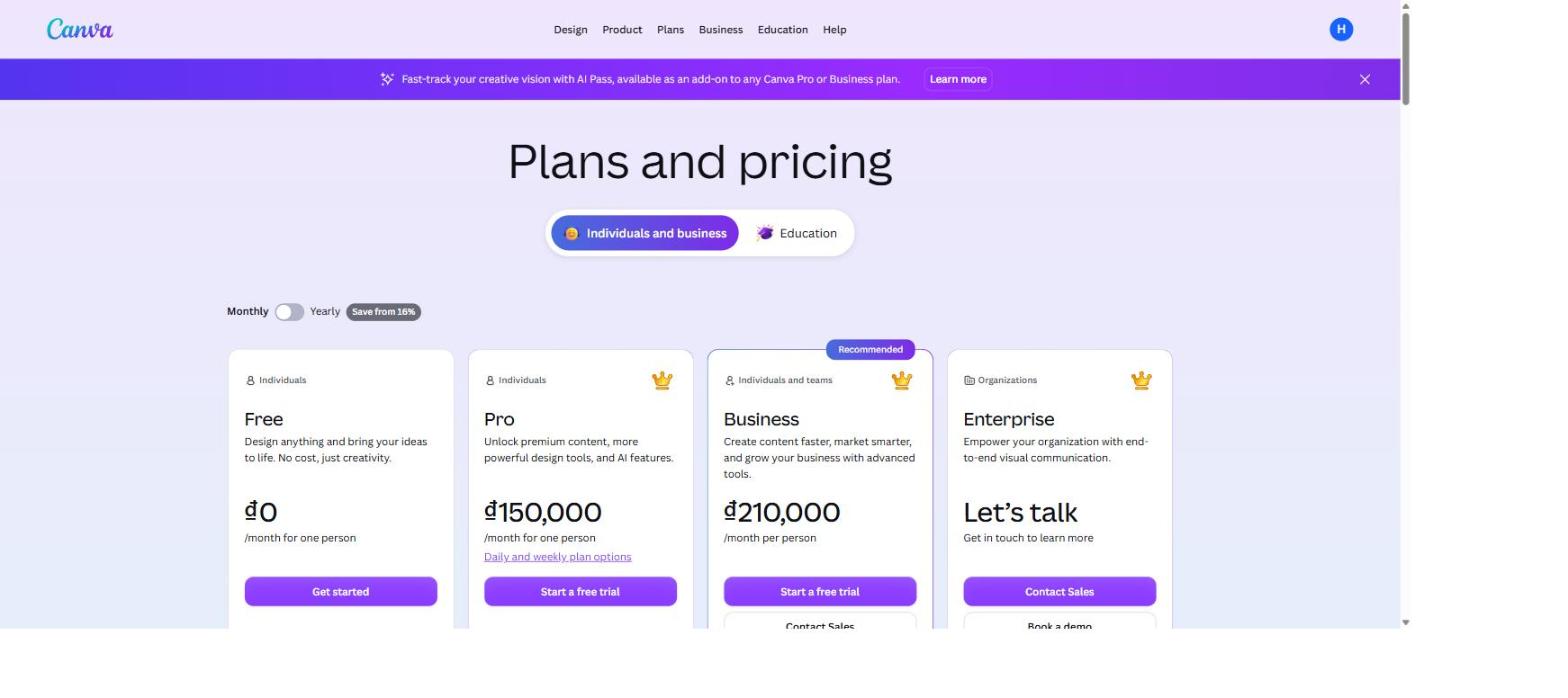
Canva is the obvious first stop and the honest answer for most casual design work. It advertises over 1.6 million templates on the free plan and 3.6 million on Pro, with real-time multi-user editing that is smoother than anything else here. Where it loses to Visme is data: chart options are basic, there is no live connection to a spreadsheet or a marketing platform, and version control stops at a linear history.
Canva’s four tiers. Prices render in your local currency, so the figures in the table above are the US dollar equivalents. Screenshot: canva.com/pricing
2. Piktochart — infographics on a small budget
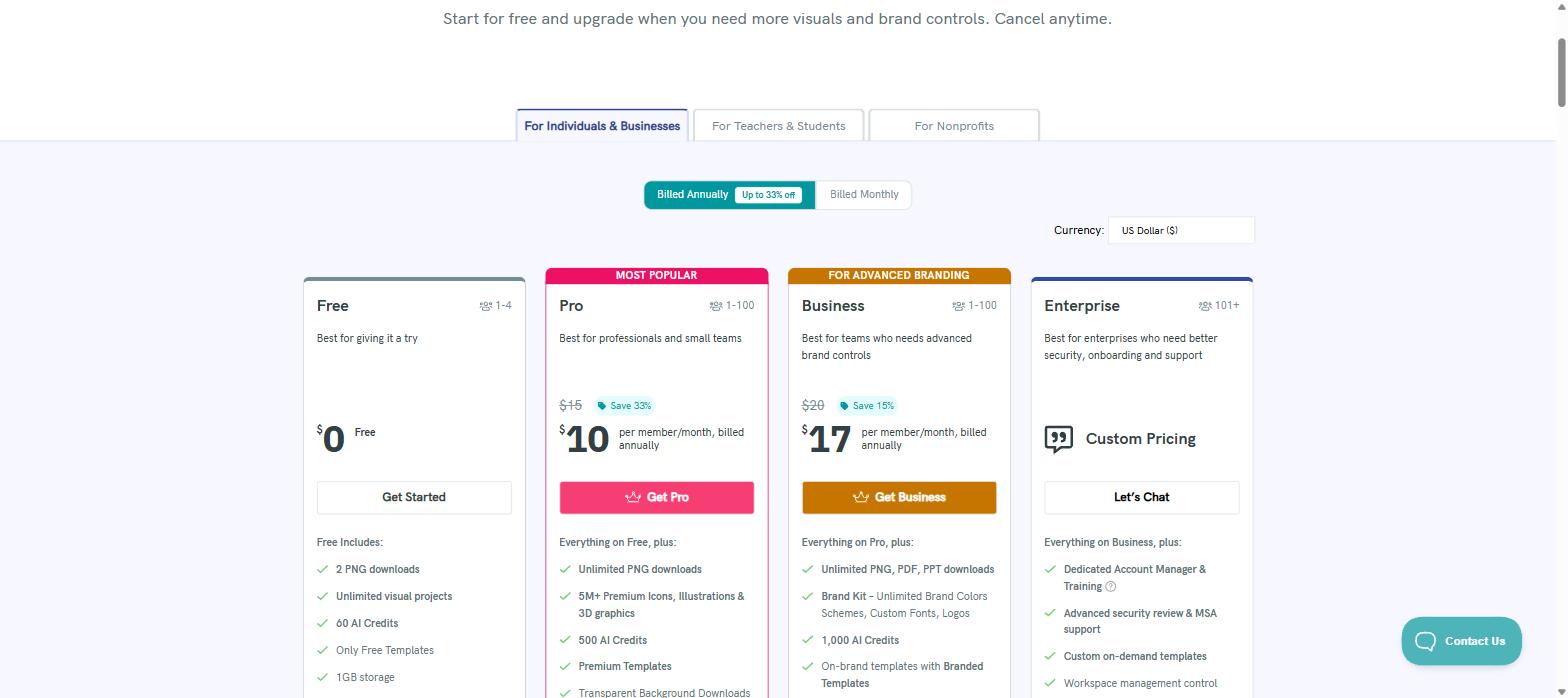
At US$10/month annually, Piktochart Pro is the cheapest serious infographic tool in this list, with a block-based editor that is genuinely quicker for simple layouts. The catch is the free tier: two PNG downloads, 60 AI credits and free templates only. PDF and PowerPoint exports need the Business plan at US$17/month. Data entry is manual only, with no API or live feed.
Piktochart spells out its free-plan limits clearly: two PNG downloads and free templates only. Screenshot: piktochart.com/pricing
3. Venngage — cheapest entry for one person
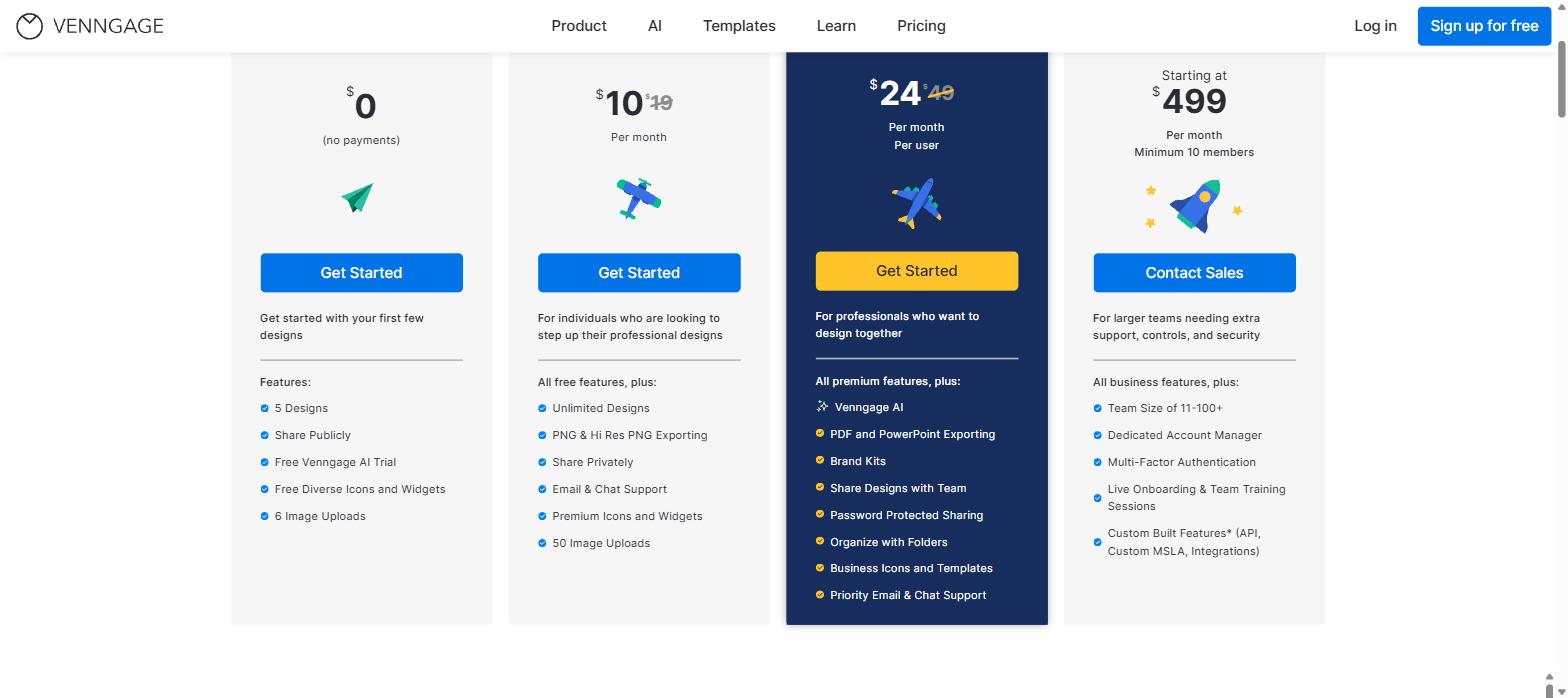
Venngage Premium is US$10/month and gives unlimited designs, hi-res PNG export and private sharing. Its industry-specific template sets (HR, education, healthcare) are a real strength if you work in one of those fields. PDF and PowerPoint export, Brand Kits and team sharing sit on the Business plan at US$24/user/month, and the free plan’s five-design cap is the tightest here.
Venngage’s free plan is capped at five designs and six image uploads. Screenshot: venngage.com/pricing
4. Beautiful.ai — slides that lay themselves out
Beautiful.ai’s Smart Slide system rebalances a layout automatically as you add content, which removes a whole class of alignment work from deck-building. It is the best pure presentation tool here. There is no free plan at all — only a 14-day trial that needs a card — and charts are basic with manual data entry.
5. Infogram — the one to beat on data
If your reason for leaving Visme is data, Infogram is the strongest answer: 35+ interactive chart types, 13 map types, CSV and API import, and scheduled data refreshes. That is more depth than Visme’s chart engine. The trade-offs are real though — less design freedom, the free plan caps you at 10 projects with an Infogram logo you cannot remove, and custom branding only arrives on Business at US$67/month.
6. Adobe Express — if you already pay Adobe
At US$9.99/month, Express makes sense mainly when your team is already inside Creative Cloud: shared libraries, licensed fonts and Firefly AI come along for free. Outside that ecosystem the learning curve is steeper than Canva’s and the data visualisation is minimal.
7. Google Slides or PowerPoint — the free fallback
Worth saying plainly: if all you need is a clean internal deck, Google Slides costs nothing with Workspace and syncs with Sheets, and PowerPoint’s Designer plus Excel connectivity covers a lot of ground. You lose the template quality and the interactive publishing, not the ability to communicate.
Where Visme still wins
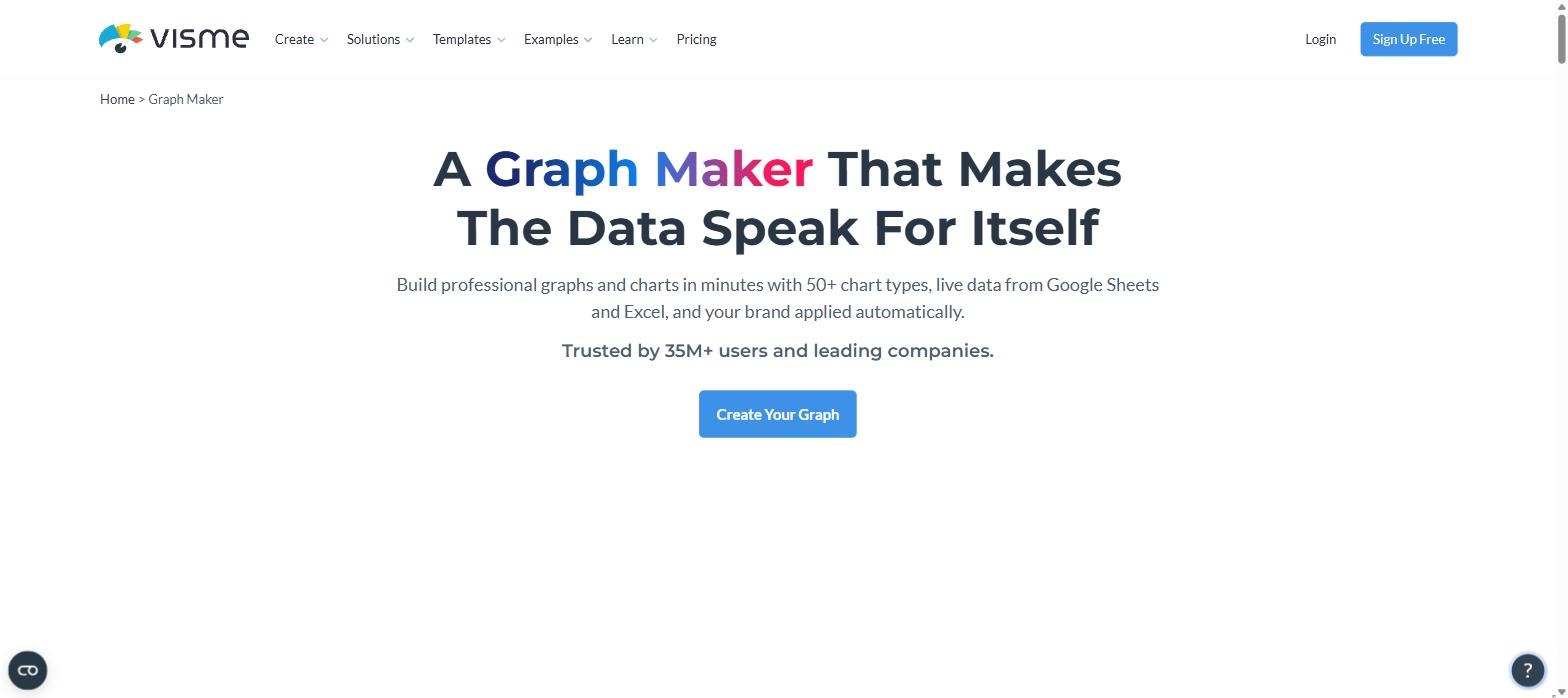
Having priced all seven Visme alternatives, the case for staying comes down to one thing: Visme is the only tool here that does the design job and the data job and the publishing job in one file. Its graph maker advertises 50+ chart types with live data pulled from Google Sheets and Excel, and your brand applied automatically — a combination Canva, Venngage and Beautiful.ai simply do not offer, and that Infogram only matches by giving up design flexibility.
Visme states the differentiator on its own page: 50+ chart types with live data from Google Sheets and Excel. Screenshot: visme.co/graph-maker
Four more things you would have to replace with separate tools if you left:
Interactive embeds with built-in view analytics — publish a report as a live link and see who opened it, covered in my Visme infographics review.
A 12-tool AI suite with published credit prices — AI Designer at 2 credits a generation, everything else at 1, with no guessing; the detail is in the Visme AI review.
Brand Wizard — paste your website URL and Visme builds a Brand Kit from your logo, fonts and colours, then shows templates already wearing them.
Forms and data collection inside the same account, so a survey and the report about it are not in two products.
The template library is the other half of the story — over 100 project types and the depth I went through in the Visme templates review, and you can test all of it on the free plan before paying.
Which one should you pick?
You need a huge template library and fast team collaboration → Canva.
Your budget is under US$12/month and you mostly make infographics → Piktochart or Venngage.
Your charts must refresh from a live data source on a schedule → Infogram.
You only make slide decks and want layout handled for you → Beautiful.ai.
You are already paying for Creative Cloud → Adobe Express.
You need branded reports, live charts, interactive publishing and AI in one place → Visme.
Be honest about Visme’s weak spots too
This is a Visme-friendly verdict, so the criticisms belong here as well rather than buried. On G2, where Visme scores 4.5 out of 5 from 511 reviews, the two most common complaints are price — reviewers describe it as roughly double Canva — and performance, with reports of slowness, lag and interface glitches. Capterra’s sentiment data (4.5 out of 5 from 719 reviews) puts glitches and slowdowns at 83% negative and awkward object resizing at 64% negative. Reviewers also rate the AI image generator and background remover below Canva’s.
None of that shows up as a dealbreaker in the review scores, which stay high and consistent — but if raw speed and a polished image engine matter more to you than live data and interactive publishing, Canva is the better fit and you should take it.
If the data and branding side is what you need, the free plan is the sensible way to test the claim rather than take my word for it. Try Visme free here.
The iPhone 18 no ports theory is suddenly everywhere. A video making the rounds on TikTok and social media appears to show something startling: an iPhone — labeled as the “iPhone 18” — charging through a small magnetic connector instead…
Hottest fashion trends 2026 reviewed honestly — which trending styles are actually wearable, which are overhyped, and what’s worth buying right now in the US market. Quick Verdict: 2026’s biggest fashion trends fall into two camps: genuinely wearable evolutions of…
PS5 Pro review 2026 — I tested it for 30 days. Here’s the honest verdict on performance, graphics, and whether upgrading from a standard PS5 is actually worth the money. Quick Verdict: The PS5 Pro is the most capable PlayStation…