Kululu photo sharing is an event photo and video collection service: the host creates a private album, guests scan a QR code or open a link, and everything they shoot lands in one place. There is no app to install and no account for guests to create. Kululu photo sharing is operated by Crunchy Granola LLC, a Wyoming company listed at 30 North Gould Street, Sheridan, WY 82801, and Kululu photo sharing is sold as a one-time fee per event rather than a subscription.
Three things make Kululu photo sharing worth a look: the entry barrier for guests is a camera pointed at a QR code, the Live Photo Wall turns the uploads into a real-time slideshow on any screen with a browser, and the company publishes an unusually detailed security page explaining exactly where the files sit. The paid tiers are 39 US dollars and 99 US dollars, one-time, excluding taxes.
This is a desk review. I did not run an event on the platform. Every figure below comes from documents Kululu photo sharing publishes itself: the pricing page, the Security page, the Terms of Service, the Privacy Policy, the Fair Usage Policy and the Help Center, all read in October 2026. Where the company makes a claim about itself, it is labelled as a company claim.
One more thing worth saying plainly: Kululu photo sharing does not appear on Trustpilot, G2 or Capterra at the time of writing. The ratings quoted on its own site are collected and displayed by the company. That is not an accusation, it simply means there is no third-party score to cross-check, so this review sticks to what is written down and verifiable.
What Kululu photo sharing actually is
Strip away the marketing and Kululu photo sharing is three connected pieces. The first is the Kululu photo sharing digital album, a private gallery for one event. The second is the Live Photo Wall, a slideshow of that album that refreshes as uploads arrive. The third is the guest entry point, a QR code or URL that drops a visitor straight into the upload screen.
What it is not is a cloud drive. The Fair Usage Policy rules that out in its own words, stating that Kululu was never “intended to be used as an all-purpose cloud drive (like Google Drive, Dropbox, etc.)”. That matters when you decide how long you can treat Kululu photo sharing as storage, which is covered further down.
Guests can also post text. Alongside photos and videos, the album accepts decorated text posts, which is how the service doubles as a digital guestbook at weddings.
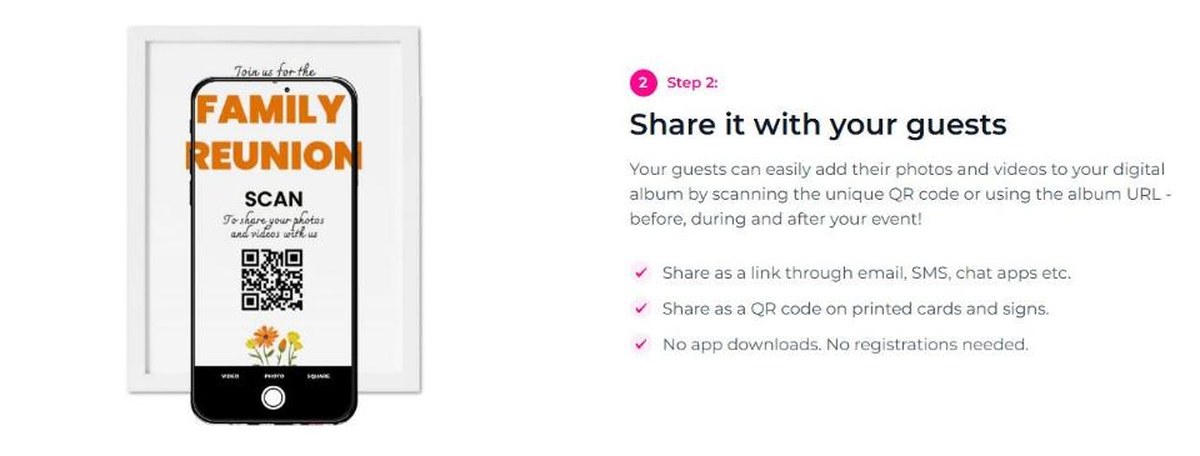
A printed QR sign is the whole onboarding flow for guests
Getting guests in: the QR code and the link
Guest onboarding is the part Kululu photo sharing is built around. The host shares one of two things: a link, by email, SMS or a chat group, or a QR code printed on table cards and entrance signs. The site’s own wording for what happens next is blunt: “No app downloads. No registrations needed.”
That single design decision solves the problem most event albums die from. If half the guests at a wedding are over fifty, an app download plus an account signup plus a permissions prompt is enough friction to lose them. A camera and a QR code is not.
Kululu photo sharing does not lock uploads to the party itself either. Kululu photo sharing states that guests can add media “before, during and after your event”, bounded by the upload window on your plan.
The album also has a welcome screen and a title, date, colours and backgrounds the host can change, so the QR code leads somewhere that looks like the event rather than somewhere that looks like a form.
The Kululu photo sharing Live Photo Wall on any screen
The Live Photo Wall is the Kululu photo sharing feature people remember. It is a slideshow of everything in the album, updating in real time as guests upload, and the clever part is how it is delivered: it is just a web link.
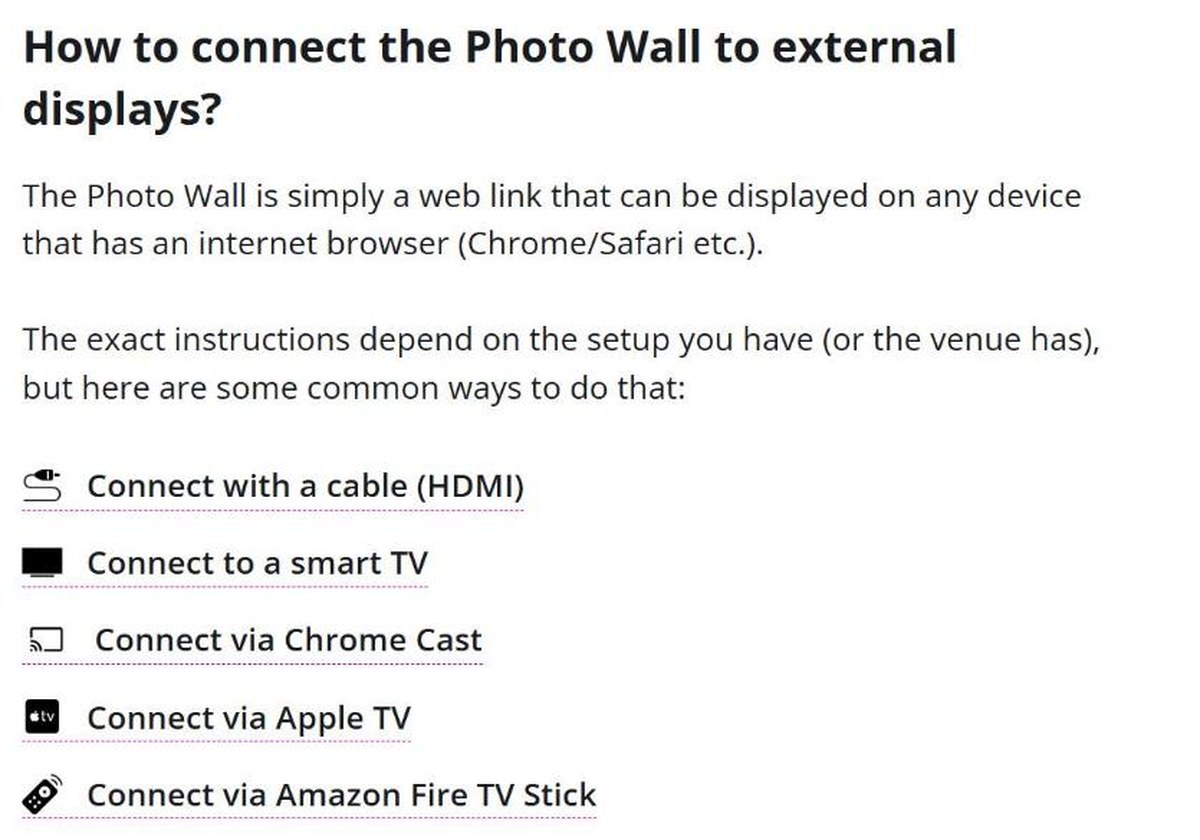
Kululu’s own help page puts it this way, that the Photo Wall “is simply a web link that can be displayed on any device that has an internet browser (Chrome/Safari etc.)”. The documented routes to a big screen are an HDMI cable, a smart TV, Chromecast, Apple TV and an Amazon Fire TV Stick. No dedicated hardware, no venue software install.
Kululu documents five ways to put the Photo Wall on a big screen
That is a sensible engineering choice and it is the reason the feature works in rented venues, where you rarely control the AV stack. Kululu’s help page even tells you to ask the venue manager to handle it, which is the right advice.
The digital album and the one-click download
Everything guests upload to Kululu photo sharing is saved to the album automatically, and the host can share that album afterwards on social media or with specific people. On the paid tiers the whole thing comes down as a single zipped folder with one click.
The Kululu photo sharing download matters more than it sounds. The honest way to use Kululu photo sharing is as a collection funnel, not an archive: let it gather what two hundred phones captured, then pull the zip and put the files somewhere you control. Which brings us to the retention table.
Kululu photo sharing pricing: free, 39 and 99 dollars
Prices are in US dollars and shown excluding taxes. The pricing page was carrying a limited-time 50 percent discount when this review was written, so treat the two paid numbers as the listed price at that moment rather than a permanent one.
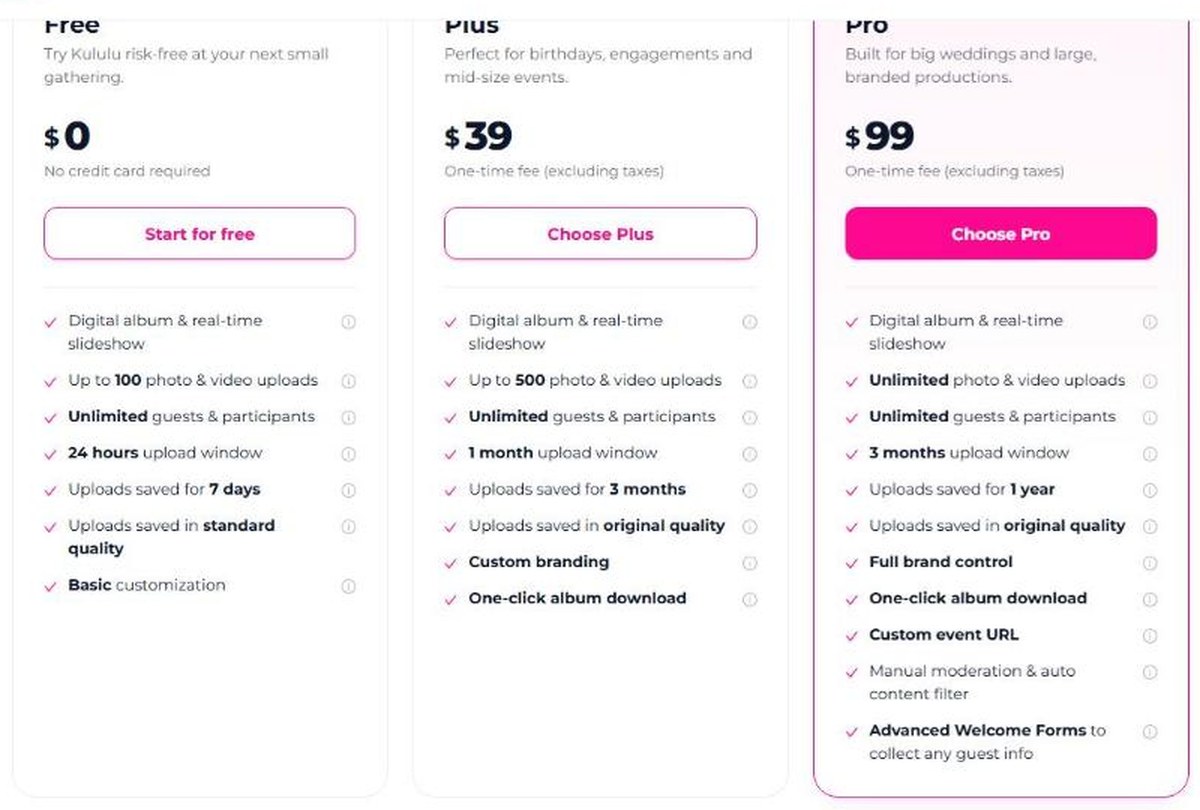
The three Kululu plans as listed in October 2026
Free — 0 dollars, no credit card. Up to 100 photo and video uploads, unlimited guests, a 24 hour upload window, uploads kept for 7 days, standard quality, basic customization.
Plus — 39 dollars one-time. Up to 500 uploads, unlimited guests, a 1 month upload window, uploads kept for 3 months, original quality, custom branding, one-click album download.
Pro — 99 dollars one-time. Unlimited uploads, unlimited guests, a 3 month upload window, uploads kept for 1 year, original quality, full brand control, one-click download, a custom event URL, manual moderation plus an automatic content filter, and advanced welcome forms for collecting guest information.
Kululu photo sharing also carries a money-back guarantee if you end up not using the service at your event, governed by the Fair Refund Policy, and a separate professionals tier for people running events continuously.
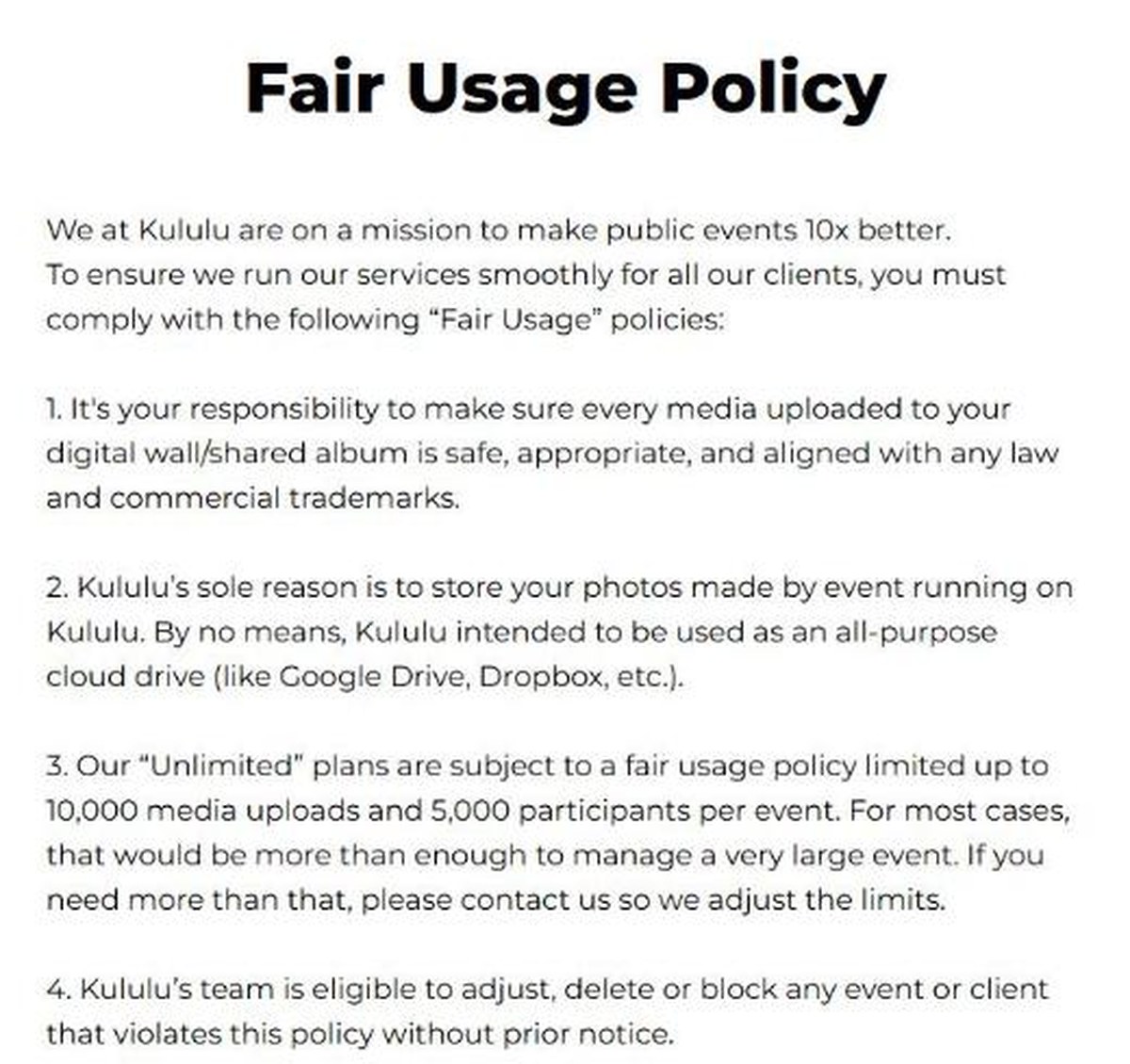
A note on “unlimited”, because three Kululu photo sharing pages say three different things and all three are worth knowing. The plan cards say unlimited guests and participants. The pricing FAQ suggests Plus suits events of up to 100 guests with no more than 500 photos. The Fair Usage Policy sets the hard ceiling: “Our ’Unlimited’ plans are subject to a fair usage policy limited up to 10,000 media uploads and 5,000 participants per event.” For any realistic wedding or conference those limits are far away, and Kululu says it will raise them on request, but the ceiling exists.
The Fair Usage Policy puts real numbers behind the word unlimited
How long your photos stay, the number most people miss
Read the Kululu photo sharing retention row before the price row. On the free tier uploads are kept for 7 days. On Plus, 3 months. On Pro, 1 year. Separately, the upload window, the period during which guests can still add things, is 24 hours, 1 month and 3 months respectively.
The Privacy Policy adds a safety net: “If your plan expires or becomes inactive, we will notify you via email at least 30 days before deleting your data.” So the deletion is not silent, and the warning goes to the host’s email.
The practical rule is simple. Download the zip the week after the event. Kululu photo sharing is excellent at the job of getting two hundred phones to contribute to one album; it is not pitching itself as your permanent archive, and the Fair Usage Policy says as much.
Where Kululu photo sharing keeps your files and how they are encrypted
This is the section that moved my rating up. Kululu photo sharing publishes a Security page with specifics rather than reassurances, and the specifics check out as sensible choices.
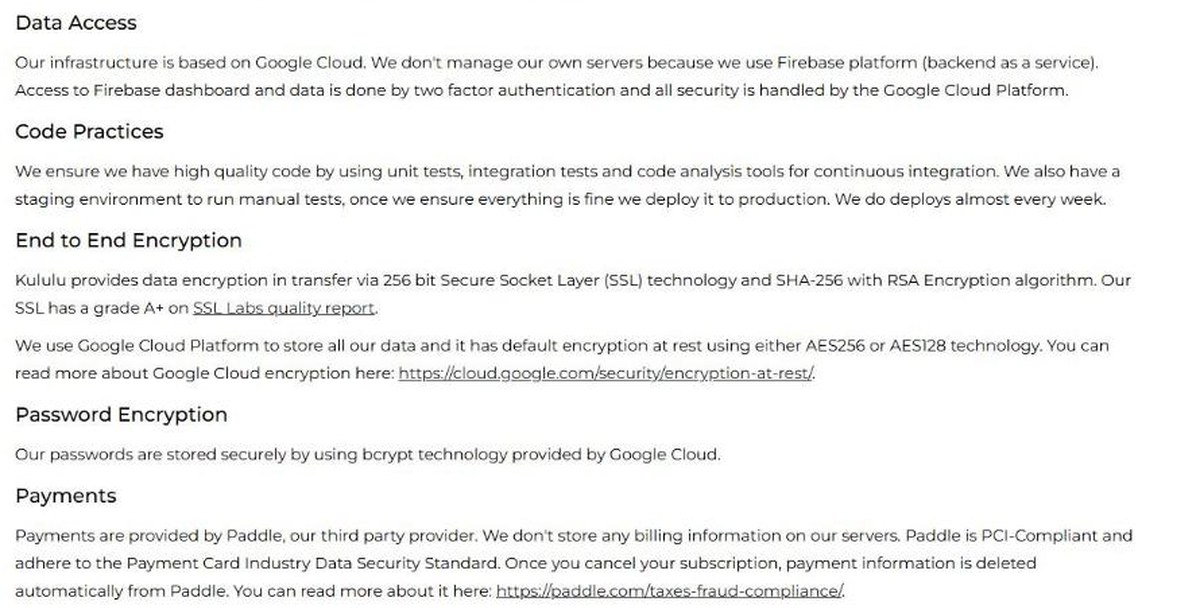
Kululu’s Security page names its encryption, hosting and payment providers
In transit: 256 bit SSL with SHA-256 and RSA. The company claims an A+ grade from SSL Labs.
At rest: Google Cloud default encryption, AES256 or AES128.
Passwords: hashed with bcrypt.
Infrastructure: Firebase on Google Cloud Platform. Kululu states it does not manage its own servers, and that Firebase dashboard access requires two-factor authentication.
Edge: Cloudflare for malicious traffic filtering and DDoS protection, plus Firebase App Check with reCAPTCHA v3.
Payments: Paddle. Kululu says it stores no billing information on its own servers and that payment details are deleted from Paddle when you cancel.
Backups: daily, encrypted, deleted 30 days after creation.
One point needs stating carefully, because it is the kind of thing review sites get wrong. The certifications listed on that page, including ISO 27001, ISO 27017, ISO 27018, SOC 1/2/3, PCI DSS and CSA, belong to Google Cloud, not to Kululu. Kululu claims no certification of its own. Inheriting a certified platform is a real advantage and it is honest of the company to attribute it correctly, but an organisation only holds ISO/IEC 27001 if it has been audited against the standard itself.
A second discrepancy belongs here too. The Security page says data is hosted in US Central and EU Central and served by client location; the Privacy Policy says primary storage is on Firebase servers in the United States. Both statements are published by the company, so both are recorded here rather than averaged. If EU residency is a contractual requirement for you, ask before you buy, and ask about the Data Processing Agreement while you are there.
Privacy, ownership and what the Terms actually say
Who owns the photos you collect with Kululu photo sharing? You do. The Terms state that you “shall own all rights, title and interest (or have the full applicable rights of use)” in the content you upload, while Kululu retains ownership only of the Services themselves. The licence you grant the company is the functional kind: “worldwide, royalty-free, and non-exclusive license, to scan and collect Your User Content”, for the purpose of running the service.
The limits are the ones you would expect from a small US software company and they are stated openly. Governing law is the State of Wyoming. Liability is capped at amounts actually paid in the preceding twelve months, and the Terms are explicit that “IF YOU HAVE NOT MADE ANY PAYMENTS HEREUNDER, Kululu SHALL NOT HAVE ANY LIABILITY.” Users must be over 18, or have parental consent. Kululu says it does not market to or knowingly collect data from children under 13, and that it does not sell personal information.
Guest consent is the host’s job, and the Terms do not pretend otherwise: you remain “exclusively responsible for all acts or omissions in connection with Your User Content”. At a public event, that means telling people the wall exists and that what they upload will be visible. Kululu photo sharing gives hosts the tools for this, including approval before posts appear, but the judgement call stays with you.
Deletion rights are straightforward: you can modify, export and delete your data at any time, and a deletion request is processed “without undue delay”.
Moderation and branding on the Pro plan
Two Kululu photo sharing Pro features are worth the gap over Plus if the event is public or branded.
Moderation first. Pro includes manual moderation plus an automatic content filter, meaning uploads can be held for approval before they appear on the wall. Kululu also says a human moderation agent is available on request. For a conference, a corporate party, or any room where a projector is visible to everyone, this is the difference between a live wall and a risk.
Branding second. Plus gives custom branding; Pro gives full brand control plus a custom event URL and advanced welcome forms that can collect guest information as people join. Agencies and corporate event teams are the obvious audience, and that is who the professionals tier is aimed at.
The numbers Kululu photo sharing publishes about itself
These are Kululu photo sharing company claims, presented here as claims and not as independently verified facts: a 4.7 rating from more than 500 reviews, roughly 8.76 million moments shared, 52,422 events, “over 50,000 events” in the FAQ, and the self-description “#1 Photo Sharing App”. The site also displays logos including Netflix, Oatly, Dior, Nike, TikTok and Harvard under an “As seen on” heading, and a corporate page referring to more than 1,000 companies and organisations.
The two FAQ figures, 52,422 events and “over 50,000 events”, are consistent with each other. None of the figures is auditable from outside, and as noted above there is no Trustpilot or G2 profile to compare them against.
Kululu’s Help Center also runs a comparison against general tools like Google Photos, Dropbox and group chats, arguing they reduce image quality and scatter the results. That is a promotional argument from the vendor rather than a tested benchmark, and it is fair to say the underlying point, that a general file tool is not an event tool, is one most event hosts will recognise.
Who Kululu photo sharing suits
It suits a host who wants everything one room photographed and does not want to chase anyone: weddings, birthdays, reunions, conferences and company events. It suits anyone whose guest list skews non-technical, because the QR code removes every step that usually loses people. It suits a team that needs a branded Kululu photo sharing wall on a projector with moderation in front of it, which is the Pro tier doing its job. And it suits someone who understands that the album is a collection funnel with a clock on it, and who will download the zip afterwards.
Kululu photo sharing suits less well anyone who wants permanent storage, anyone who needs a contractually guaranteed EU data location without asking first, and anyone who wants an independent review score before buying, because there is not one yet.
Readers comparing creator and event tooling more broadly may also want our OWN3D overlays review, which looks at the same question of what a one-off purchase actually includes, and our Visme AI review for the design side of event materials. And if you want to read the limits yourself before committing, Kululu’s own pricing and policy pages are short and unusually clear.
The iPhone 18 no ports theory is suddenly everywhere. A video making the rounds on TikTok and social media appears to show something startling: an iPhone — labeled as the “iPhone 18” — charging through a small magnetic connector instead…
Hottest fashion trends 2026 reviewed honestly — which trending styles are actually wearable, which are overhyped, and what’s worth buying right now in the US market. Quick Verdict: 2026’s biggest fashion trends fall into two camps: genuinely wearable evolutions of…
PS5 Pro review 2026 — I tested it for 30 days. Here’s the honest verdict on performance, graphics, and whether upgrading from a standard PS5 is actually worth the money. Quick Verdict: The PS5 Pro is the most capable PlayStation…