Quick note on approach: This review is based on Anima’s official website, pricing page, and public testimonials rather than a multi-week hands-on build, so treat feature claims below as reported and cross-checked, not independently verified over time.
INTRODUCTION: IS ANIMA AI WORTH IT IF YOU ALREADY VIBE CODE?
Anima positions itself as “AI with an eye for design,” a platform that turns a prompt, a live website, a screenshot, or a Figma file into working HTML or React code, and it claims to be trusted by 1.8 million users along with teams at Netflix, Walmart, Disney, Deloitte, and Amazon. That is a bold claim set against a crowded field of “vibe coding” tools that all promise to turn ideas into apps.
We reviewed Anima’s published feature pages, its four pricing tiers, and independent user testimonials directly from its site, then compared its plans against two well-known Figma-to-code competitors, v0 by Vercel and Locofy, to see where the value actually sits.
QUICK VERDICT
Rating: 4/5
Best for: Designers and small product teams who want to start from real design or brand context (Figma, a live site, or an image) instead of a blank prompt
Should you try it? Yes — the Free plan is enough to test Figma import and website cloning before paying anything
Designers who already have Figma files or a brand system and want code that matches, rather than a generic AI-generated layout
Teams that want to clone and rebuild an existing website’s structure, routes, and navigation instead of starting from zero
Developers who want editable, exportable React or HTML output rather than being locked into one platform
Who should think twice:
Solo users who only need a handful of AI messages a month, since Anima’s Free plan caps out at 5 monthly chat messages and 5 code generations
Teams that need unlimited generations without watching a credit-style message count, since every paid tier still lists a fixed monthly chat message allowance
Buyers who want a single flat price rather than per-seat billing that scales with team size
REAL EXPERIENCE & WHAT THE PLATFORM ACTUALLY SHOWS
FIRST IMPRESSIONS
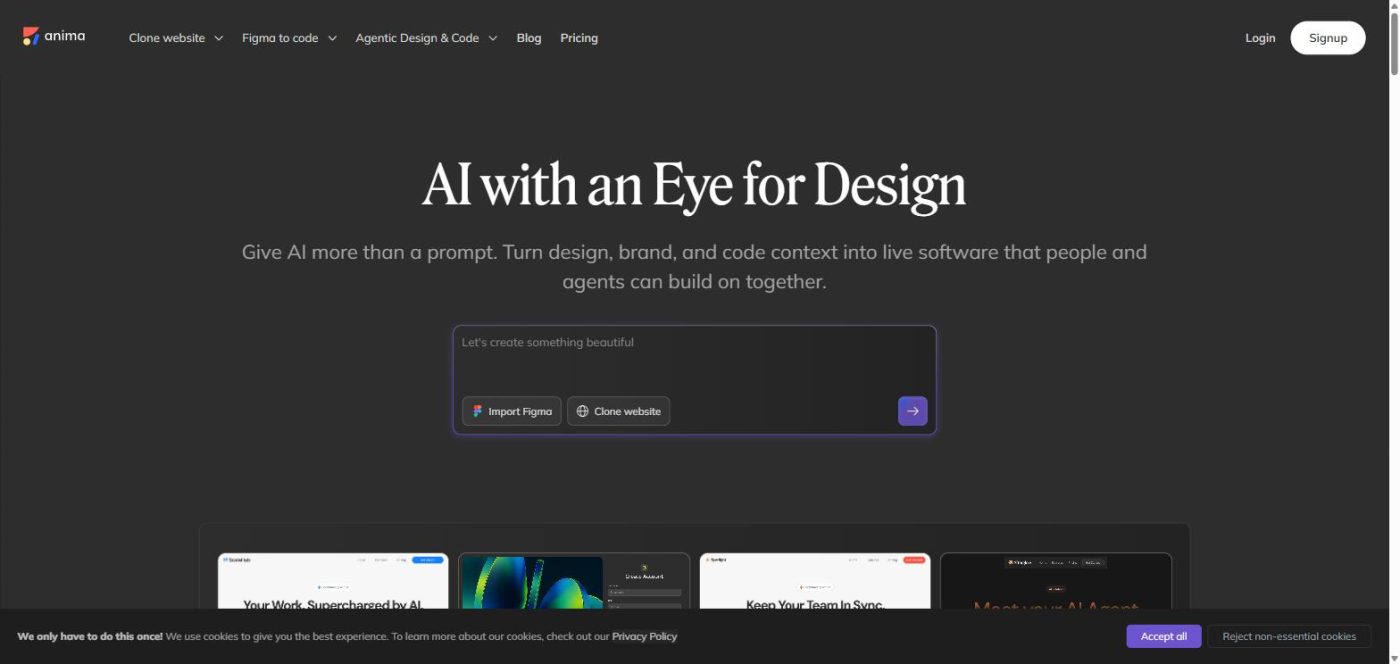
Anima’s homepage leads with a single prompt box offering two entry points, “Import Figma” or “Clone website,” alongside four example builds (a startup landing page, a signup flow, a SaaS landing page, and an AI agent landing page). That framing is more specific than most generic “describe your app” tools, and it signals the product’s real differentiator: starting from existing design or brand context rather than a blank text box.
KEY FEATURES & TESTING
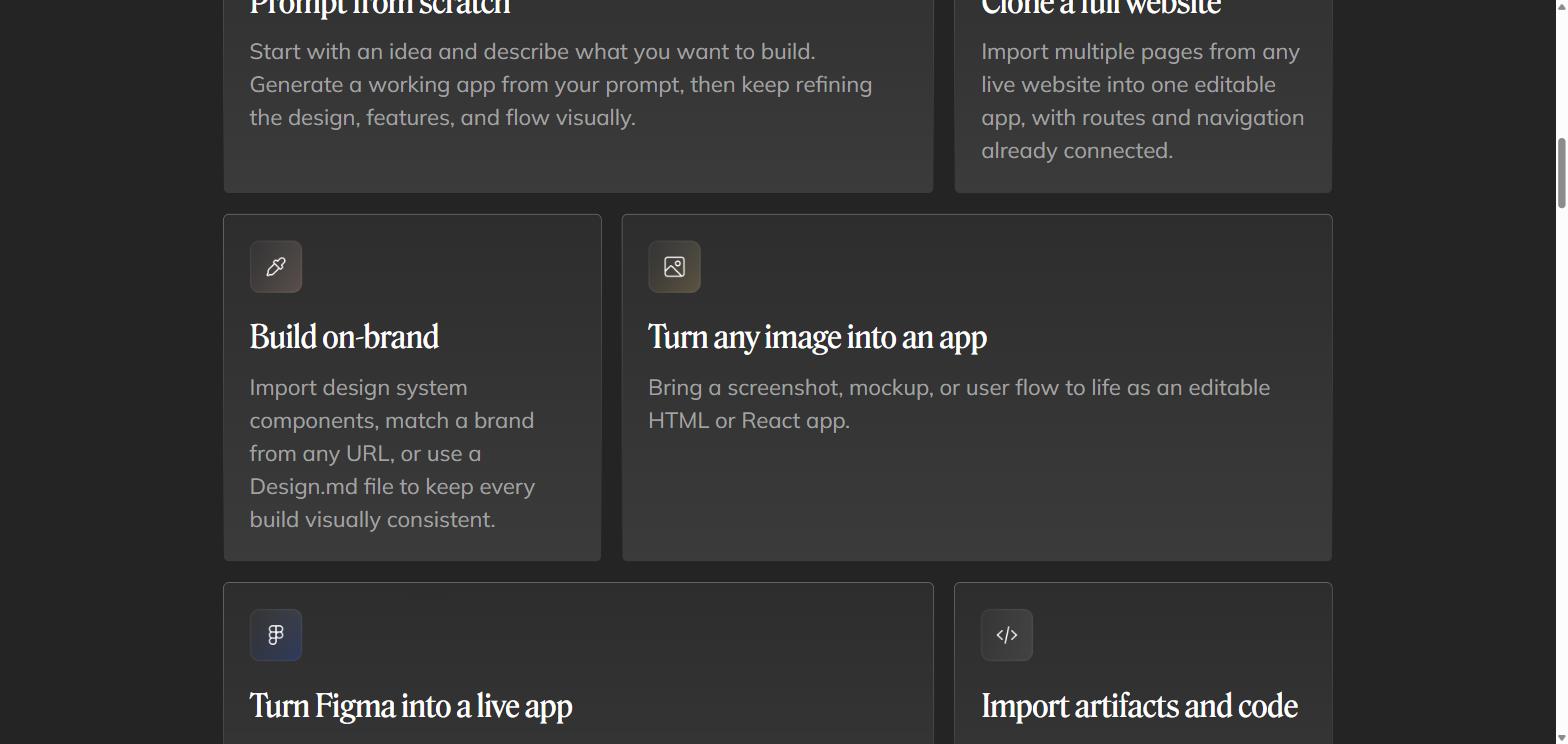
1. Website cloning: Anima’s “Clone a full website” feature imports multiple pages from any live site into one editable app, with routes and navigation already connected, which removes a step most competitors leave entirely manual.
2. Figma and image import: Beyond Figma files, Anima can turn a screenshot, mockup, or user flow image into an editable HTML or React app, which is useful for teams handed a static design with no source file.
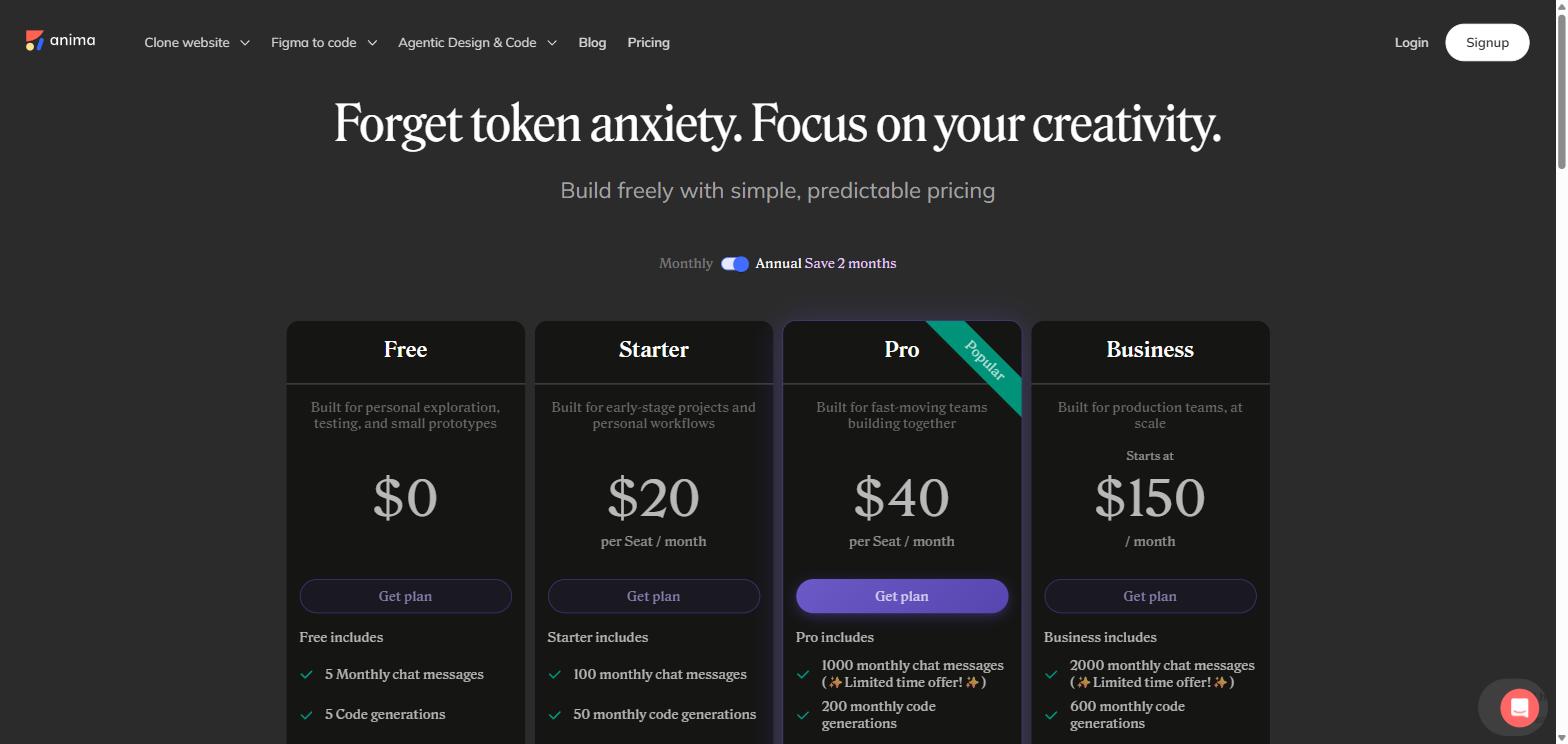
3. Credit-style limits: Every tier, including Pro at $40 per seat/month, still lists a fixed monthly chat message allowance (1000 on Pro at the time of writing), so heavy daily use can run into the same “credit anxiety” that affects competing AI builders, even though Anima’s marketing explicitly targets that pain point.
VS. MARKETING CLAIMS
Anima’s own positioning, “forget token anxiety, focus on your creativity,” is a fair description of its flat per-seat pricing compared to pure pay-per-credit tools, but it doesn’t mean usage is unlimited, since monthly message and code-generation caps still apply on every plan. One published user testimonial calls Anima “the best one… was @AnimaApp” among several Figma-export plugins tested — a real but limited data point, not proof of consistent output quality across every project type.
PROS & CONS
PROS
Multiple real entry points — prompt, Figma file, live website clone, or image — instead of only a text prompt
Full website cloning connects routes and navigation automatically, saving manual setup work
Exports to clean HTML/CSS/Tailwind or React and TypeScript, so output isn’t locked into one proprietary format
Free plan is genuinely usable for testing Figma import and website cloning before paying
CONS
Every paid tier still caps monthly chat messages and code generations, despite the “forget token anxiety” pitch
Per-seat pricing on Starter ($20/seat/mo) and Pro ($40/seat/mo) scales quickly for larger teams
Business plan starts at $150/month and adds $49/month per additional seat on top of that
SSO is only available on annual billing for the Business plan, not monthly
HOW ANIMA AI COMPARES TO OTHER FIGMA-TO-CODE TOOLS
Tool
Entry Price
Mid Tier
Standout Feature
Anima
Free ($0)
Pro: $40/seat/month
Clone a full live website into one editable app with routes and navigation connected
v0 by Vercel
Free ($0)
Plus: $30/user/month
Deep integration with Vercel deployment and GitHub sync
Locofy
Free ($0)
Pro: $80/month
MCP support for AI-assisted copilots and enterprise-grade frontend export
Why choose Anima over these two? If your starting point is an existing brand, live website, or Figma file rather than a blank prompt, Anima’s cloning and design-import tools are more purpose-built for that than v0 or Locofy. If you specifically want the tightest Vercel deployment pipeline, v0 is the more natural fit; if you want enterprise frontend export tooling with MCP support, Locofy is worth comparing directly.
PRICING & VALUE
Anima runs four tiers: Free ($0, 5 monthly chat messages, 5 code generations), Starter ($20/seat/month, 100 monthly chat messages, 50 monthly code generations, custom domains), Pro ($40/seat/month, 1000 monthly chat messages on a limited-time offer, 200 monthly code generations, priority support), and Business (starting at $150/month, 2000 monthly chat messages, team roles and permissions, SSO on annual billing). Annual billing is advertised as saving roughly two months compared to paying monthly.
Business plan seats beyond the base plan cost an extra $49/month per seat
Monthly chat message limits apply even on paid tiers, so heavy daily users may still need to manage usage
SSO requires committing to annual billing on the Business tier, not available month-to-month
FINAL VERDICT: SHOULD YOU TRY ANIMA AI?
Anima earns a solid 4/5 for building a genuinely different entry point than most AI app builders: starting from a Figma file, a live website, or a brand system instead of only a text prompt, backed by real adoption numbers and recognizable enterprise users. The per-seat pricing and message caps on every tier mean it isn’t the unlimited tool its “forget token anxiety” tagline might imply, but the Free plan is enough to judge that for yourself before paying.
Try Anima AI if: you have existing Figma files, a live site to clone, or brand assets you want reflected directly in generated code.
Skip or wait if: you only need occasional, lightweight AI generations and don’t want to track per-seat, per-message limits.
1. Is Anima AI free to use? Yes, the Free plan includes 5 monthly chat messages and 5 code generations, enough to test Figma import and basic website cloning before upgrading.
2. Does Anima AI export real, editable code? Yes, output can be exported as clean HTML/CSS/Tailwind or as React and TypeScript application code rather than being locked into a closed editor.
3. How is Anima AI different from a typical AI app builder? It emphasizes starting from real design and brand context, such as a Figma file, a live website clone, or a screenshot, instead of only a blank text prompt.
4. Is Anima AI good for teams? Business plans add team roles, permissions, and SSO on annual billing, though per-seat costs and additional-seat fees should be checked against your team size first.
Hottest fashion trends 2026 reviewed honestly — which trending styles are actually wearable, which are overhyped, and what’s worth buying right now in the US market. Quick Verdict: 2026’s biggest fashion trends fall into two camps: genuinely wearable evolutions of…
PS5 Pro review 2026 — I tested it for 30 days. Here’s the honest verdict on performance, graphics, and whether upgrading from a standard PS5 is actually worth the money. Quick Verdict: The PS5 Pro is the most capable PlayStation…
How to track your health at home on a $50 budget — a practical step-by-step guide to the best tools, apps, and habits for home health monitoring in 2026. Quick Answer: You don’t need expensive wearables or a gym membership…