RackNerd runs 20 datacenter locations across North America, Europe and Asia.
Running an AI agent used to mean either paying for somebody else’s cloud by the hour or spending an evening on the command line getting Docker, a reverse proxy and SSL to behave. RackNerd has taken a third route: put the whole thing behind a button.
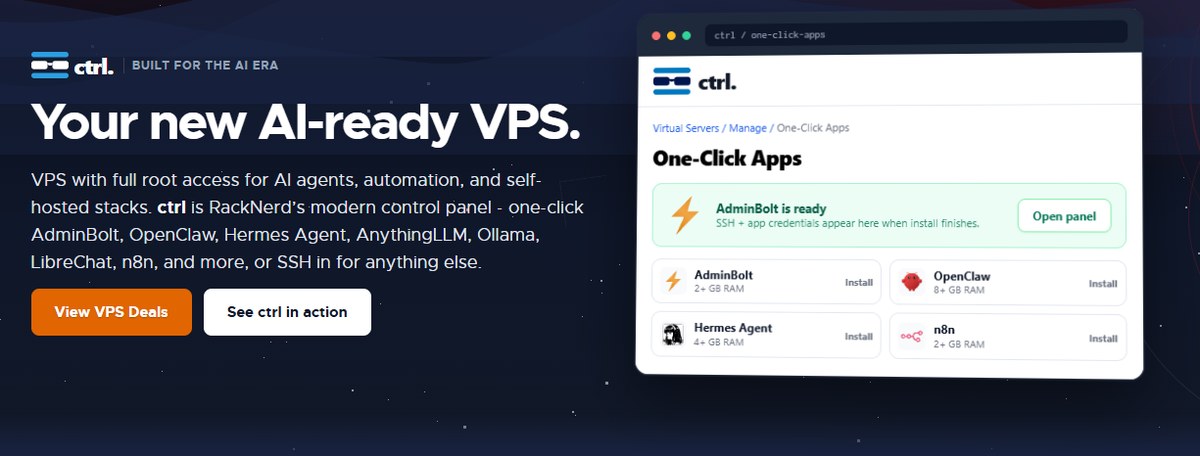
The RackNerd AI VPS is not a different machine from the cheap KVM boxes the company is known for. It is the same full-root VPS with a new control panel on top, called ctrl, that installs OpenClaw, Ollama, n8n, AnythingLLM and nine other self-hosted stacks in a single click. Plans start at $21.99 a year. This review looks at what that actually gets you, what the one-click catalogue covers, and the one warning you should read before pressing Install.
If you want the wider picture of RackNerd as a host — pricing tiers, where it sits in the market — our earlier RackNerd.com review covers that ground.
What a RackNerd AI VPS actually is
There is no special hardware tier behind the RackNerd AI VPS, and RackNerd does not pretend there is. Its own description is precise: “VPS with full root access for AI agents, automation, and self-hosted stacks.” Underneath it is unmanaged KVM — dedicated resources, proper isolation, and a root login.
ctrl sits on top of an ordinary full-root KVM VPS. One-click is optional; SSH is always there.
What is new is the layer above it. RackNerd puts it plainly: “Full-root KVM underneath — one-click when you want it, SSH when you don’t.” Nothing is locked down. If the app you want is not in the catalogue, you install it yourself the way you always would.
That framing matters, because plenty of “AI hosting” products are managed platforms that take control away in exchange for convenience. This one adds a shortcut without removing the long way round.
ctrl: the panel doing the work
ctrl is RackNerd’s own control panel and it is included with every VPS special, not sold as an add-on. Beyond the one-click catalogue it handles the jobs you would otherwise open a support ticket for:
Reboot and reinstall the server
Console access when SSH will not cooperate
A network firewall that filters inbound traffic in front of the VPS, with rules you manage from the panel
One-click app installs with credentials delivered in-panel
The firewall placement is the detail worth noticing. Filtering upstream of the machine means a flood never reaches your own iptables in the first place — useful on a small box where CPU is the scarce resource. RackNerd also offers an interactive demo of ctrl on its site, so you can click through the panel before buying anything.
Every plan on RackNerd Specials includes ctrl, so the one-click catalogue is available on the $21.99 entry plan as much as on the $119.99 one — the only thing the price buys is headroom.
The one-click catalogue
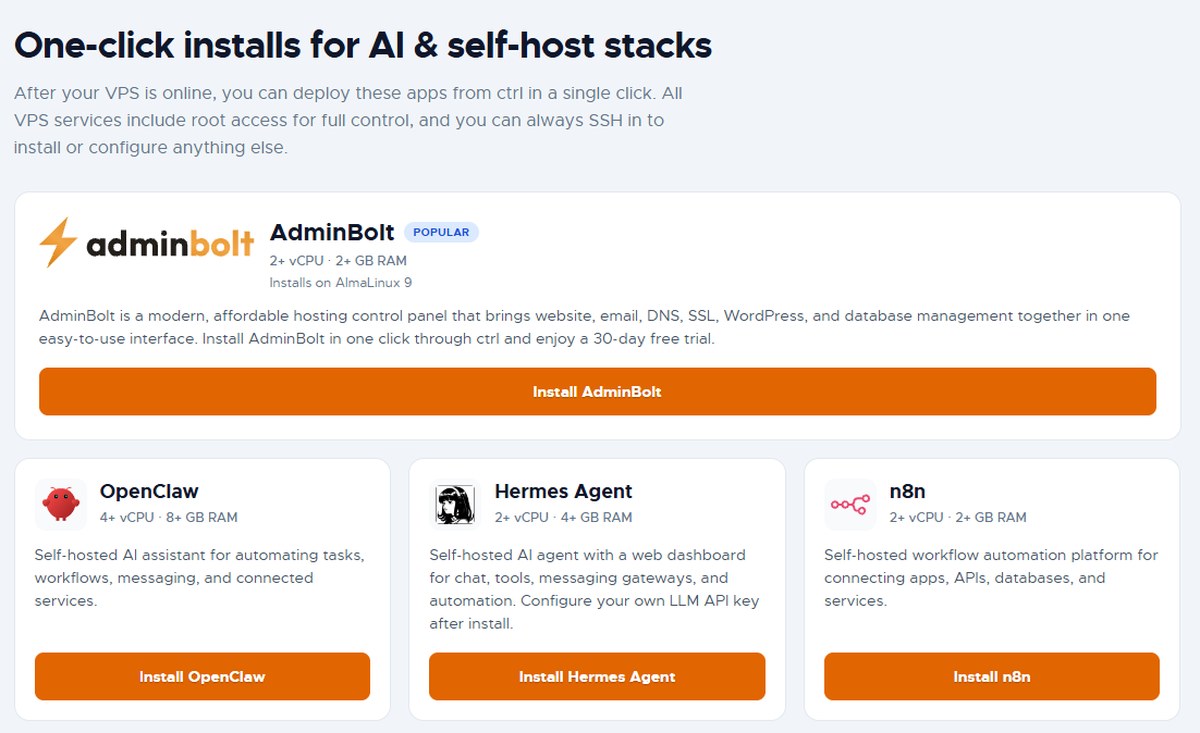
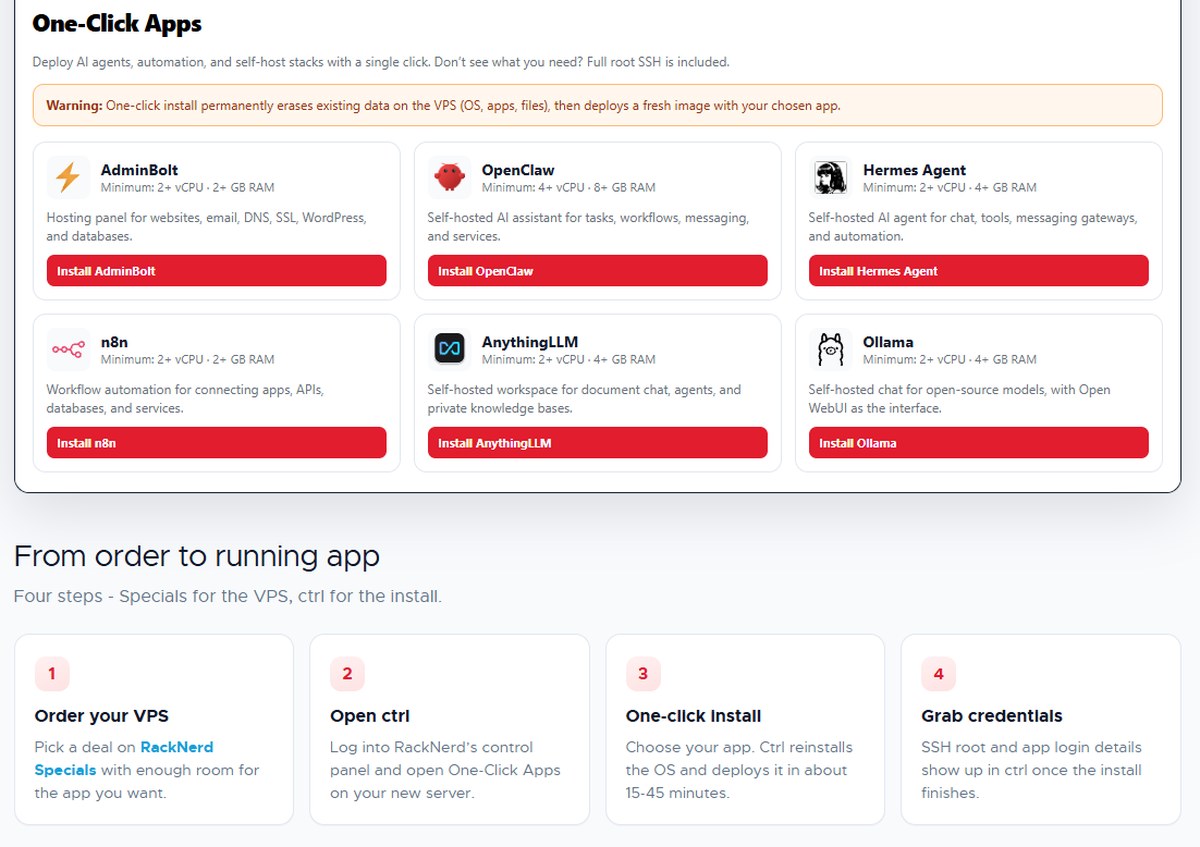
Thirteen applications are currently installable on a RackNerd AI VPS from ctrl, and the list is more thoughtfully chosen than most. It covers AI agents, automation, container management and three different hosting panels.
Every app lists its minimum vCPU and RAM up front, so you can size the VPS before you order.
App
Minimum
What it does
AdminBolt(popular)
2 vCPU / 2 GB
Hosting panel for sites, email, DNS, SSL, WordPress and databases — 30-day free trial, installs on AlmaLinux 9
OpenClaw
4 vCPU / 8 GB
Self-hosted AI assistant for tasks, workflows, messaging and connected services
Hermes Agent
2 vCPU / 4 GB
Self-hosted AI agent with a web dashboard for chat, tools and messaging gateways
AnythingLLM
2 vCPU / 4 GB
Workspace for document chat, agents and private knowledge bases
Ollama
2 vCPU / 4 GB
Runs open-source models, with Open WebUI as the chat interface
LibreChat
2 vCPU / 4 GB
Chat front end for multiple AI providers, with accounts and history on your server
n8n
2 vCPU / 2 GB
Workflow automation across apps, APIs and databases
Coolify
2 vCPU / 2 GB
Self-hosted PaaS with automatic SSL and Git-based deploys
Portainer
1 vCPU / 2 GB
Web UI for Docker containers, images and stacks
CyberPanel
1 vCPU / 1 GB
Hosting panel for sites, email, DNS, databases and SSL
CloudPanel
1 vCPU / 2 GB
Panel for PHP, Node.js, Python and static sites with NGINX and free SSL
Webmin
1 vCPU / 1 GB
Web-based Linux administration
WireGuard (wg-easy)
1 vCPU / 1 GB
VPN with a web UI for clients, QR codes and peers
Two of these deserve a note. Hermes Agent and AnythingLLM both say to configure your own LLM API key after install — the VPS runs the software, and you bring the model. Ollama is the exception: it runs open-source models locally on the server, so nothing leaves the machine.
Which size for which stack
RackNerd does something most hosts avoid: it tells you which plan to buy, by name, for the app you have in mind. That saves the usual guessing game of ordering too small and rebuilding a week later.
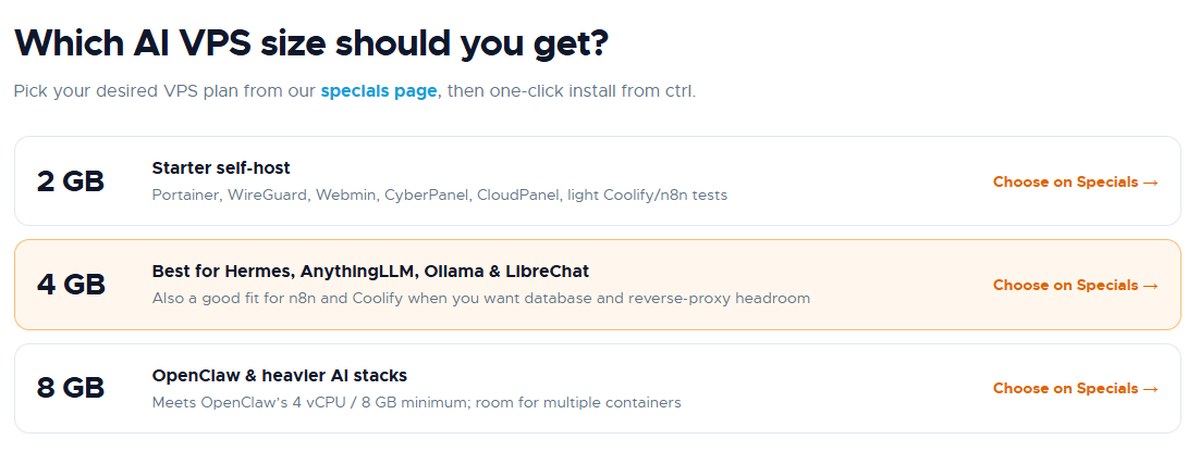
RackNerd maps its own plans to the apps they can actually run.
2 GB — starter self-host. Portainer, WireGuard, Webmin, CyberPanel, CloudPanel, and light Coolify or n8n testing.
4 GB — the sweet spot for AI. Best for Hermes Agent, AnythingLLM, Ollama and LibreChat; also right for n8n and Coolify when you want database and reverse-proxy headroom.
8 GB — OpenClaw and heavier stacks. Meets OpenClaw’s 4 vCPU / 8 GB minimum with room for multiple containers.
Reading that against the price list, the 4 GB plan at $59.99 a year is where most people running a RackNerd AI VPS for agent work will land — roughly five dollars a month for a machine that can hold Ollama and a reverse proxy at the same time.
From order to running app in four steps
The workflow is deliberately short. RackNerd summarises it as “Four steps — Specials for the VPS, ctrl for the install.”
The install path in full, with the warning RackNerd puts above the app list.
Step
What happens
1. Order your VPS
Pick a plan on RackNerd Specials with enough room for the app you want
2. Open ctrl
Log in and open One-Click Apps on the new server
3. One-click install
Choose the app; ctrl reinstalls the OS and deploys it in about 15–45 minutes
4. Grab credentials
SSH root and app login details appear in ctrl when the install finishes
The VPS itself is provisioned right after payment, so step one takes minutes rather than a business day. Steps two to four are where the 15 to 45 minutes goes.
Ordering is the only step that costs money: pick the plan on the RackNerd VPS specials page, and everything after that happens inside ctrl.
Read this before you press Install
RackNerd prints the most important sentence on the page in a box above the app list, and it deserves repeating here because it is the one thing that can cost you an afternoon:
“One-click install permanently erases existing data on the VPS (OS, apps, files), then deploys a fresh image with your chosen app.”
This is not a bug or a hidden catch — it is how the mechanism works. ctrl does not layer an app onto your running system; it reimages the server from scratch with that app baked in. Two practical consequences follow:
Install first, build second. Do your one-click install on a brand-new VPS, before you have put anything on it.
Want two apps on one box? One-click gives you one. Install the first through ctrl, then SSH in and add the rest by hand — or run them as containers through Portainer or Coolify.
Handled that way it is a non-issue. Discovered afterwards, it is a bad day.
What the VPS costs
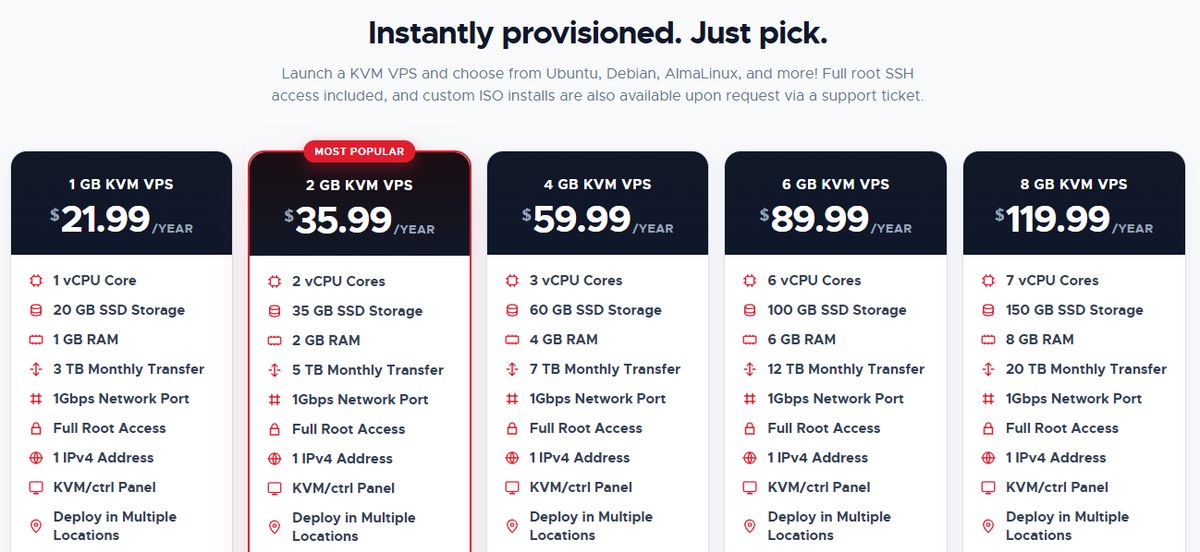
RackNerd prices annually rather than monthly, which is what makes the numbers look the way they do.
Every plan includes full root access, a 1Gbps port, an IPv4 address and the ctrl panel.
Plan
vCPU
RAM
SSD
Transfer/mo
Price
1 GB KVM VPS
1
1 GB
20 GB
3 TB
$21.99/yr
2 GB KVM VPS (most popular)
2
2 GB
35 GB
5 TB
$35.99/yr
4 GB KVM VPS
3
4 GB
60 GB
7 TB
$59.99/yr
6 GB KVM VPS
6
6 GB
100 GB
12 TB
$89.99/yr
8 GB KVM VPS
7
8 GB
150 GB
20 TB
$119.99/yr
Every plan on that list carries the same core specification: a 1Gbps network port, full root access, 1 IPv4 address, the KVM/ctrl panel, and deployment in multiple locations. You choose from Ubuntu, Debian, AlmaLinux and others at order time, and custom ISO installs are available on request through a support ticket.
Note the CPU curve: the 6 GB plan jumps to 6 vCPU cores, double the 4 GB plan’s three. If your bottleneck is processing rather than memory, that is the step worth paying for.
Choosing a city: the deployment location matters as much as the plan size, and not every RackNerd site sells the same products. We mapped all twenty of them – carriers, certifications and the test IPs you can ping before you order – in our RackNerd datacenter locations guide.
The hardware and network underneath
A one-click button is only worth having if the machine behind it is sound, and the RackNerd AI VPS runs on the same fleet as the company’s other products. RackNerd lists four things that matter for agent workloads:
RAID-10 SSD storage — fast and redundant, which is what container images, model caches, databases and agent state actually want.
1Gbps port on every plan, on a premium low-latency network optimised by Noction IRP.
Intel Xeon processors across the fleet, with AMD Ryzen available on separate product lines.
20 datacenter locations across North America, Europe and Asia — Los Angeles, San Jose, Seattle, Dallas, Utah, Chicago, Atlanta, Tampa, Miami, New York, New Jersey, Ashburn, Toronto, Montreal, London, Dublin, Amsterdam, Strasbourg, Frankfurt and Singapore.
Twenty locations is a lot for a host at this price, and it is the practical argument for using RackNerd over a single-region budget provider: an agent that polls an API in Frankfurt should not be doing it from California.
RackNerd also states it is “trusted by hundreds of thousands of customers globally, and recognized on the Inc. 5000”, with 24/7 support staffed around the clock.
Who the RackNerd AI VPS suits
It suits the self-hoster who wants their agent on their own machine rather than somebody’s managed platform — the person who would have set this up by hand anyway, and is happy to skip the first two hours of it.
It suits anyone experimenting. At $35.99 a year for the 2 GB plan, standing up an n8n instance or a WireGuard endpoint to see whether it is useful costs roughly what one month of a managed equivalent does.
And it suits developers who want Docker without ceremony: Portainer and Coolify are both one click away, and full root means Compose files behave exactly as they do locally.
It does not suit anyone who needs a GPU. Nothing on this list runs a large model on the server itself except Ollama, and that means small open-source models on CPU. For serious local inference you want a different class of machine.
The verdict on the RackNerd AI VPS
RackNerd built this the right way round. It did not invent a new product tier or charge a premium for the word “AI” — it took the KVM VPS it already sells, wrote a decent control panel, and pre-baked thirteen images people were installing by hand anyway. The result is that a $59.99-a-year box can be running Ollama, AnythingLLM or an n8n automation within the hour, with root access intact if you want to take it further.
The reimaging behaviour is the one thing to plan around, and RackNerd flags it clearly rather than burying it. Do the one-click install first, build afterwards, and there is very little to fault here. For anyone who has been meaning to self-host an agent and kept putting it off, the RackNerd AI VPS removes most of the excuse.
Category
Score
Value for money
4.9 / 5
Ease of deployment
4.7 / 5
App catalogue relevance
4.6 / 5
Control and flexibility
4.6 / 5
Network and locations
4.5 / 5
Suitability for heavy AI workloads
3.8 / 5
Overall
4.5 / 5
Disclaimer
This article is for information only. Prices, plan specifications, datacenter locations and the one-click app catalogue are those published by RackNerd at the time of writing and may change — check the official site before ordering. One-click installation reimages the server and erases existing data; back up anything you need first. Self-hosted AI applications such as Hermes Agent and AnythingLLM require your own LLM API key, billed separately by that provider. This page contains affiliate links, which means we may earn a commission if you make a purchase, at no extra cost to you.
The iPhone 18 no ports theory is suddenly everywhere. A video making the rounds on TikTok and social media appears to show something startling: an iPhone — labeled as the “iPhone 18” — charging through a small magnetic connector instead…
Hottest fashion trends 2026 reviewed honestly — which trending styles are actually wearable, which are overhyped, and what’s worth buying right now in the US market. Quick Verdict: 2026’s biggest fashion trends fall into two camps: genuinely wearable evolutions of…
PS5 Pro review 2026 — I tested it for 30 days. Here’s the honest verdict on performance, graphics, and whether upgrading from a standard PS5 is actually worth the money. Quick Verdict: The PS5 Pro is the most capable PlayStation…