Anyone who has tried to build a dated planner in Canva knows where the evening goes: not into the design, but into typing 365 dates by hand. Planify Pro templates exist to delete that job entirely — you pick a start month, press one button, and the whole year is stamped correctly.
That is the pitch, and it is why 2,000+ creators now design their planners here. This guide looks at the Planify Pro templates library itself — how many templates there are, what they cover, and the three features that turn a template into a finished, sellable planner.
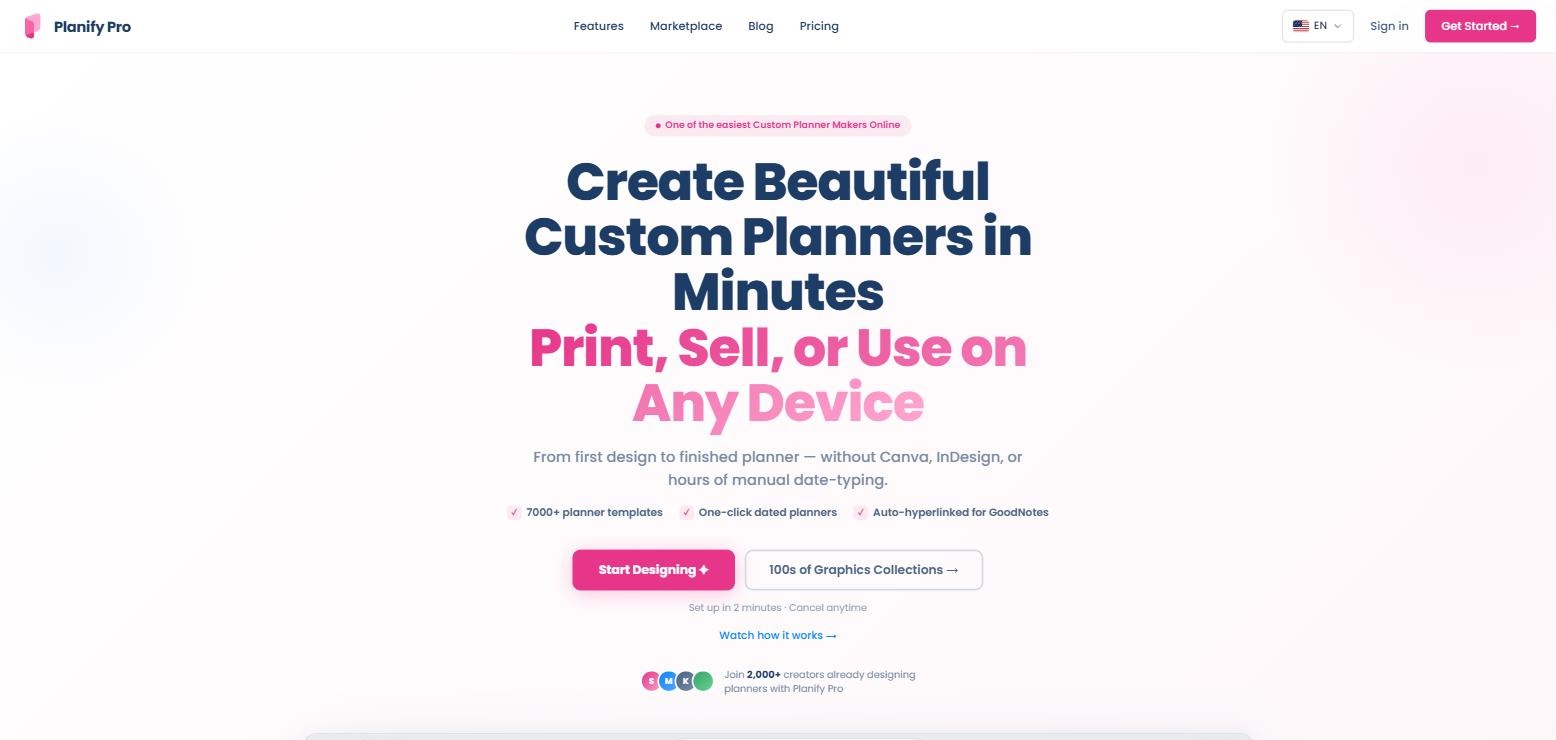
Planify Pro positions itself as a planner maker you can finish in minutes — without Canva or InDesign (screenshot from planifypro.com)
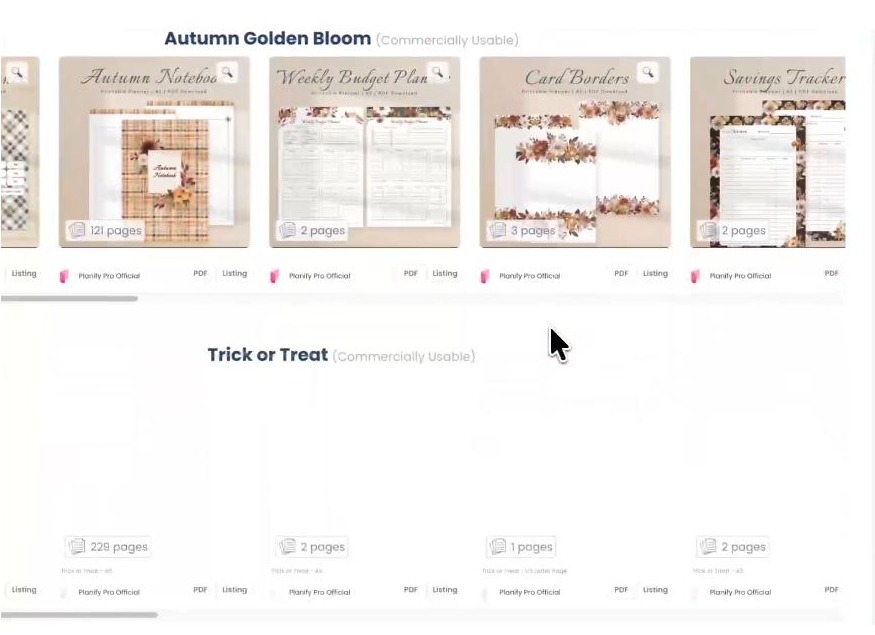
7,000+ Planify Pro templates, sorted into collections
Collections are grouped and labelled “Commercially Usable”, with the page count shown on every template (screenshot from planifypro.com)
The Planify Pro templates library is the reason most people sign up. There are more than 7,000 templates arranged into 50+ collections, and the catalogue keeps growing at 2 to 4 new collections every month. You are not staring at a blank canvas; you are picking a starting point.
Every planner style covered — monthly and weekly spreads, daily pages, habit trackers, budget pages, meal planners, dashboards, note pages and themed seasonal sets.
Collections, not loose files. A set such as “Autumn Golden Bloom” or “Trick or Treat” arrives as a coordinated look, so a 100-page planner stays visually consistent without design work.
Page counts shown up front — some entries are a 2-page spread, others are a 121-page or 229-page planner you can adapt in an afternoon.
Commercial status labelled on the collection, so you know before you start whether you can sell what you build from it.
Hundreds of graphics collections on top of the planner templates — clipart packs of 100+ PNGs you can drop into pages.
Everything is editable — colours, fonts, page layouts and sizes are all yours to change.
One-click dated planners: hours of work in seconds
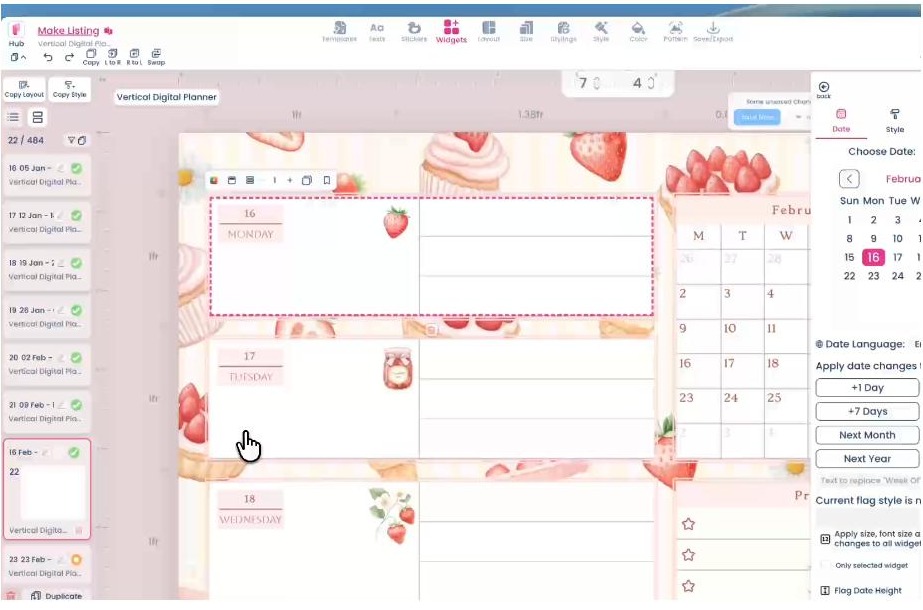
Choose a date, then push the whole planner forward by a day, a week, a month or a year (screenshot from planifypro.com)
This is the feature that justifies the subscription on its own. Select your start month, pick an end date, click once, and Planify Pro stamps every month, every week and every day across the entire planner — the editor in the screenshot above is sitting on page 22 of 484.
The controls are refreshingly blunt: +1 Day, +7 Days, Next Month, Next Year. Built a 2026 planner and want the 2027 edition? Push it forward a year and the whole file re-dates itself. In Canva or InDesign that same job means typing every date by hand — several hours for a twelve-month planner, repeated every time you make a new edition.
There is also a date-language setting, so a planner can be produced for a non-English market without rebuilding it.
Automatic hyperlinking: GoodNotes-ready on export
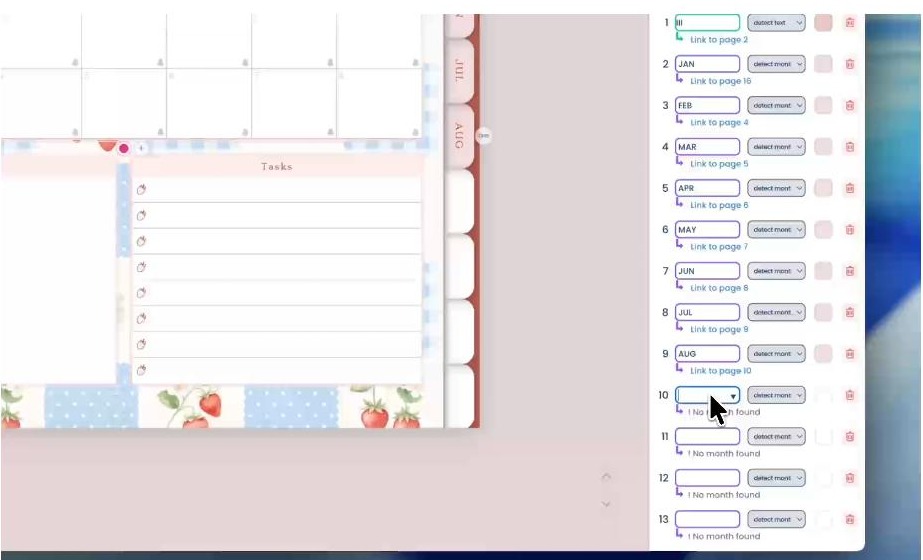
Month tabs mapped to page numbers automatically — JAN to page 16, FEB to page 4, and so on (screenshot from planifypro.com)
A digital planner built from Planify Pro templates is only worth buying if it navigates. Tap “MAR” and you should land on March. Doing that by hand means creating a hyperlink for every tab on every page — on a 300-page planner that is genuinely days of clicking.
Planify Pro detects the month text and wires the links for you, then bakes them into the exported PDF so the planner works in GoodNotes and Notability exactly as a buyer expects. The panel lists each tab next to the page it points at, so you can check the map rather than test 300 taps.
Drag-and-drop widgets and a built-in graphics library
Alongside the Planify Pro templates sits a widget library: sticky notes, habit trackers, mood boards, divider tabs, checkboxes, date flags and hundreds of stickers. You drag, drop, resize and recolour to match the collection you started from.
The practical benefit is that you are not hunting for clip art with unclear licensing, and you are not designing a habit tracker grid from rectangles. The widgets are coordinated with the collections, so a tracker dropped onto an autumn page already looks like it belongs there.
Export: print-ready and tablet-ready from the same file
What you export is what you sell — there is no reformatting step between the editor and the listing.
Print-ready PDF in A4, Letter and Half-letter, ready for a home printer or a print shop.
Digital planner export optimised for iPad and other tablets, with the hyperlinks already live.
Works on iPad, tablet and desktop, so you can design on the machine you have.
Sell on Etsy and Amazon KDP — the business plans include a full commercial licence and let you list the exported file directly.
One-click re-theming (Business Plus and above) — recolour and restyle an entire planner into a new collection, which is how one design becomes five listings.
Bundle Credits — 2 a month on Business Plus, 4 on Business Max.
Bundle drops — free every two weeks on the business tiers, with early access on Business Max.
Translations — 10 a month on Personal, rising to 100 on Business Max, for selling into other languages.
Monthly market reports on Business Plus and above, so you are picking niches on data rather than instinct.
Planify Pro plans at a glance
Personal — $99.99/year ($8.33/month): 200 pages per planner, 5 GB storage, personal use only, 10 translations a month.
Business — $179.40/year ($14.95/month): 450 pages, 10 GB, Standard commercial licence, free bi-weekly bundle drops, 20 translations.
Business Plus — $349/year ($29.08/month, the most popular tier): 700 pages, 50 GB, Premium licence, 2 bundle credits, one-click re-theming, monthly market reports, 30 translations.
Business Max — $499/year ($41.58/month): 1,000 pages, 100 GB, Scale licence, 4 bundle credits, early access to drops, 100 translations.
There is a free tier as well: you can explore the editor and design planners with no time limit, and only need a paid plan once you want to save, export or sell. Setup takes about two minutes and you can cancel any time.
In practice most sellers start on Business, because that is the first tier where the Planify Pro templates come with a commercial licence attached. Open a free account and browse the library first — you can see every collection before you pay for anything.
Building your first planner: the five-step version
Pick a collection that matches the niche you want — seasonal, budget, fitness, academic.
Choose the page sizes you will export: A4 and Letter for print, tablet-optimised for digital.
Set the dates once — start month, end date, one click, and the year is stamped.
Drop in widgets — trackers, tabs, stickers — and adjust colours and fonts to taste.
Export and list. The PDF that comes out is the file you upload to Etsy or KDP, hyperlinks included.
Who gets the most out of the Planify Pro templates
DIY planner makers
If you want a planner built around your own week rather than whatever the stationery shop stocked, this is the shortest path from idea to a printed, bound book on your desk.
Etsy and KDP sellers
Design once, sell forever. The business tiers include a full commercial licence, the export is the listing file, and one-click re-theming turns a single planner into a shelf of products.
Digital planner creators
Auto-hyperlinking and tablet-optimised export remove the two jobs that make digital planners painful to produce, which is why they are the headline features rather than footnotes.
Coaches, teachers and course creators
Workbooks, habit journals and course companions are the same build as a planner. The dated pages and trackers do most of the structure for you.
Verdict: are the Planify Pro templates worth it?
Yes — and the reason is narrower and more convincing than “it has a lot of templates”. Any design tool can give you 7,000 starting points. What makes Planify Pro templates different is the three jobs it removes that no general design tool handles: stamping a full year of dates in one click, wiring every month tab to the right page automatically, and exporting a file that is simultaneously print-ready and GoodNotes-ready.
Add a library that grows by 2–4 collections a month, a widget and graphics set that matches those collections, a commercial licence from the $179.40/year tier, and a free tier with no time limit to try it all, and the case is easy to make. Start designing on Planify Pro and see how far you get in one evening.
Rating: 4.6/5
Planify Pro templates FAQ
How many templates are there?
More than 7,000, organised into 50+ collections, with 2 to 4 new collections added every month.
Can I sell planners made from the templates?
Yes, on the business plans, which include a full commercial licence — Standard on Business, Premium on Business Plus and Scale on Business Max. The Personal plan is for personal use.
Do the digital planners work in GoodNotes?
Yes. Hyperlinking is generated automatically and exported into the PDF, so month tabs and page navigation work in GoodNotes and Notability out of the box.
What print sizes can I export?
Print-ready PDF in A4, Letter and Half-letter, alongside the tablet-optimised digital export.
Is there a free version?
There is a free tier for exploring the editor and designing with no time limit. Saving, exporting and selling require a paid plan, which starts at $99.99 a year.
Do I need design experience?
No. You start from a finished collection and change colours, fonts and layouts, rather than building pages from scratch.
The iPhone 18 no ports theory is suddenly everywhere. A video making the rounds on TikTok and social media appears to show something startling: an iPhone — labeled as the “iPhone 18” — charging through a small magnetic connector instead…
Hottest fashion trends 2026 reviewed honestly — which trending styles are actually wearable, which are overhyped, and what’s worth buying right now in the US market. Quick Verdict: 2026’s biggest fashion trends fall into two camps: genuinely wearable evolutions of…
PS5 Pro review 2026 — I tested it for 30 days. Here’s the honest verdict on performance, graphics, and whether upgrading from a standard PS5 is actually worth the money. Quick Verdict: The PS5 Pro is the most capable PlayStation…